Contents
Get a Personalized Demo
See how Torq harnesses AI in your SOC to investigate, prioritize, and respond to threats faster.
Every second counts in today’s cybersecurity landscape. Threats move fast, attack surfaces evolve daily, and manual processes aren’t cutting it. That’s why modern Security Operations Centers (SOCs) are rethinking how they operate — and turning to security operations workflows that automate the detection, triage, and response process from start to finish.
A security operations workflow is an essential part to an effective SOC. It defines how incidents are detected, analyzed, escalated, contained, and reported. Done right, these workflows cut response times, strengthen security posture, and reduce analyst fatigue. Done manually, they slow everything down.
With Hyperautomation and Torq’s AI-powered security workflow builder, teams are empowered to build intelligent, adaptive workflows that evolve as quickly as the threats they defend against.
The Importance of Hyperautomation in Security Operations
As threats become more complex — spanning endpoints, identities, and cloud workloads — automation must evolve, too. Hyperautomation takes security orchestration to the next level. It integrates AI reasoning, no-code automation, and agentic decision-making to help SOC teams move at machine speed. Instead of managing dozens of tools and playbooks, analysts can let automation handle repetitive triage and enrichment while they focus on investigation and strategy.
Modern SOCs are adopting Hyperautomation because:
- The volume of threat intelligence data has outpaced human capacity.
- Cloud and hybrid architectures demand scalable, adaptive SOC workflows.
- Faster incident response means fewer breaches and reduced dwell time.
- Agentic AI now enables real-time decision-making across the entire security operations workflow.
Components of a Security Operations Workflow
Building an effective security workflow requires a balance of structure, flexibility, and intelligence. Here are the core components every team needs:
- Incident detection: Data from SIEM, EDR, CSPM, and other tools flows into the SOC. The goal is to identify genuine threats, not noise.
- Analysis and enrichment: AI and automation gather context — who’s affected, what systems are at risk, whether the IP or file hash is known to be malicious — to reduce false positives.
- Triage and escalation: Incidents are prioritized based on severity, impact, and business risk. Hyperautomation can even apply risk-based escalation rules automatically.
- Response and containment: Automated playbooks isolate hosts, block domains, or reset credentials in seconds — minimizing damage before humans intervene.
- Reporting and continuous improvement: Every workflow should automatically document actions, enabling metrics tracking, audit readiness, and ongoing optimization.
Evolving from Templates to AI-Powered Workflows
Historically, teams built automation from scratch or relied on static templates. Templates were a major improvement — they made it easier to deploy pre-built use cases like phishing response or endpoint isolation. But they were limited. Each template still required customization and maintenance.
Torq’s AI Workflow Builder is a true leap forward for security workflow builders. Using natural language, you simply describe what you want to automate, and the system creates a complete workflow in seconds.
Powered by 4,000+ actions and 300+ native integrations, Torq’s AI Workflow Builder understands your intent and connects your security stack instantly — from vulnerability management and SIEM to identity, ticketing, and chat platforms. It understands the context of your SOC, automatically aligning logic, tools, and policies.
That means your workflows operate within the greater context of your security operations platform — pulling in threat intelligence, correlating events, enriching alerts, and even routing cases to the right analyst or team.
And because Torq’s AI is agentic, it doesn’t just follow static instructions. It builds reasoning through workflows — suggesting optimizations, identifying missing steps, and aligning automations with your organization’s security posture. It learns how your team works, then helps them work smarter.
With Torq’s AI Workflow Builder, simply:
- Describe it: Tell Torq what you need in plain English.
- Get it: AI builds your workflow in seconds.
- Refine it: Review, adjust, and run.
The result:
- Complex workflows that once took hours to design now take minutes.
- Junior analysts can automate advanced use cases without coding.
- Security teams can scale automation consistently across departments.
Best Practices for Designing Effective AI Security Operation Workflows in Torq
Here’s how to design AI security workflows in Torq that scale with your organization and strengthen your overall security posture.
1. Start with What You Want to Accomplish
In Torq, building starts with plain English, not code. Just describe your goal — for example: “When a phishing email is reported in Outlook, analyze it with VirusTotal, remove it from all inboxes, and notify the user in Slack.”
The AI Workflow Builder instantly generates a working automation that connects all relevant tools. You don’t have to map APIs, configure triggers, or guess which actions to use — Torq’s AI does that for you. Within seconds, you’re previewing a workflow that would’ve taken hours to build in a legacy SOAR platform.
2. Customize with Ease
Once Torq builds your workflow, it’s easy to tweak it. Every step is editable in an intuitive drag-and-drop canvas. Want to add another integration? Just type or search for it — Torq automatically configures it. Need to adjust conditions, risk levels, or timeouts? You can do it directly from the workflow builder without touching a line of code.
Because Torq integrates with 4,000+ out-of-the-box actions and 300+ tools, every new system you connect — from Wiz and Okta to CrowdStrike, Jira, and Slack — becomes part of a living automation ecosystem. You can reuse steps, clone workflows, and scale them globally with a few clicks.
3. Use AI to Design Smarter, Not Harder
Torq’s agentic AI thinks through workflows with you. As you describe what you want, it:
- Suggests missing logic or best-practice security steps
- Auto-selects the right tools based on your integrations
- Maps data across systems automatically (no more manual field matching)
- Writes descriptions, case summaries, and contextual notifications for you
This means junior analysts can create advanced SOC workflows that follow expert logic — safely, consistently, and with built-in guardrails.
4. Keep Collaboration Seamless
Workflows in Torq are naturally collaborative. You can embed ChatOps steps directly into automations — sending alerts to the right Slack or Teams channels, tagging relevant users, or requiring quick approvals before executing sensitive actions.
These built-in collaboration loops ensure that even highly automated SOCs maintain human oversight for key decisions like access control, multi-factor authentication resets, or encryption changes.
5. Build Once, Reuse Everywhere
One of the biggest advantages of Torq is reusability. Every workflow can be turned into a reusable “building block” for other automations. For example, if you’ve already built a malicious IP detection flow, you can drop that same step into new phishing or cloud exposure workflows instantly.
Torq also supports environment-level organization — letting global teams (SOC, IT, or DevSecOps) share templates, enforce naming standards, and manage compliance documentation.
6. Measure, Iterate, and Scale
Torq’s built-in analytics and reporting make it easy to see what’s working — tracking metrics like MTTR, alert reduction, and automation success rate. You can clone successful workflows, experiment safely, and continuously improve without slowing down operations.
Hyperautomation isn’t just about speed; it’s about evolution. Torq’s AI learns from your actions and continuously helps refine workflows for efficiency and precision, improving your security posture over time.
AI Builder in Action: Instant IP Threat Detection
Let’s see it in action. Suppose your SOC wants to check whether an IP address is malicious using VirusTotal — and automatically create a case if flagged.
Just type this prompt into the AI Workflow Builder:
Check IP address 8.8.8.8 with VirusTotal. If it’s flagged as malicious more than three times:
- Create a Torq case with High severity.
- Send a Slack alert to #alerts.
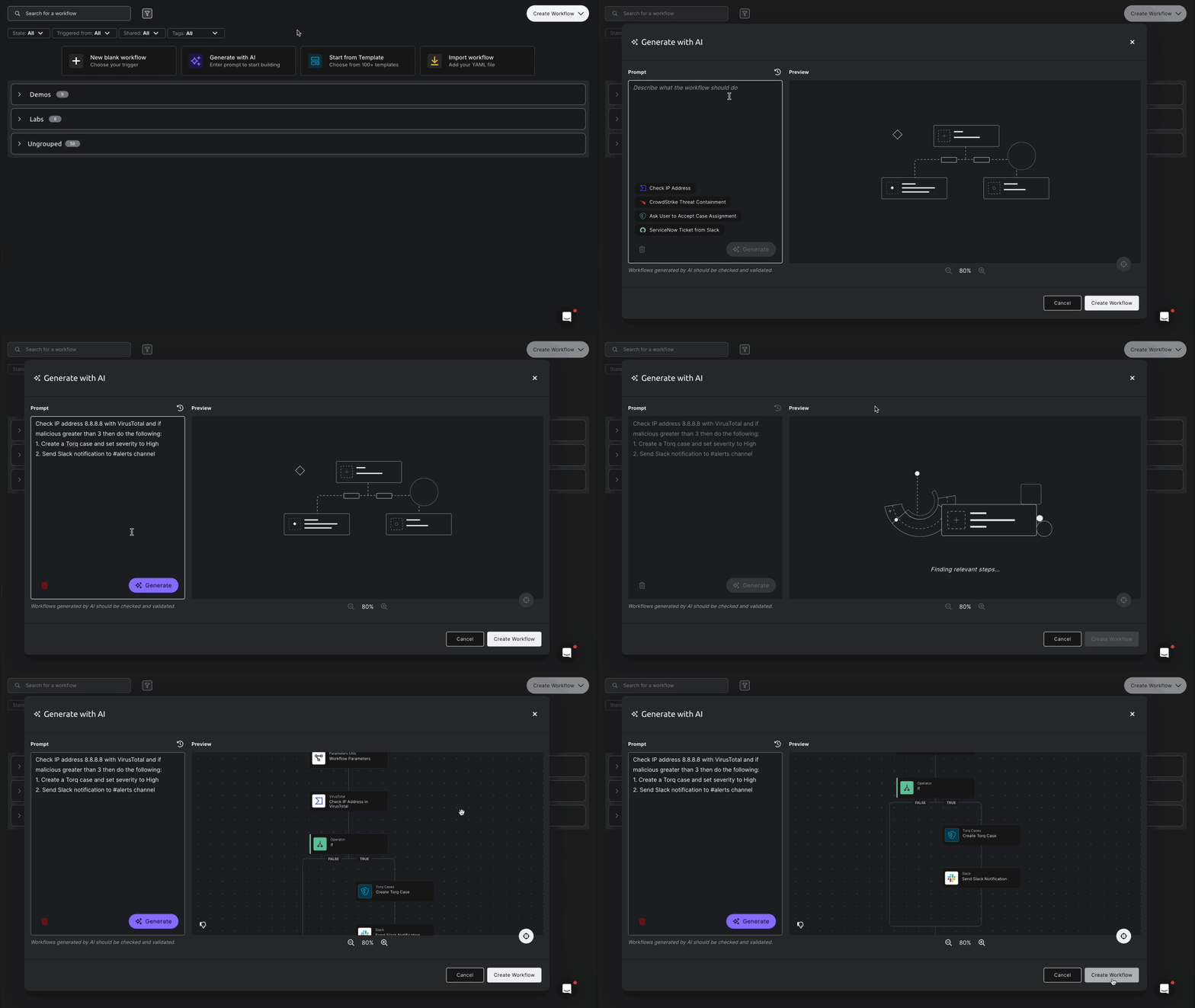
Seconds later, Torq’s AI Workflow Builder generates a fully functioning workflow ready for review. You can tweak anything — from setting custom thresholds to fine-tuning case details and personalizing Slack alerts.
Build the SOC of Tomorrow with Torq’s AI Workflow Builder
The SOC of the future won’t be defined by how many alerts it handles — but by how intelligently it evolves. With AI-powered security operations workflows, teams can finally break free from manual triage, fragmented tools, and burnout.
Torq’s AI Workflow Builder transforms everyday response into continuous innovation — connecting people, processes, and platforms through Hyperautomation that learns and adapts at machine speed.
Start building the SOC of tomorrow — today. The Google Cloud + Torq playbook shows you how to spot SOC bottlenecks early, automate what drags you down, and rebuild for long-term resilience.