AI Threat Detection: The Key to Proactive and Adaptive Cybersecurity

Contents

Get a Personalized Demo

See how Torq harnesses AI in your SOC to detect, prioritize, and respond to threats faster.

Request a Demo

Static signatures. Rule-based alerts. Manually updated threat feeds. These were fine when attackers moved slowly and predictably. But, they don’t anymore.

IBM’s 2025 Cost of a Data Breach Report found that one in six breaches now involve attackers using AI — most commonly for phishing (37%) and deepfake impersonation (35%). When threats are machine-generated, defenses built around known patterns aren’t just slow, they’re blind.

AI threat detection represents a fundamental shift in how security operations identify and respond to threats. Instead of matching known bad signatures against incoming traffic — and missing everything that doesn’t fit the pattern — AI-driven systems use machine learning, behavioral analytics, and automation to establish behavioral baselines, spot anomalies in real time, and prioritize threats with speed and accuracy that human teams simply can’t match.

The difference matters most where legacy systems fail hardest: zero-day exploits, novel attack techniques, and the subtle indicators of compromise that hide in the noise of normal operations. Traditional defenses can’t catch what they’ve never seen before. AI can.

How AI Systems Power Threat Detection

AI threat detection isn’t a single technology; it’s a stack of methodologies working together to analyze vast amounts of data and surface what matters.

The Core AI Methodologies

Machine Learning (ML) forms the foundation. ML models train on historical data to recognize patterns associated with both normal behavior and known threats. Once trained, they classify new events, flag anomalies, and improve over time as they’re exposed to more data.

Deep Learning (DL) takes this further. Using neural networks with multiple layers, deep learning excels at identifying complex, non-linear relationships in data — the kind of subtle correlations that indicate sophisticated attacks designed to evade simpler detection methods.

Natural Language Processing (NLP) handles the unstructured data that makes up so much of the security landscape: log files, threat reports, phishing emails, chat messages. NLP extracts meaning from text, enabling AI to analyze the content and context of communications for social engineering cues, suspicious language patterns, and indicators of impersonation.

The Detection Process

The process flows through three phases:

  1. Data ingestion and training: AI systems consume data from across the environment — network traffic, endpoint telemetry, cloud logs, identity events, email metadata — and use it to build models of normal behavior. The more comprehensive the data, the more accurate the baseline.
  2. Anomaly and pattern recognition: With baselines established, the system continuously monitors for deviations. A user accesses sensitive files at unusual hours. A device communicating with an unfamiliar external IP. A login attempt from an impossible geographic location. These anomalies trigger alerts — not because they match a known signature, but because they break the pattern.
  3. Adaptive learning: Unlike static rule sets, AI systems evolve. They incorporate new data, adjust to changing environments, and refine their models based on analyst feedback. The system that detects threats today is smarter than the one deployed six months ago.

Benefits of AI-Driven Threat Detection

AI doesn’t just detect threats differently; it delivers measurable improvements across every metric that matters to SOC teams.

Faster Detection and Response

AI accelerates the identification of subtle Indicators of Compromise (IoCs) from hours to seconds. While human analysts are still correlating data across dashboards, AI has already flagged the anomaly, enriched it with context, and prioritised it against the rest of the queue. Organizations that extensively use AI and automation across their security operations saved an average of $1.9 million in breach costs and reduced the breach lifecycle by an average of 80 days.

Reduced Alert Fatigue and Higher Accuracy

The average SOC receives over 1,000 alerts daily. 40% never get investigated and 61% of teams admit to ignoring alerts that later proved to be critical incidents. AI correlates events across multiple sources, distinguishing genuine threats from noise and dramatically reducing false-positive rates. Analysts can start focusing on incidents that actually matter.

Enhanced Visibility at Scale

Modern environments span cloud infrastructure, on-prem systems, remote endpoints, IoT devices, and SaaS applications. No human team can monitor it all, all the time. AI can. It provides 24/7 visibility across the entire distributed environment without fatigue, coverage gaps, or the 3 am blind spots that attackers love to exploit.

Key Use Cases of AI in Threat Detection

Advanced Phishing and Email Security

Phishing remains a top initial access vector — and AI-generated phishing is making attacks harder to spot. AI-powered email security fights fire with fire. These systems analyze writing style, sender behaviour, header anomalies, and social engineering cues to identify impersonation attempts, business email compromise, and AI-generated content designed to bypass traditional filters. They catch what keyword matching misses.

Malware and Endpoint Protection

Signature-based antivirus is a relic. Modern malware morphs constantly, and fileless attacks leave no signatures to match. AI-driven endpoint protection analyzes s process behavior, file characteristics, and system calls to identify malicious activity regardless of whether it matches a known pattern. It detects ransomware by what it does, not what it looks like.

Behavioral Anomaly Detection

Static rules can tell you if a login came from a blocked IP. They can’t tell you if a legitimate user is behaving like an attacker. AI-driven behavioral anomaly detection closes that gap by building dynamic baselines of normal activity for every user, device, and application in the environment. It continuously learns what “typical” looks like — which systems a user accesses, at what hours, from which locations, and in what patterns.

This isn’t speculation; it’s pattern recognition at scale. If a new vulnerability is disclosed in software you run, and AI detects that exploitation techniques for similar CVEs have been trending across threat actor forums, it can elevate that risk before a single probe hits your perimeter. The result is a security posture that’s anticipatory rather than reactive — patching and hardening based on predicted attack paths, not just yesterday’s incident reports.

Best Practices for Implementation

Deploying AI threat detection effectively requires understanding its limitations and building guardrails around them. Adversarial attacks pose a real risk. Attackers can attempt to poison training data, manipulate inputs to evade detection, or exploit the opacity of “black-box” models that can’t explain their decisions. 

Data quality matters — biased or incomplete training data produces biased, incomplete detection. And the expertise required to deploy, tune, and maintain AI systems remains a barrier for resource-constrained teams.

Keep Humans in the Loop (Strategically) 

AI handles volume. Humans handle judgment. That division of labor sounds simple, but getting it right requires deliberate design. The goal isn’t to have a human review every AI decision — that negates the speed advantage. It’s to ensure human oversight is applied where it matters most: high-risk alerts with irreversible consequences, novel threat patterns the model hasn’t seen before, and strategic decisions about detection priorities and acceptable risk thresholds.

In practice, this means building escalation paths that route specific alert categories — identity-based containment actions, executive account lockouts, production system isolation — to human decision-makers while allowing AI to autonomously handle high-volume, lower-risk triage. The model augments the analyst’s capacity. The analyst ensures the model’s outputs stay aligned with business context and risk tolerance.

Treat Governance as a Cost Control

Shadow AI — unauthorized AI tools adopted by employees without IT oversight — was involved in 20% of breaches in IBM’s 2025 study, adding an average of $670,000 to breach costs and disproportionately exposing customer PII and intellectual property. This isn’t just a policy problem. It’s a financial one.

Effective AI governance for threat detection means securing the entire data pipeline: encrypting sensitive training data, enforcing access controls on model endpoints, continuously validating inputs to prevent poisoning and drift, and maintaining visibility into every AI deployment across the organization — sanctioned or otherwise. Organizations that embed governance into their AI operations from day one avoid the compounding costs of retrofitting it after a breach.

Continuous Validation

Threat landscapes evolve. Attacker techniques shift. Your environment changes as new applications, users, and infrastructure get added. AI models that aren’t continuously validated against these shifts degrade over time — a phenomenon known as model drift that can silently erode detection accuracy while dashboards still show green.

Build feedback loops that keep detection capabilities current: regular stress-testing against emerging TTPs, red-team exercises that specifically target the AI layer, analyst feedback mechanisms that flag false positives and missed detections back into model retraining, and periodic benchmarking against updated threat intelligence. The system that detects today’s threats should be measurably better than the one you deployed six months ago.

Torq’s Role in Operationalizing AI Detection

AI can detect threats in milliseconds. But if the response still requires a human to open a ticket, pivot between consoles, and manually execute containment steps, that speed advantage stops.

Torq’s AI SOC acts as the orchestration layer that connects the tools where AI detections happen — SIEM, EDR, UEBA, cloud security platforms — with the tools that take action: firewalls, IAM systems, endpoint agents, and communication platforms. When AI in these detection solutions flag a threat, Torq automatically triggers the appropriate response workflow across all the relevant solutions throughout the security stack: isolating the endpoint, revoking credentials, notifying stakeholders, and logging every step for compliance.

This is what transforms rapid detection into rapid defense. AI identifies the threat, sends that detection to Torq, and Torq neutralizes it — at machine speed, with machine consistency, while analysts focus on the incidents that actually require human judgment.

Detect at Machine Speed

Attackers craft phishing campaigns in five minutes that used to take 16 hours. One in six breaches already involves AI-powered techniques. The average SOC leaves almost half of alerts on the floor because there aren’t enough hours in the day to look at them.

Signature-based detection was built for a world where threats moved slowly enough for humans to write rules. That world is gone.

The organizations pulling ahead aren’t the ones with the biggest security budgets. They’re the ones that connected AI detection to automated response — so the time between “we spotted something” and “we stopped it” collapsed from hours to seconds. That’s what Torq does. 

Learn more in our Don’t Die, Get Torq manifesto.

FAQs

What types of AI are used in threat detection?

Three core AI methodologies power modern threat detection. Machine learning (ML) trains on historical data to classify events and flag anomalies. Deep learning uses multi-layered neural networks to identify complex attack patterns that evade simpler models. Natural language processing (NLP) analyzes unstructured data like phishing emails, log files, and threat reports to detect social engineering cues and impersonation attempts. Most AI threat detection platforms combine all three to cover the full spectrum of attack techniques.

How does AI detect cyber threats that traditional security tools miss?

AI threat detection establishes dynamic baselines of normal behavior across users, devices, and network traffic, then flags deviations in real time. Unlike signature-based tools that can only catch known threats, AI-driven systems use machine learning and behavioral analytics to identify zero-day exploits, novel attack techniques, and subtle indicators of compromise that don’t match any existing rule or pattern. The system improves continuously — learning from new data and analyst feedback to sharpen detection over time.

Can AI threat detection reduce false positives in a SOC?

Yes — and the impact is significant. AI reduces false positives by correlating events across multiple data sources rather than evaluating alerts in isolation. Instead of flagging every anomaly as a potential threat, AI-driven systems weigh context: user history, device behavior, geographic patterns, and threat intelligence. According to the AI SOC Market Landscape 2025 survey, SOC teams face an average of 960 alerts per day and leave 40% uninvestigated. AI-powered triage ensures analysts focus on genuine threats instead of chasing noise.

What is the difference between AI threat detection and traditional signature-based detection?

Signature-based detection compares incoming traffic against a database of known threat patterns. If an attack doesn’t match an existing signature, it passes through undetected. AI threat detection works differently — it learns what normal behavior looks like and identifies anything that deviates from that baseline, whether or not the specific technique has been seen before. This makes AI far more effective against zero-day exploits, fileless malware, and AI-generated phishing attacks that evade static rules.

How does AI threat detection work with security automation platforms like Torq?

AI handles the detection; automation handles the response. AI-driven systems identify threats in milliseconds by analyzing behavioral anomalies, correlating signals, and prioritizing risk. Torq then acts as the orchestration layer — ingesting the detection alert, before automatically triggering response workflows like endpoint isolation, credential revocation, and stakeholder notification the moment a threat is confirmed. Without that automation bridge, even the fastest AI detection stalls when a human has to manually open a ticket and execute containment steps.

SEE TORQ IN ACTION

Ready to automate everything?

“Torq takes the vision that’s in your head and actually puts it on paper and into practice.”

Corey Kaemming, Senior Director of InfoSec

“Torq HyperSOC offers unprecedented protection and drives extraordinary efficiency for RSM and our customers.”

Todd Willoughby, Director

Compuquip logo in white

“Torq saves hundreds of hours a month on analysis. Alert fatigue is a thing of the past.”

Phillip Tarrant, SOC Technical Manager

Fiverr logo in black

“The only limit Torq has is people’s imaginations.”

Gai Hanochi, VP Business Technologies

Carvana logo in black

“Torq Agentic AI now handles 100% of Carvana’s Tier-1 security alerts.”

Dina Mathers, CISO

Riskified logo in white

“Torq has transformed efficiency for all five of my security teams and enabled them to focus on much more high-value strategic work.”

Yossi Yeshua, CISO

What Is An MSSP & MSP? Key Differences Explained

Contents

Get a Personalized Demo

See how Torq harnesses AI in your SOC to detect, prioritize, and respond to threats faster.

Request a Demo

TL;DR: MSSP vs MSP  

  • What is an MSP? A Managed Service Provider manages IT infrastructure, networks, help desk, cloud services, and software updates
  • What is an MSSP? A Managed Security Service Provider focuses on cybersecurity — 24/7 threat monitoring, incident response, and compliance
  • Main difference between MSP and MSSP: MSPs handle IT operations; MSSPs handle security operations
  • Can an MSP provide security? Yes, but only baseline protection. MSSPs offer specialized, SOC-level defense
  • Do you need an MSP or MSSP? Many organizations use both for complete IT and security coverage
  • What’s changing? Automation is bridging the MSP-MSSP gap, enabling faster response and broader capabilities

You’ve seen the acronyms. MSP. MSSP. MDR. But do you know the difference between them?

The primary difference between a managed service provider (MSP) and a managed security services provider (MSSP) is the scope of their offerings. One keeps your IT lights on. The other keeps attackers out. 

In this blog, we’ll break down exactly what MSPs and MSSPs do, where they diverge, and why automation is becoming the great equalizer for both. Whether you’re a CISO evaluating service providers or a security architect building your defense strategy, understanding this distinction could mean the difference between operational efficiency and a costly breach — IBM reports the average now tops $4.88 million.

What is an MSP?

A Managed Service Provider (MSP) functions as your outsourced IT department. They deliver comprehensive technology services that keep your business operations running smoothly. They’re the ones who make sure your employees can actually do their jobs without screaming at frozen screens.

MSPs handle the operational backbone of your technology stack:

  • Network management and infrastructure support
  • Cloud migration and hosting services
  • Help desk support and troubleshooting
  • Software deployment, maintenance, and updates
  • User access management and provisioning
  • Data backup and disaster recovery

Their goal is to keep your IT systems operational and efficient, handling the technology backbone so your team can focus on core business objectives.

The catch? While MSPs typically include baseline security services like antivirus management and patch deployment, security represents just one component of their broader service portfolio. While MSPs do offer some level of security services, such as antivirus and firewall management, their services are not as specialized as those provided by MSSPs.

For organizations without the budget or headcount for a full internal IT team, MSPs provide instant scale. They’re invaluable for keeping operations running. But when sophisticated threats come knocking — and they will — you’ll need a specialist.

What is an MSSP?

A Managed Security Service Provider (MSSP) is a different animal entirely. MSSPs operate at a higher level of specialization. They build and run a dedicated security operations center (SOC) or leverage one through a partnership.

MSSPs don’t dabble in general IT. Their singular goal is protecting your organization from cyber threats — 24/7, 365 days a year. While your MSP ensures employees can access their email, your MSSP ensures attackers can’t. 

Some MSSPs also offer Managed Detection and Response (MDR) — a more focused service that combines advanced threat detection, real-time monitoring, and active incident response. Where traditional MSSP services might stop at alerting you to a problem, MDR goes further by investigating threats and taking action to contain them. Think of MDR as the rapid-response team within the broader MSSP model.

Other core MSSP capabilities include:

MSSPs specialize in monitoring, detecting, and responding to cybersecurity threats. They evolved to address a brutal reality: modern security environments are too complex for generalists to handle. According to (ISC)², the global cybersecurity workforce faces a shortage of approximately 4.8 million unfilled positions; most organizations simply cannot build a capable internal security team.

A single good security analyst can cost over $120,000 per year. To cover your business 24/7, you’d need at least five of them. An MSSP delivers that entire team — plus the technology stack — for a predictable monthly fee.

MSSPs are particularly critical for organizations in highly regulated industries like finance, healthcare, government contracting, and e-commerce, where the stakes of a breach extend far beyond dollars to include regulatory penalties, legal exposure, and reputational damage. According to the World Economic Forum, two-thirds of organizations face additional risks because of cybersecurity skills shortages, making external security expertise more valuable than ever.

MSSP vs MSP: 6 Key Differences

The line between MSPs and MSSPs isn’t just semantic;  it defines your organization’s risk posture. Here’s how they stack up:

FactorMSPMSSP
Primary FocusIT operations and infrastructure managementCybersecurity and threat protection
Core ObjectiveSystem uptime and operational efficiencyRisk reduction and incident response
Security DepthBaseline security (antivirus, patches)Advanced security (SIEM, XDR, threat hunting)
Operating ModelReactive — responds to IT issues as they ariseProactive — continuously monitors for threats
Operations CenterNetwork Operations Center (NOC)Security Operations Center (SOC)
Compliance SupportLimitedComprehensive (HIPAA, PCI, GDPR, etc.)

MSPs are generalists focused on reliability and IT operations. MSSPs are security specialists focused on risk reduction and incident response.

The distinction matters because the MSSP needs to provide clients with 24/7 protection and availability to combat security incidents through speedy detection and response. Most MSPs struggle with this simply because of limited resources and experience.

That said, the line is blurring. SOAR is out. Hyperautomation is in. The difference: More integrations, cloud-native scalability, and AI-powered automation that actually works. This technological shift is enabling both MSPs and MSSPs to expand their capabilities in ways that were impossible just a few years ago.

How Hyperautomation Transforms Both MSPs and MSSPs

Here’s where it gets interesting. The traditional boundaries between MSPs and MSSPs are dissolving — and automation is the catalyst.

According to MSSP Alert, manual responses won’t be able to keep up with AI-assisted adversaries, making security automation the only viable path forward. In 2026, the MSSPs gaining the most market share will be the ones shifting their operating model from human-led workflows to AI-driven automation. But this shift isn’t exclusive to MSSPs. Forward-thinking MSPs are leveraging automation platforms to punch above their weight class and deliver MSSP-level capabilities.

For MSPs expanding into security:

Hyperautomation platforms enable MSPs to automate security workflows without requiring a dedicated security engineering team. This includes automated compliance checks, standardized response actions, and cross-tool orchestration that previously demanded specialized expertise.

For MSSPs scaling service delivery:

Forward-thinking MSSPs implementing AI-driven automation with Hyperautomation platforms are already achieving 90–95% autonomous Tier-1 alert handling, effectively eliminating the most resource-draining portion of SOC operations. The result? They can onboard more customers with fewer analysts, unlocking higher margins without adding headcount.

Torq Hyperautomation™ enables both models to unify monitoring, response, and compliance across managed environments. Whether you’re an MSP looking to add advanced security services or an MSSP scaling to meet growing demand, the platform provides:

  • Unlimited integrations with existing security and IT tools
  • AI-driven case triage that eliminates noise and surfaces real threats
  • Automated response playbooks that execute at machine speed
  • Multi-tenant architecture built for service providers

The shift from manual to automated operations isn’t just an efficiency play; it’s an existential one. 

Choosing Between an MSP and MSSP Provider (and Why Many Choose Both)

So which do you need? The honest answer: it depends on your current capabilities, risk tolerance, and regulatory requirements.

Consider an MSP if:

  • You lack internal IT resources and need comprehensive infrastructure support
  • Your security needs are relatively basic (compliance isn’t heavily regulated)
  • You’re a small business looking to outsource IT operations cost-effectively

Consider an MSSP if:

  • You have IT resources, but need dedicated security expertise
  • You operate in a highly regulated industry (healthcare, finance, government)
  • You require 24/7 threat monitoring and rapid incident response
  • Your organization handles sensitive data that attackers actively target

Consider both if:

  • You need comprehensive IT operations AND advanced security capabilities
  • You want a clear separation of duties between IT management and security
  • Your organization is scaling rapidly and needs both operational efficiency and robust protection

For businesses with larger, more complex IT environments, a hybrid approach that combines the strengths of both MSPs and MSSPs can offer a more complete, strategic solution.

Tip: Ask how prospective providers are leveraging automation. The managed services landscape is rapidly bifurcating between providers stuck in manual, human-led workflows and those embracing AI-driven operations. The former will struggle to keep pace with evolving threats. The latter will deliver faster response times, better coverage, and stronger outcomes.

The MSP vs MSSP Debate Ends Where Automation Begins

MSPs and MSSPs serve different but complementary functions. MSPs keep your IT operations humming. MSSPs keep attackers at bay. Confusing the two — or assuming one can fully cover the other’s domain — creates gaps that adversaries will exploit.

But here’s the real takeaway: the MSP vs MSSP debate is becoming obsolete. Automation is rapidly bridging the gap between IT management and security orchestration. The managed service providers winning market share aren’t just hiring more analysts;  they’re deploying intelligent automation that enables machine-speed detection and response while freeing human experts to focus on strategic work.

For MSSPs and MDRs, that means solving the challenges that have plagued the industry for years: analyst burnout from triaging low-value alerts, slow customer onboarding, and margins squeezed by headcount-dependent delivery models. Torq’s AI SOC addresses these head-on with:

  • 95% of Tier-1 cases auto-investigated and enriched — clearing out low-impact work so analysts focus on what matters
  • 18x faster customer onboarding — spinning up new customers in minutes, not weeks
  • Multi-tenant architecture — centralized automation with segmented environments for performance and SLA management
  • AI SOC Analyst (Socrates) — a 24×7 on-call agent handling Tier-1 and Tier-2 cases autonomously, escalating with full context when human judgment is needed

Whether you’re evaluating external providers or looking to enhance your internal capabilities, the question isn’t just “MSP or MSSP?” It’s “How are they automating security operations?”

Ready to see how Torq powers the next generation of managed security? 

FAQs

What is an MSP in IT?

A Managed Service Provider (MSP) is a third-party company that remotely manages an organization’s IT infrastructure and end-user systems. MSPs handle tasks like network management, cloud services, help desk support, software updates, and data backup — essentially functioning as an outsourced IT department.

What is an MSSP in cybersecurity?

A Managed Security Service Provider (MSSP) is a specialized third-party provider focused exclusively on cybersecurity. MSSPs deliver services like 24/7 threat monitoring, incident response, vulnerability management, and compliance support, typically operating from a dedicated Security Operations Center (SOC).

What's the main difference between an MSP and an MSSP?

The primary difference is focus. MSPs concentrate on broad IT operations and keeping systems running efficiently. MSSPs specialize exclusively in cybersecurity, providing advanced threat detection, incident response, and compliance management that goes far beyond the baseline security services MSPs typically offer.

Can an MSP also offer managed security services?

Yes, many MSPs include basic security services like antivirus management and patching. However, these offerings typically lack the depth, 24/7 monitoring, and specialized expertise that MSSPs provide. Some MSPs are expanding into MSSP-level capabilities by leveraging automation platforms like Torq Hyperautomation™.

How does Torq help MSSPs automate security operations?

Torq Hyperautomation enables MSSPs to automate Tier-1 alert triage, incident investigation, and response actions across multiple client environments. With AI-driven case management, unlimited integrations, and multi-tenant architecture, MSSPs can handle more customers without increasing headcount, reducing MTTR from minutes to seconds while improving service margins.

What is MSP vs MDR?

Managed Detection and Response (MDR) is a specialized cybersecurity service that combines advanced technology with human experts for continuous monitoring, threat hunting, and active remediation. While an MSP manages general IT infrastructure, MDR focuses specifically on detecting and responding to threats. MDR is typically a service that top-tier MSSPs provide as part of their security offerings.

SEE TORQ IN ACTION

Ready to automate everything?

“Torq takes the vision that’s in your head and actually puts it on paper and into practice.”

Corey Kaemming, Senior Director of InfoSec

“Torq HyperSOC offers unprecedented protection and drives extraordinary efficiency for RSM and our customers.”

Todd Willoughby, Director

Compuquip logo in white

“Torq saves hundreds of hours a month on analysis. Alert fatigue is a thing of the past.”

Phillip Tarrant, SOC Technical Manager

Fiverr logo in black

“The only limit Torq has is people’s imaginations.”

Gai Hanochi, VP Business Technologies

Carvana logo in black

“Torq Agentic AI now handles 100% of Carvana’s Tier-1 security alerts.”

Dina Mathers, CISO

Riskified logo in white

“Torq has transformed efficiency for all five of my security teams and enabled them to focus on much more high-value strategic work.”

Yossi Yeshua, CISO

Automating HIPAA Breach Notification Workflows with No-Code Security Automation

Contents

Get a Personalized Demo

See how Torq harnesses AI in your SOC to detect, prioritize, and respond to threats faster.

Request a Demo

TL;DR: HIPAA Compliance

  • What triggers a HIPAA breach notification? Any unauthorized access, acquisition, use, or disclosure of unsecured PHI is presumed a breach unless you can document a low probability of compromise.
  • What’s “unsecured” PHI? PHI that isn’t encrypted (at rest and in transit) or properly destroyed per NIST standards.
  • What are the notification deadlines? 60 days to notify affected individuals; 60 days to notify HHS and media for breaches affecting 500+ people.
  • Why do manual workflows fail? Buried alerts, inconsistent documentation, missed handoffs between security, legal, and compliance, and audit trails that fall apart under OCR scrutiny.
  • Why does automation matter? Speed lowers risk. Consistency wins audits. Integration prevents misses. When OCR investigates, you want to export a timeline — not reconstruct one from email threads.
  • How does Torq help? 300+ integrations, prebuilt healthcare workflows, BAA-ready compliance, and no-code orchestration.

HIPAA breach notifications are a “must get right” moment for every healthcare organization. When unsecured protected health information (PHI) is exposed, the clock starts, and so do the obligations: investigate rapidly, determine notifiability, coordinate with legal and compliance, notify affected individuals (and sometimes HHS and the media), and document everything for audit. Doing this manually across fragmented tools introduces delays, inconsistencies, and risks.

This blog shows CISOs how to move beyond generic checklists by Hyperautomating HIPAA breach notification workflows, so your team can respond in real time, enforce consistency, and produce audit-ready evidence on demand. Modern AI SOCs (like Torq) integrate with the systems you already use (SIEM, EHR, IAM, ticketing, comms) to orchestrate a defensible, repeatable response for incidents involving PHI and ePHI.

What is HIPAA Security Compliance?

HIPAA compliance means meeting the regulations established by the Health Insurance Portability and Accountability Act and its implementing rules: Privacy, Security, and Breach Notification. Together, they define the requirements for how covered entities and business associates protect and use PHI.

Core Goals of HIPAA

HIPAA exists to:

  • Protect patient privacy by limiting uses and disclosures of PHI
  • Ensure confidentiality, integrity, and availability of electronic PHI (ePHI)
  • Enable secure healthcare operations with appropriate administrative, physical, and technical safeguards

Three Rules That Define HIPAA Compliance

  1. Privacy Rule: Governs when and how PHI may be used or disclosed.
  2. Security Rule: Sets safeguard standards (administrative, physical, technical) for ePHI; it is the core of HIPAA security compliance.
  3. Breach Notification Rule: Requires notification when unsecured PHI is breached. This is where speed, coordination, and documentation matter most — and where automation delivers outsized value.

What Does HIPAA Protect? 

What is PHI?

Protected health information (PHI) is individually identifiable health information held or transmitted by a HIPAA-covered entity or its business associate, in any form. Examples include medical records, diagnostic images, claims and billing data, lab results, clinical notes, appointment histories, and insurance details. If a data element can reasonably identify a person and relates to health, care, or payment, it’s PHI.

ePHI and Its Risks

ePHI is PHI in electronic form. It’s uniquely exposed to cyber risks, including lost or stolen devices, misconfigured cloud storage, exposed backups, insider snooping in electronic health records (EHRs), phishing-driven account takeovers, and unpatched systems. The HIPAA security rule requires safeguards that match these risks.

What Counts as “Unsecured” PHI

Under HIPAA, PHI is “unsecured” if it is not rendered unusable, unreadable, or indecipherable to unauthorized individuals — typically by NIST-recognized encryption (at rest and in transit) or proper destruction. 

Breach notification duties generally apply to unsecured PHI. A “breach” is presumed unless a documented risk assessment shows a low probability of compromise considering factors such as: the nature of the data, who received it, whether it was actually viewed/acquired, and the extent of mitigation (e.g., verified deletion).

Who Must Comply with HIPAA?

HIPAA-Covered Entities and Business Associates

Covered entities: Health plans, most healthcare providers, and healthcare clearinghouses.

Business associates: Vendors and partners that create, receive, maintain, or transmit PHI for a covered entity (e.g., IT providers, billing services, cloud platforms).

Both share responsibility: Business associates must notify the covered entity of a breach without unreasonable delay (no later than 60 days), and covered entities generally carry the public notification burden.

Who Enforces HIPAA

The U.S. Department of Health and Human Services (HHS) Office for Civil Rights (OCR) investigates complaints, conducts audits, and enforces HIPAA regulations. Penalties range from corrective action plans to significant civil monetary penalties, based on willfulness, negligence, and corrective actions.

Why AI and Automation Support Compliance

  • Speed lowers risk: Faster detection, triage, and decision-making reduces exposure and the likelihood of OCR findings.

  • Consistency wins audits: Standardized workflows and complete, immutable logs show diligence, reduce human error, and improve audit outcomes.

  • Integration prevents misses: Automated orchestration across EHR, IAM, SIEM, cloud, legal, and comms keeps every stakeholder aligned.

HIPAA Breach Notification Requirements and Why They’re Easy to Miss

When a Breach Triggers Notification

A breach is any unauthorized access, acquisition, use, or disclosure of unsecured PHI that compromises its security or privacy. Under HIPAA, a breach is presumed unless your organization can demonstrate, through a documented risk assessment, that there’s a low probability that the PHI was actually compromised.

The challenge is that these determinations require coordination across security, legal, privacy, and compliance teams. Manual processes mean delayed handoffs, inconsistent documentation, and risk assessments that don’t hold up under scrutiny.

Notification Obligations

Individual notification: Affected individuals must be notified within 60 days of breach discovery. Notices must include specific information about what happened, what data was involved, and what steps individuals should take.

HHS notification: Breaches must be reported to HHS via the OCR portal. Breaches affecting fewer than 500 individuals can be reported annually; breaches affecting 500 or more must be reported within 60 days.

Media notification: If a breach affects more than 500 residents of a state or jurisdiction, prominent media outlets serving that area must be notified within 60 days.

Why Manual Workflows Fail

Manual breach response is a game of broken telephone. Alerts get buried in inboxes. Escalations depend on someone remembering to forward an email. Risk assessments get documented inconsistently — or not at all. Legal doesn’t get looped in until it’s too late.

This results in missed deadlines, incomplete documentation, and the kind of audit trail that makes OCR investigators lean forward in their chairs.

HIPAA Compliance Checklist for Automating Breach Notifications

Use this checklist to design a defensible, automated breach notification workflow with Torq Hyperautomation.

End-to-End Automation Steps

1. Detect incidents involving PHI: Ingest signals from EHR audit logs, SIEM/XDR, DLP, CASB, cloud posture tools, IAM (impossible travel and geo anomalies), and ticketing systems. Torq has 300+ integrations out of the box, so you’re pulling signals from your entire stack — not just the tools that happen to have a native connector.

2. Auto-enrich with context: Automatically correlate accounts to identities and roles, devices and endpoints, data systems accessed, specific data elements involved (demographics, clinical notes, etc.), geo/IP, and time ranges. This context is what transforms a raw alert into an actionable case.

3. Escalate to legal and compliance: Route a standardized breach-risk questionnaire and facts pack to Privacy and Legal with required fields to drive the low-probability-of-compromise analysis. No more chasing down stakeholders — Torq can spin up a dedicated Slack channel, assign Jira tickets, and track response SLAs automatically.

4. Notify external parties per HIPAA guidelines: Generate compliant individual notices, queue OCR portal submission, and prepare media templates when thresholds are met. Track deadlines and automate reminders so nothing slips past the 60-day window.

5. Log everything for audit and OCR reviews: Maintain immutable, timestamped records of events, decisions, content sent, recipients, and approvals. Tag by incident ID and retention policy. When OCR comes knocking, your documentation is already organized, complete, and ready to present.

Why CISOs Need This HIPAA Checklist

Codifying policy into machine-enforced steps reduces pressure on Legal and Privacy, ensures consistency across every incident, and creates the kind of documentation that demonstrates diligence. When you can show OCR exactly what happened, when it happened, and how your team responded, you’re in a fundamentally different position than the organization scrambling to reconstruct a timeline from email threads.

Real Use Cases: How Healthcare Organizations Automate HIPAA Breach Notifications

Here’s how healthcare providers are actually using Torq Hyperautomation to meet HIPAA breach notification requirements in the real world.

Unauthorized EHR Access by Internal Staff

An impossible travel alert fires. A nurse’s credentials accessed patient records from two states within an hour. Torq automatically enriches the alert with the user’s role, recent access patterns, and the specific records viewed. If the access looks anomalous, Torq escalates to the security team via Slack, creates a case in ServiceNow, and kicks off a breach risk assessment workflow, prompting Privacy and Legal to complete a pre-populated questionnaire. If the assessment confirms a breach, notification workflows trigger automatically.

Lost or Stolen Device with PHI Access

An employee reports a stolen laptop through a self-service Slack chatbot. Torq immediately queries the endpoint management system to confirm whether the device was encrypted and whether it had access to PHI. If encryption was enabled and remotely verified, the incident is documented and closed. If not, Torq initiates the breach notification workflow, pre-populating the risk assessment with device details, user access history, and data classification tags.

Cloud Storage Misconfiguration Exposing PHI

A Wiz alert identifies an S3 bucket containing patient data that’s been publicly accessible for 72 hours. Torq automatically remediates the misconfiguration, then pivots to breach assessment: What data was exposed? Was it accessed? By whom? Torq queries access logs, enriches with data classification, and routes findings to Legal with a recommendation on notifiability. The entire sequence — from detection to auto-remediation to breach assessment— happens in minutes, not days.

Why No-Code Automation Is a Game-Changer for HIPAA Compliance

Manual breach response doesn’t scale. It doesn’t document well. And it definitely doesn’t hold up under regulatory scrutiny. No-code automation changes the equation.

Key Capabilities That Improve Breach Response

Prebuilt workflows for healthcare use cases: Torq offers templates purpose-built for compliance scenarios, so you’re not starting from scratch. Deploy a HIPAA breach notification workflow in hours, not months.

Real-time escalation across systems: Torq connects your SIEM, EHR, Slack, Jira, ServiceNow, email, and more — orchestrating response across every stakeholder without manual handoffs. When an alert fires, the right people know immediately, with full context.

Audit logs for OCR readiness: Every action, decision, and communication is logged automatically. When it’s time for an audit, you’re not reconstructing a timeline; you’re exporting one.

How Torq Stands Out

Security-first platform: Torq is built for security teams, with SOC 2 Type 2, HIPAA, GDPR, and C5 compliance baked in. When engaging with HIPAA-covered entities, Torq provides and signs Business Associate Agreements (BAAs) to ensure the highest level of care for information.

Healthcare integrations out of the box: EHR systems, cloud platforms, identity providers, ticketing tools; Torq connects to 300+ tools natively, with AI-powered integration generation for anything not already in the library.

No-code, low-code, and full-code flexibility: Security analysts can build workflows visually without writing code. Engineers can drop into Python or custom logic when needed. Everyone works in the same platform.

Manual HIPAA breach notification processes are slow, risky, and impossible to scale. Every hour spent on manual coordination is an hour the breach window stays open, documentation stays incomplete, and OCR scrutiny grows more likely.

With Torq Hyperautomation, healthcare security teams can detect PHI incidents in real time, enrich and escalate with full context, coordinate breach assessments across Legal and Privacy, automate compliant notifications, and maintain audit-ready documentation — all without writing a line of code.

Ready to Hyperautomate your HIPAA breach response? Get the Don’t Die, Get Torq Manifesto.

FAQs

What triggers a HIPAA breach notification requirement?

Any unauthorized access, acquisition, use, or disclosure of unsecured protected health information (PHI) triggers HIPAA breach notification requirements. Under HIPAA, a breach is presumed unless your organization can document — through a formal risk assessment — that there’s a low probability the PHI was actually compromised. Factors include the nature of the data, who received it, whether it was viewed or acquired, and the extent of mitigation efforts like verified deletion.

How long do you have to report a HIPAA breach?

HIPAA requires covered entities to notify affected individuals within 60 days of discovering a breach. Breaches affecting 500 or more individuals must also be reported to HHS and prominent media outlets within 60 days. Breaches affecting fewer than 500 individuals can be reported to HHS annually. Business associates must notify covered entities without unreasonable delay, and no later than 60 days after discovery.

How can automation help with HIPAA compliance?

Automation helps healthcare organizations meet HIPAA compliance requirements by accelerating breach detection and response, ensuring consistent documentation, and maintaining audit-ready records. Automated workflows can ingest alerts from EHR, SIEM, and cloud systems; enrich incidents with context; route risk assessments to legal and compliance teams; generate compliant notifications; and log every action with immutable timestamps. This reduces human error, prevents missed deadlines, and produces the kind of evidence trail that stands up to OCR scrutiny.

SEE TORQ IN ACTION

Ready to automate everything?

“Torq takes the vision that’s in your head and actually puts it on paper and into practice.”

Corey Kaemming, Senior Director of InfoSec

“Torq HyperSOC offers unprecedented protection and drives extraordinary efficiency for RSM and our customers.”

Todd Willoughby, Director

Compuquip logo in white

“Torq saves hundreds of hours a month on analysis. Alert fatigue is a thing of the past.”

Phillip Tarrant, SOC Technical Manager

Fiverr logo in black

“The only limit Torq has is people’s imaginations.”

Gai Hanochi, VP Business Technologies

Carvana logo in black

“Torq Agentic AI now handles 100% of Carvana’s Tier-1 security alerts.”

Dina Mathers, CISO

Riskified logo in white

“Torq has transformed efficiency for all five of my security teams and enabled them to focus on much more high-value strategic work.”

Yossi Yeshua, CISO

AI SOC, Explained: How AI-Powered SOCs Transform SecOps

Contents

Get a Personalized Demo

See how Torq harnesses AI in your SOC to detect, prioritize, and respond to threats faster.

Request a Demo

TL;DR: AI SOC

  • SOCs are drowning. Alert volumes are exploding, 40% of alerts go unaddressed, and there’s a 4M+ cybersecurity talent shortage with no end in sight.
  • AI in the SOC isn’t enough. Bolt-on copilots and point tools make analysts slightly faster — they don’t transform operations.
  • A true AI SOC is different. AI agents autonomously triage, investigate, and remediate threats across the complete security lifecycle.
  • Five capabilities define a true AI SOC: Unified data layer, autonomous investigation and response, agentic AI, native case management, and open ecosystem with MCP support.
  • Humans aren’t replaced. AI agents take on the grunt work so analysts can focus on critical threats and strategic decisions.
  • Results: Torq customers achieve 90%+ auto-remediation of cases in minutes and reclaim hours of analyst time daily — on a platform Forbes calls “the de facto leader of the AI SOC space.”

Security Operations Centers (SOCs) are the command center of an organization’s frontline cybersecurity defenses — responsible for monitoring threats, prioritizing alerts, and orchestrating remediation. However, today’s SOCs are facing an existential crisis: an overwhelming volume of increasingly complex and AI-scale threats combined with a shortage of skilled analysts. This perfect storm is pushing SOCs to their breaking point, burning out their teams and leaving their organizations vulnerable.

Legacy security automation solutions struggled to keep up with the evolving threat landscape, especially at scale. The rise of artificial intelligence (AI) has been hailed as a game-changer for SOCs, offering the potential for unprecedented efficiency gains.

But what does effective AI use in the SOC look like, and what’s the difference between AI in the SOC and an AI SOC? Below, we break down everything you need to know about AI-powered security operations.

What is an AI SOC?

But here’s what matters most: the AI SOC doesn’t stop at analysis.

While many solutions focus solely on detection and triage, the true value of an AI SOC lies in managing the complete threat lifecycle — from triage through investigation to response. The agentic SOC takes action and closes cases autonomously.

Modern security operations is shifting from automated (static playbooks and scripts) to autonomous (agentic AI that can reason, plan, and act within explicit guardrails). This distinction matters: the difference between AI as a feature and AI as the engine of your security operations is the difference between incremental improvement and operational transformation.

AI in the SOC vs. AI SOC: What’s the Difference?

Not all AI-powered security is created equal. There’s a critical distinction between adding AI capabilities to an existing SOC and building a truly AI-native SOC.

AI in the SOC refers to bolt-on AI tools layered on top of traditional SOC infrastructure — a copilot here, a chatbot there, maybe some machine learning (ML)-based detection. These point solutions can provide incremental improvements, but they typically stop providing any real value at a crucial tipping point: the verdict. AI that simply triages alerts but doesn’t take the next step to turn analysis into action won’t fundamentally change how the SOC operates. Analysts still context-switch between disconnected tools, manually correlate data across systems, and spend hours on repetitive tasks to actually contain and remediate threats. In this scenario, the AI assists, but the human remains the bottleneck.

An AI SOC is architecturally different. It’s built from the ground up with AI at the core — not as an add-on, but as the foundation. In a true AI SOC:

  • AI agents don’t just advise — they act. They autonomously triage, investigate, and remediate threats across the complete lifecycle.
  • The platform is unified, not fragmented. A single operational data layer connects your entire security stack without forcing data migration or vendor lock-in.
  • Humans shift from operators to overseers. Instead of manually executing every step, analysts provide strategic direction and handle only the cases that truly require human judgment.
  • Automation is agentic, not scripted. Rather than rigid playbooks, AI reasons through novel situations, adapts to new threat vectors, and takes goal-driven action within defined guardrails.

AI in the SOC speeds up analyst work slightly. A true AI SOC fundamentally reimagines how analysts spend their time.

The Technical Foundations of an AI SOC

Security automation has evolved way past SOAR and even the basic no-code/low-code automation platforms that quickly became standard-issue features. The new cornerstones of the modern autonomous SOC are Hyperautomation and AI agents.

  • AI-driven Hyperautomation: By seamlessly integrating your security stack and instantly automating any security process using thousands of pre-built integration steps and AI-generated workflows, Hyperautomation offloads routine tasks, reduces analyst burnout, and accelerates threat response.
  • Multi-Agent System: Specialized AI agents automate incident response by interpreting natural-language instructions and collaborating to autonomously execute tasks such as alert triage, containment, and remediation. Human analysts can interact with AI agents using natural language to accelerate enrichment, investigation, and recommended next steps.

Five Core Capabilities of a True AI SOC

To operate at machine speed, defend against AI-enhanced adversaries, and eliminate manual work, a next-generation AI SOC must deliver five core capabilities:

  1. A unified operational data layer: A true AI SOC delivers SIEM-agnostic connectivity with native integrations across identity, cloud, SaaS, EDR, NDR, and email security — enabling decentralized processing without forcing data migration or vendor lock-in.
  2. Autonomous investigation and response: A true AI SOC eliminates manual alert enrichment, tab-switching, and log correlation by autonomously executing identity enrichment, endpoint posture analysis, threat intelligence lookups, evidence collection, and more.
  3. Agentic AI capabilities: The best AI SOCs include agentic AI that can reason, plan, adapt, and take actions within defined guardrails — enabling goal-driven planning, dynamic tool use, contextual memory, and independent decision-making that is safe, predictable, and auditable.
  4. Native case management: A true AI SOC requires purpose-built case management with autonomous case generation, AI-driven prioritization, integrated collaboration, full evidence timelines, and audit-ready transparency — not legacy ticketing systems that were never designed for security investigations.
  5. Open ecosystem + Model Context Protocol (MCP): Top AI SOCs provide comprehensive integrations, no-code workflow creation, API-first architecture, and support for MCP — the open protocol that standardizes communication between AI agents and tools.

AI in the SOC Terminology, Explained

This new landscape of AI in the SOC comes with a LOT of similar-but-different terminology. GenAI, AI Agents, OmniAgents, agentic AI, multi-agent systems — we get it, it can be confusing. 

Here’s a breakdown of all the AI powering modern security operations, what each one does, and how Torq HyperSOC™ puts them all to work. 

TermDefinitionWhat It DoesHow Torq Uses It
GenAICreates content, code, text, images, or predictions in response to natural language promptsEnhances SOC operations with automated case summaries, enrichment, and workflow generationDrafts incident summaries, generates workflow templates, and speeds up case documentation
Agentic AIAutonomous, goal-driven AI that plans, adapts, and executes multi-step security workflows across time and toolsPowers AI agents with autonomy and adaptability to handle tasks like detection, triage, and response in real-timeEnables agentic analysis to become actionable intelligence, elevating AI beyond a simple recommendation tool into an extension of your workforce, making decisions and taking action
AI AgentAn AI Agent is a single AI entity that independently handles a specialized taskPerforms specific security tasks such as isolating endpoints, locking accounts, or enriching threat intelligence based on predefined triggersPowers single-task automations: pulling threat intel, scanning suspicious emails, updating ServiceNow or Jira tickets
HyperAgentsAutonomous, transparent, and customizable AI Agents that transform SecOps workflowsAdapt to your use cases, automate routine tasks, and simplify workflow design based on clear direction your team controlsPowers Auto Triage verdicts, investigation workflows, and remediation actions with full transparency and customization
Multi-Agent System (MAS)Composed of multiple autonomous AI agents that collaborate to achieve complex goalsDeploys specialized AI agents in parallel across the SOC to handle triage, investigation, containment, and case managementSocrates, the AI SOC Analyst, coordinates a team of Agents to act autonomously without human-triggered actions from case creation through threat remediation at machine speed
OmniAgentActs as a “Super Agent” orchestrating the activities and interactions between specialized AI Agents in a MASUses sophisticated iterative planning and reasoning to solve complex, multi-step problems autonomously through the coordination of multiple AI AgentsSocrates identifies, prioritizes, and remediates threats across the entire organization by controlling and coordinating the Runbook, Investigation, Remediation, and Case Management Agents

AI SOCs Complete Threat Lifecycle Management

One of the benefits of a true AI SOC is that it manages the complete threat lifecycle. Here’s how each stage transforms traditional security operations:

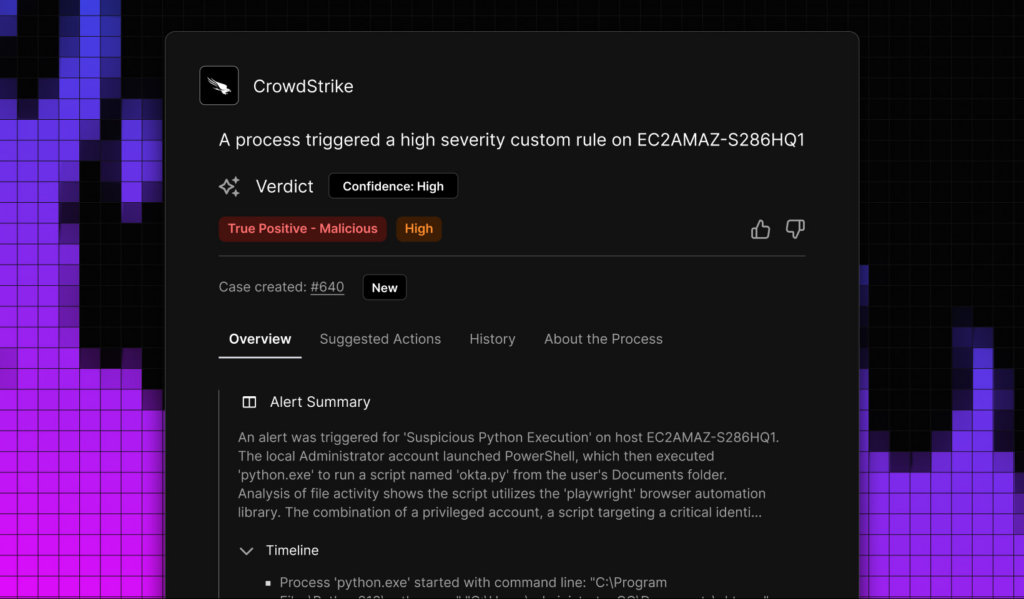
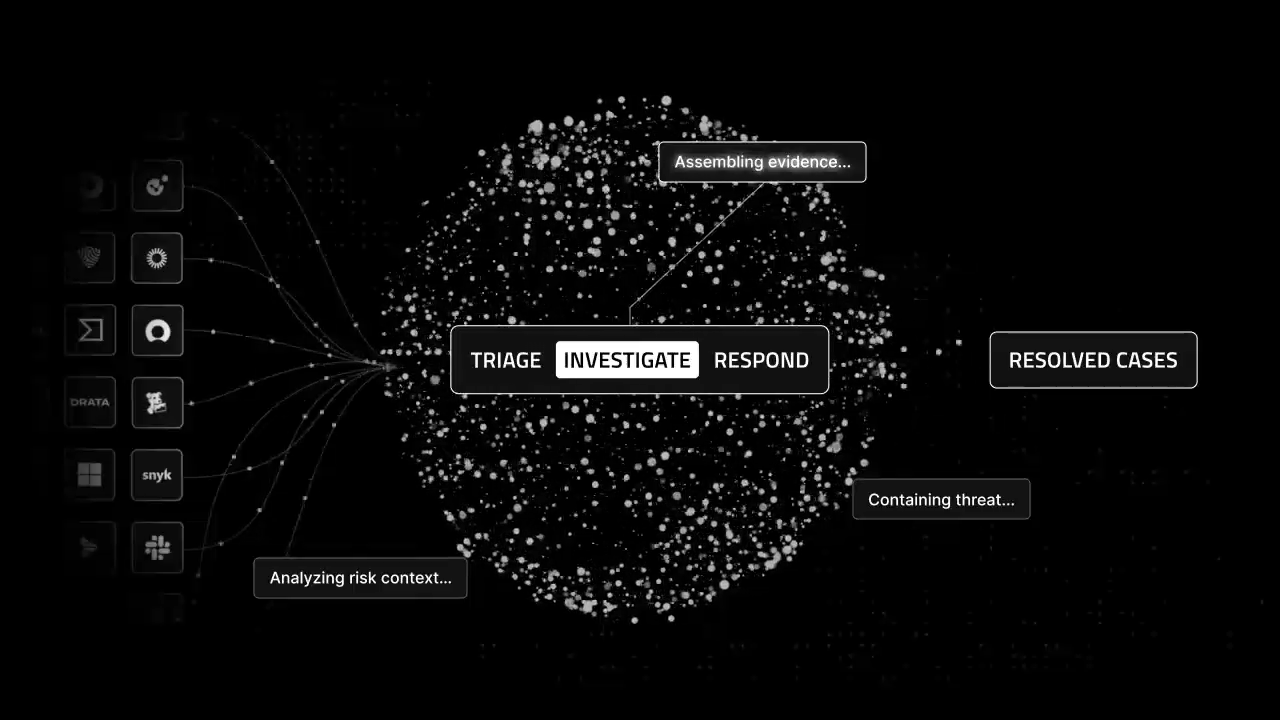
Triage: The AI SOC ingests and normalizes telemetry from across your security stack, correlating and deduplicating events to reduce noise. Agentic AI analyzes risk context and threat intel to deliver verdicts that separate false positives from actual risk — before alerts ever reach a human analyst.

Investigate: Cases are assigned to a task force of specialized, customizable AI Agents that work at the direction of your staff to gather evidence, assemble timelines, and summarize findings. This removes manual bottlenecks and expands SOC capacity, all with the transparency, oversight, and control your team demands.

Respond: The AI SOC enables autonomous response actions to contain threats quickly and ensure critical threats are seen by the right people. Over 90% of cases can be remediated completely autonomously, freeing your team to do what they do best: threat hunting, strategic planning, and high-level decision making.

Top Use Cases for AI SOCs

By analyzing vast amounts of data from across your security stack and executing intelligent automations, AI unlocks efficiency gains across SOC functionalities such as:

  • Incident investigation: Analyze massive volumes of alerts to identify patterns, suppress low-fidelity alerts, and automate triage and validation, accelerating the investigation process from start to resolution. 
  • Case management: Streamline the process of prioritizing, tracking, and managing security incidents by intelligently enriching and automating cases.
  • Workflow generation: Prompt AI with a natural language description of your use case to instantly build security automation workflows — no code required.
  • Case summarization: Analyze all relevant data points associated with a security alert to provide easy-to-digest, evidence-backed summaries of complex security cases, improving SOC analysts’ efficiency and collaboration.
  • Documentation: Automatically generate documentation for complex automated processes, increasing both efficiency and accuracy from shift-handovers to compliance audits.
  • Executive reporting: Prompt the system to generate case info in the right tone and level of information for a specific persona, such as for a non-technical executive or board member. 
  • Team collaboration: Automatically alert Slack or Teams channels when a case is created, escalated, resolved and more.
  • Resource optimization: Use AI to assign cases to an available analyst based on workload and shift schedules. 
  • Data correlation: Combine and correlate data from all tools in your security stack to provide a holistic view of your security environment.
  • Threat response: Automate tasks like threat detection and containment for faster incident resolution.

How Do AI SOCs Transform Traditional Security Operations? 

Scaling SOC operations: AI agents can handle an influx of security events: triaging, investigating, and remediating the majority of Tier-1 and Tier-2 alerts. This frees up analyst bandwidth to focus on urgent incidents and strategic projects, enabling SOCs to efficiently scale their operations without increasing headcount. Torq’s AI-powered Hyperautomation scales elastically, handling unlimited alert volumes without degradation. Carvana’s agentic AI now handles 100% of Tier-1 alerts, with no increase in headcount required.

Shifting to a proactive security posture: Agentic AI goes beyond just detecting and counteracting attacks by applying real-time intelligence to identify patterns and detect emerging threats. This allows SOCs to adopt a less reactive, more preemptive approach to address vulnerabilities before they can be exploited or breached. 

Reducing alert fatigue and analyst burnout: By autonomously triaging alerts and reducing false positives, AI agents reduce the number of irrelevant alerts that analysts must wade through. And by automating tedious, repetitive tasks and auto-remediating most low-level alerts, AI-driven Hyperautomation helps senior analysts regain time and capacity to focus on more rewarding work, such as strategic projects. 

Accelerating incident response: Manual investigation and remediation take hours; time attackers use to move laterally and escalate privileges. Socrates coordinates detection, enrichment, containment, and case management at machine speed, auto-remediating 95% of cases within minutes. Valvoline cut analyst workload by 7 hours per day after implementing Torq.

Speeding up MTTR: All of the efficiency gains from leveraging AI in the SOC translate to more alerts resolved, faster.

Will AI Replace Humans in the SOC?

Adopting AI in the SOC is not about replacing human SOC analysts — it’s about augmenting and empowering them. With a looming 4 million+ cybersecurity talent shortage, organizations must not only retain their existing analysts, but also help them work more efficiently. On top of that, organizations are recognizing that human-only defenses are inadequate to counter the evasive and persistent threats posed by AI-driven attacks.

AI reduces analyst burnout: A multi-agent system can reduce the strain on SOC teams by offloading rote tasks, auto-remediating the majority of Tier 1 tickets, and upleveling the skills of junior analysts. This frees up senior analysts to focus their expertise on critical threats and strategic projects, helping their organization achieve a stronger overall security posture.

Human expertise must remain the final line of defense: Done the right way, AI-powered SOCs keep humans “in the loop” as the ultimate decision-makers for high-stakes threats following rigorous, multi-tiered AI evaluation and case enrichment that helps human analysts take informed, decisive action.

“By 2028, multiagent AI in threat detection and incident response will rise from 5% to 70% of AI implementations to primarily augment — not replace — staff.” 

Gartner Inc.

How Torq Delivers a True AI SOC

Torq isn’t AI bolted onto a legacy platform — it’s a true AI SOC built from the ground up. The Torq AI SOC Platform delivers all five core capabilities, combining agentic AI and automation to triage, investigate, and respond to threats with speed, scale, and transparency.

  • Socrates, the OmniAgent AI SOC Analyst: Socrates intelligently automates alert triage, incident investigation, and response, extending your SOC teams’ capabilities and improving response times across the board. Socrates coordinates a full Multi-Agent System (MAS) — planning, investigating, remediating, and managing security cases with human-like decision-making and machine-speed execution. Socrates can auto-remediate 95% of cases within minutes. For critical cases that require human intervention, your analysts can collaborate with Socrates using natural language to summarize case details, enrich cases with additional investigation and threat intelligence, and trigger remediation workflows
  • AI Workflow Builder: Simply describe your desired security automation workflow in natural language, and Torq’s AI Workflow Builder will generate a tailored solution in seconds. Rather than spending hours manually building workflows from scratch, your team is freed up to focus on more strategic security initiatives.
  • AI Case Summaries: Help your team make the right decisions quickly by presenting them with a concise, insightful, and verifiable AI-generated summary of each case. No more wading through pages of logs and incident details! The easy-to-read summaries empower SOC teams to work faster, make informed decisions with confidence, and seamlessly transition between shifts by giving the incoming team clear case context backed by citations.
  • AI Data Transformation: Simplify complex data manipulation for security operations by easily transforming complex JSON data using natural language — no coding required. Each transformation is broken down into precise, testable micro-transformations that users can edit, validate, and modify individually.
  • Runbook Execution: Intelligently plan customized investigation and response strategies based on the organization’s historical outcomes and adapt to new threat vectors, ensuring faster containment.
  • Deep Research Investigations: Uncover hidden attack patterns across disparate data sources, perform detailed root cause analyses, and dynamically assess threat impact — giving SOC teams context previously out of reach without hours of manual digging.
  • Limitless Integrations: 300+ pre-built integrations with 4,000+ steps, plus AI-powered creation of new integrations and workflows.

Torq is the first autonomous security platform to support Model Context Protocol (MCP) natively — making it the most autonomous and truly agentic SecOps platform available.

The Future of the SOC

When deployed effectively, an AI SOC contains threats immediately while extending and enhancing your existing staff’s capabilities. This will become more critical than ever as attackers leverage AI to scale at machine speed.

So, what does the future of SOC automation look like? Sophisticated multi-agent AI continuously learns from historical data and real-time incidents to generate insights and recommendations, automate routine security tasks, and auto-remediate the majority of alerts, with a top layer of human analysts providing strategic oversight for critical cases. This means faster, more proactive responses to threats and vulnerabilities — and a more secure future for organizations everywhere.

Want to learn how to deploy AI in the SOC the right way? Read the AI or Die Manifesto to learn CISO considerations, fake AI red flags, and evaluation questions.

FAQs

What is an AI SOC?

An AI SOC (AI-powered Security Operations Center) is a security operations center that uses agentic artificial intelligence to automate threat detection, accelerate incident response, and manage the complete threat lifecycle — from triage through investigation to remediation. Unlike traditional SOCs that rely on manual processes and static playbooks, an AI SOC leverages agentic AI that can reason, plan, and take autonomous action within defined guardrails.

What is the difference between AI in the SOC and a true AI SOC?

AI in the SOC refers to bolt-on AI tools added to existing infrastructure — such as copilots or ML-based detection — that provide incremental improvements but don’t fundamentally change how the SOC operates. A true AI SOC is built from the ground up with AI at the core, where agents autonomously triage, investigate, and remediate threats across a unified platform. The key difference: AI in the SOC makes analysts slightly faster, while a true AI SOC transforms what analysts spend their time on.

Will AI replace human analysts in the SOC?

No. AI SOCs are designed to augment and empower human analysts, not replace them. AI handles routine tasks like alert triage, data correlation, and Tier-1 remediation — freeing analysts to focus on critical threats, threat hunting, and strategic projects. According to Gartner, multi-agent AI in threat detection will rise from 5% to 70% by 2028, primarily to augment staff rather than replace them.

What are the core capabilities of a next-generation AI SOC?

A next-generation AI SOC must deliver five core capabilities: (1) a unified operational data layer with SIEM-agnostic connectivity, (2) autonomous investigation and response that eliminates manual enrichment, (3) agentic AI that can reason, plan, and act within guardrails, (4) native case management with AI-driven prioritization and evidence timelines, and (5) an open ecosystem with API-first architecture and Model Context Protocol (MCP) support.

Can AI SOC integrate with existing security tools?

Yes. Torq HyperSOC connects seamlessly with your existing stack — SIEM, EDR, IAM, cloud platforms, ticketing systems, and more — through 300+ pre-built integrations. There’s no rip-and-replace required; AI enhances the tools you already have. Explore integrations →

How quickly can an AI SOC be implemented?

Torq deploys in minutes, not months, with agentless architecture and no-code workflow building. Carvana automated 41 runbooks within one month of deployment. Most customers see production value within 30 days, with AI handling the majority of Tier-1 alerts from day one. Get a demo →

SEE TORQ IN ACTION

Ready to automate everything?

“Torq takes the vision that’s in your head and actually puts it on paper and into practice.”

Corey Kaemming, Senior Director of InfoSec

“Torq HyperSOC offers unprecedented protection and drives extraordinary efficiency for RSM and our customers.”

Todd Willoughby, Director

Compuquip logo in white

“Torq saves hundreds of hours a month on analysis. Alert fatigue is a thing of the past.”

Phillip Tarrant, SOC Technical Manager

Fiverr logo in black

“The only limit Torq has is people’s imaginations.”

Gai Hanochi, VP Business Technologies

Carvana logo in black

“Torq Agentic AI now handles 100% of Carvana’s Tier-1 security alerts.”

Dina Mathers, CISO

Riskified logo in white

“Torq has transformed efficiency for all five of my security teams and enabled them to focus on much more high-value strategic work.”

Yossi Yeshua, CISO

The Best SOC Tools in 2026: Legacy vs Modern Automation

Contents

Get a Personalized Demo

See how Torq harnesses AI in your SOC to detect, prioritize, and respond to threats faster.

Request a Demo

Security Operations Centers (SOCs) are evolving faster than ever. As cybersecurity threats grow more sophisticated and digital infrastructure expands across cloud, hybrid, and on-prem environments, legacy SOC tools like SOAR are falling behind. Static dashboards, siloed point solutions, and human-dependent processes simply can’t keep up.

Traditional SecOps tools are no longer enough. Modern tools must proactively detect suspicious activities using broad data sources (e.g., threat intelligence, vulnerability databases, etc.) and enable seamless collaboration across teams. Automation is the key SOC tool to scale detection and response efficiently. 

Modern SOCs require automation-first platforms that enable proactive defense, seamless integrations, and high-scale responsiveness. Platforms like Torq — powered by Hyperautomation — represent the next generation of SOC architecture. 

Read on for a breakdown of SOC tools, an exploration of the best tools of 2025, and how automation streamlines security operations.

What is a SOC Tool?

Today’s cybersecurity environments rely on dozens of integrated systems. While powerful, this complexity can create inefficiencies, increase SOC analyst fatigue, and lead to slower threat response times. This is where SOC automation platforms like Torq shine by orchestrating across all tools, streamlining workflows, and accelerating response.

5 Core Capabilities of Security Operations Center Tools

Modern SOCs demand tools built for the cloud’s dynamic, distributed nature. Here are five must-have capabilities your stack needs.

1. Continuous SOC Monitoring

Tools should provide always-on visibility across cloud, hybrid, and on-prem workloads, dynamically adapting to autoscaling and ephemeral infrastructure. Look for platforms that detect real-time anomalies, monitor traffic flows, flag malicious configurations, and help strengthen your cloud security posture with minimal manual effort.

2. Log Collection and Analysis

Log tools enable deep investigation by aggregating decentralized telemetry across services. They help correlate signals across layers, enhancing intrusion detection, root cause analysis, and threat attribution across sprawling cloud environments.

3. Threat Detection

The best detection tools are plugged into real-time threat intel feeds and vulnerability databases. This allows SOC teams to quickly spot indicators of compromise (IoCs), detect novel tactics, and stay ahead of emerging threats with precision.

4. Incident Response

Incident response platforms have prebuilt playbooks and customizable workflows to stop attacks quickly. They can block malicious IPs, isolate compromised assets, and auto-contain threats without human intervention.

5. Automation

Security automation is essential for modern SOCs to operate efficiently at scale. It streamlines repetitive tasks, accelerates incident response, and allows SOC analysts to focus on complex threats instead of manual workflows.

How to Evaluate SOC Tools in a Fragmented Market

Knowing the capabilities is only half the battle. With thousands of vendors on the market, how do you distinguish a future-proof platform from legacy tech? When evaluating your stack for 2026, prioritize these three non-negotiable criteria:

  • Vendor-agnostic integration: Avoid “walled gardens.” Your tools must communicate openly via API. If a SOAR platform only works well with its parent company’s SIEM, it creates a silo, not a solution.

  • Agentic AI capabilities: Look beyond simple chatbots. Modern tools should feature Agentic AI that can autonomously plan, execute, and verify complex remediation tasks—not just summarize alerts.

  • Time-to-value: Can the tool deploy in hours, or does it require a six-month consulting engagement? The speed of implementation is a critical metric for agile SOCs.

The Top 10 SOC Tools in 2025

Specific tools have emerged as foundational to operational success as the SOC landscape evolves. Below are ten must-have SOC software tools and technologies for any security team aiming to stay ahead.

1. Log Collection and Management

Log management tools like Splunk and Elastic gather security logs and telemetry from various sources, including endpoints, network devices, and cloud environments. Proper log management is foundational for threat detection, compliance monitoring, and forensic investigations, making it an indispensable part of the SOC infrastructure.

2. Security Information and Event Management (SIEM)

SIEM platforms provide essential SOC monitoring and event correlation capabilities, helping security teams quickly identify and respond to threats. They are the cornerstone for centralized security operations.

Common examples of SIEM tools include IBM QRadar, Microsoft Sentinel, Splunk Enterprise Security, LogRhythm, and ArcSight. This SOC software correlates data across multiple sources, providing comprehensive threat visibility and efficient event management. 

3. Vulnerability Management

Vulnerability management platforms continuously scan and assess SOC network assets for vulnerabilities, prioritizing them based on severity and business impact. These platforms help SOC analysts proactively address critical issues before attackers can exploit them.

Rapid7 InsightVM, Nessus, Tenable, and Qualys are leading vulnerability management tools that provide actionable vulnerability data, enabling teams to rapidly and effectively patch vulnerabilities. Effective vulnerability management reduces organizational risk, maintains compliance, and prevents attackers from exploiting known weaknesses.  

4. Endpoint Detection and Response (EDR) and Extended Detection and Response (XDR)

EDR tools monitor endpoints, such as laptops and servers, enabling detection of malicious activities and automated response to threats in real time. Extended Detection and Response (XDR) solutions expand this coverage to networks, email, the cloud, and servers, delivering comprehensive security visibility.

EDR solutions like CrowdStrike Falcon and SentinelOne provide forensic capabilities and proactive threat-hunting features. XDR tools like Palo Alto Networks Cortex XDR unify endpoints, SOC networks, and cloud security to offer a holistic view of the threat landscape. 

5. Email Security

Email security tools work by performing detection and response across email, endpoints, and identity systems. They can quarantine malicious messages, remove harmful emails post-delivery, and correlate activity across systems to reveal the full scope of an attack. 

Solutions like Proofpoint and Microsoft Defender provide real-time URL and attachment sandboxing, threat intelligence integration, and automated remediation of compromised accounts. These capabilities not only strengthen threat response but also support compliance by enforcing encryption, archiving, and access controls.

6. Threat Hunting

Threat hunting tools proactively search for signs of malicious activity that evade traditional detection methods. Platforms like Carbon Black and Cisco empower SOC analysts with advanced investigative capabilities to discover and neutralize threats before they cause significant damage.

7. Threat Intelligence

Threat intelligence tools gather and analyze external threat data, providing actionable insights into potential cyber threats. Platforms such as Recorded Future and Anomali enhance a SOC’s ability to predict, identify, and ensure a proactive response to emerging threats, keeping teams informed of global threat trends and attacker tactics.

8. Cloud Security Posture Management (CSPM)

CSPM tools help identify, assess, and remediate misconfigurations and policy violations in cloud infrastructure. These tools continuously monitor cloud environments like AWS, Microsoft Azure, and Google Cloud Platform to ensure compliance with internal security policies and industry standards.

CSPM solutions automatically detect configuration drift, enforce least privilege access, and reduce the risk of data exposure by alerting teams to insecure storage, open ports, or excessive permissions. By offering centralized visibility and continuous compliance assessment, CSPM enables SOC teams to secure cloud workloads at scale while responding faster to evolving risks.

9. Identity and Access Management (IAM) 

IAM tools control and monitor user access to IT resources, ensuring only authorized individuals can reach sensitive systems and data. They encompass technologies like single sign-on (SSO), multi-factor authentication (MFA), privileged access management (PAM), and identity governance. 

In a SOC, IAM is essential for investigating incidents, detecting compromised accounts, and preventing unauthorized lateral movement, making it a cornerstone of a strong security posture.

10. Automation

At Torq, we call this Hyperautomation. Hyperautomation represents the next generation of SOC technology, combining advanced automation and artificial intelligence (AI) into a unified approach that fundamentally transforms traditional security operations. 

Torq integrates seamlessly with existing SOC tools, orchestrating complex workflows across the entire security stack and significantly reducing repetitive, manual tasks. By leveraging GenAI and agentic AI, Torq Hyperautomation dynamically identifies, analyzes, and responds to threats in real time, delivering faster and more consistent incident responses.

This proactive, autonomous approach enables security teams to scale effectively, enhance operational efficiency, and improve accuracy across their security processes. Hyperautomation accelerates response times, reduces SOC analyst workload, and ensures more precise threat detection and remediation. 

How Automation Transforms SOC Tools

Automation transforms traditional SOC operations by connecting disparate tools, streamlining workflows, and enabling rapid, automated responses. Here’s how:

  • Faster detection and response: Automation drastically reduces the time it takes to identify, investigate, and respond to security incidents. What once took hours or days now happens in seconds, minimizing dwell time and damage.

  • Increased SOC analyst efficiency: With Tier-1 alerts automatically triaged (and often auto-remediated) and routine tasks offloaded to automated workflows, SOC analysts can handle a higher volume of cases without burnout. Teams get more done with fewer resources, reducing the need to scale headcount just to keep up.

  • Effortless scalability: As threats grow in number and complexity, automation allows SOC analysts to keep pace without compromising performance. Whether your environment is expanding across clouds or adding new tools, automation scales effortlessly alongside.

  • Smarter use of human talent: SOC analysts are too valuable to be bogged down by repetitive tasks. Automation frees them to focus on high-impact investigations, strategic decision-making, and threat hunting, where human judgment and creativity matter most.

  • Reduction in alerts: Automated triage filters out low-priority noise, enriching and escalating only the alerts requiring attention. SOC analysts stay focused on real threats instead of drowning in false positives.

How Torq Hyperautomation Transforms the SOC

Torq HyperSOC™ is the first agentic, AI-powered SOC platform built for autonomous security operations. It transforms your SOC from reactive and overloaded to autonomous and high-performing

Here’s how Torq makes it happen.

Seamless Integration with Your Entire Security Stack

Torq connects instantly to all your SOC tools — SIEM, EDR, CSPM, IAM, SaaS platforms, ticketing systems, and even homegrown apps — without custom code or complex deployments. Whatever you’re running, Torq plugs in and gets to work.

AI Agents That Work Like SOC Analysts

At the heart of HyperSOC is Socrates, Torq’s AI SOC Analyst and omniagent. Socrates orchestrates a team of specialized AI Agents purpose-built for tasks like enrichment, case management, user verification, and remediation. Together, they coordinate end-to-end case lifecycles with precision and speed.

Natural Language-Driven Automation

Security automation doesn’t have to be complex. With Torq, anyone on your team can trigger powerful workflows using plain English. Want to isolate a user, rotate credentials, or escalate a threat? Just ask — Torq handles the rest.

Hyperautomation at Enterprise Scale

Torq’s performance automatically scales to keep up, whether your environment is cloud-native, hybrid, or on-prem. It runs thousands of workflows in parallel, adapts to evolving threats, and ensures no alert slips through the cracks.

Built to Flex with Your Needs

Torq’s open architecture and robust APIs let you fully customize cases to fit your cybersecurity strategy. Build once, reuse anywhere, and adapt fast to new use cases — all without needing a team of developers.

Real-World Use Case: Transforming the SOC from Black Box to Strategic Value

To understand the true impact of modern SOC tools when orchestrated correctly, let’s look at Kenvue, the world’s largest pure-play consumer health company (home to brands like Tylenol and Listerine).

  • The problem: Kenvue relied on an outsourced SOC model. This created a “black box” effect, characterized by limited visibility, inconsistent workflows, and a reactive approach to threats. Analysts were stuck on a conveyor belt of tickets with no way to measure true effectiveness.

  • The solution: Kenvue brought operations in-house and deployed Torq Hyperautomation™ as their central nervous system. They integrated their entire stack (EDR, SIEM, Identity) into Torq to unify case management and standardize response workflows.

  • The result: The transformation was immediate. Kenvue achieved a 60% decrease in MTTR within just two months. They now automate 89% of cases, allowing analysts to stop churning through tickets and start going “ten layers deeper” into complex investigations.

10 Questions for Your SOC Tool Evaluation

  • Does this tool offer open APIs for bidirectional integration with our current stack?

  • Can it handle our projected data volume without performance degradation?

  • Is the pricing model transparent, or are there hidden costs for data ingestion/retention?

  • Does it support “Human-in-the-Loop” workflows for sensitive decisions?

  • What is the average time-to-value for new deployments?

  • Does it utilize Agentic AI to perform autonomous investigations?

  • Can we build and customize workflows without a dedicated coding team?

  • Does it support multi-tenant operations (crucial for scaling teams)?

  • How frequently is the threat intelligence or vulnerability database updated?

  • Does it automatically map detections and responses to the MITRE ATT&CK framework?

Hyperautomation is the SOC Tool You Need Today

As cybersecurity challenges mount, traditional tools are no longer enough. Modern security operations centers require intelligent, automated, and scalable solutions that enable security teams to move faster, act smarter, and deliver better outcomes.

AI-driven Hyperautomation is that solution.

Torq brings Hyperautomation to life, enabling SOC analysts to move beyond fragmented processes and manual triage. Whether you’re a lean security team or an enterprise SOC analyst, Torq empowers you to detect, respond, and remediate with unprecedented speed and precision.

Get the SOC tool you need.

FAQs

What is a SOC tool?

A SOC (Security Operations Center) tool is any software or technology used by security teams to monitor, detect, analyze, and respond to cyber threats. These tools collect data from across an organization’s network, endpoints, and cloud environments to identify suspicious activity and support incident response. Common examples include SIEM, EDR, and vulnerability scanners.

What are the best SOC tools for 2025?

The best SOC tools for 2025 include modern platforms that prioritize automation and integration. Key tools include next-gen SIEMs (like Microsoft Sentinel), EDR/XDR solutions (like CrowdStrike), vulnerability management platforms, and threat intelligence feeds. Leading the list are Hyperautomation platforms like Torq, which orchestrate these diverse tools into a unified, autonomous defense system.

How do modern SOC tools differ from legacy systems?

Legacy SOC tools are often siloed, on-premise, and rely heavily on manual human intervention for triage and response. In contrast, modern SOC tools are cloud-native, API-first, and designed for automation. They seamlessly share data, scale dynamically with cloud workloads, and use AI to reduce false positives and accelerate response times.

What tools are used in a Security Operations Center?

A standard Security Operations Center (SOC) stack typically includes a SIEM for log management, EDR/XDR for endpoint protection, vulnerability scanners for risk assessment, and threat intelligence platforms. Advanced SOCs also utilize Cloud Security Posture Management (CSPM) tools and security hyperautomation platforms to connect and orchestrate these technologies.

Why is security automation important for SOC tools in 2025?

Security automation is critical in 2025 because the volume and speed of cyberattacks now exceed human capacity. Automation allows SOC tools to handle massive alert volumes, reduce response times from hours to seconds, and prevent analyst burnout by offloading repetitive tasks like data enrichment and Tier-1 triage.

Which SOC tools are most effective for cloud environments?

For cloud environments, the most effective SOC tools provide deep visibility into dynamic infrastructure. These include Cloud Security Posture Management (CSPM), Cloud Workload Protection Platforms (CWPP), and Cloud-Native Application Protection Platforms (CNAPP). Tools like Wiz and Orca Security are essential for monitoring configuration drift and runtime risks in the cloud.

How does AI enhance SOC tool operations?

AI enhances SOC operations by enabling autonomous investigation and decision-making. AI-driven tools can analyze vast datasets to identify subtle patterns of compromise, reduce false positives, and power Agentic AI that executes complex remediation workflows — such as user verification and threat containment — without requiring constant human hand-holding.

SEE TORQ IN ACTION

Ready to automate everything?

“Torq takes the vision that’s in your head and actually puts it on paper and into practice.”

Corey Kaemming, Senior Director of InfoSec

“Torq HyperSOC offers unprecedented protection and drives extraordinary efficiency for RSM and our customers.”

Todd Willoughby, Director

Compuquip logo in white

“Torq saves hundreds of hours a month on analysis. Alert fatigue is a thing of the past.”

Phillip Tarrant, SOC Technical Manager

Fiverr logo in black

“The only limit Torq has is people’s imaginations.”

Gai Hanochi, VP Business Technologies

Carvana logo in black

“Torq Agentic AI now handles 100% of Carvana’s Tier-1 security alerts.”

Dina Mathers, CISO

Riskified logo in white

“Torq has transformed efficiency for all five of my security teams and enabled them to focus on much more high-value strategic work.”

Yossi Yeshua, CISO

MDR vs MSSP: Why AI and Automation Are the Only Differentiator that Actually Matters

Contents

Get a Personalized Demo

See how Torq harnesses AI in your SOC to detect, prioritize, and respond to threats faster.

Request a Demo

TL;DR

  • MDR (Managed Detection and Response) is a specialized service focused on active threat hunting, incident containment, and hands-on response — ideal for teams that need someone not just to alert, but to act.
  • MSSP (Managed Security Service Provider) is a broader service that covers security infrastructure management, monitoring, and compliance — best suited for mature internal teams that need broad coverage and operational support.
  • Both models share the same core limitation: manual processes create response bottlenecks that slow down triage, investigation, and containment — regardless of how good the analysts are.
  • AI SOC automation and Hyperautomation close that gap — enabling MDRs and MSSPs to triage faster, scale without adding headcount, and deliver measurably better outcomes for their clients.

Anyone who’s evaluated security services has been there — staring at a slide deck and trying to make sense of whether they need managed detection and response (MDR) or a managed security service provider (MSSP). The acronyms often get used interchangeably, and it’s easy for the lines between them to blur.

MDRs and MSSPs are designed for fundamentally different needs. Choose the wrong fit, and you can end up with coverage gaps that adversaries love to exploit.

In this blog, we’re going to get into what MDR vs MSSP actually mean for your day-to-day SOC operations, where each model breaks down, and why the real differentiator in 2026 isn’t which acronym you pick — it’s whether your managed security setup is built on top of real Hyperautomation.

What is Managed Detection and Response (MDR)?

MDR is a specialized, outcome-focused security service. The mandate is narrow and deep: find threats, validate them, and stop them — fast. MDR providers embed their team into your environment, hunt for threats your tools might miss, and take hands-on action when something’s confirmed.

The keyword is response. MDR doesn’t just tell you the house is on fire. They show up with the hose.

MDR emerged as a direct answer to a real problem: organizations were drowning in security tooling that generated enormous volumes of alerts but required significant human expertise to act on them. MDR providers fill that gap by bringing the analysts to you.

What MDR Services Typically Include

A mature MDR offering typically includes:

  • 24/7 threat monitoring and analysis: Continuous human-led review of your environment, not just automated rule triggers
  • Proactive threat hunting: Analysts actively searching for indicators of compromise before an alert fires
  • Incident containment and response: Hands-on remediation, including host isolation, account suspension, and malware removal
  • Forensic investigation: Root cause analysis after an incident, so you understand the full scope
  • Threat intelligence integration: Operationalizing current adversary TTPs directly in your environment
  • Endpoint Detection and Response (EDR) management: Active management and tuning of your endpoint tooling

What is a Managed Security Service Provider (MSSP)?

An MSSP is a broader, foundational security service. Where MDR goes deep on detection and response, an MSSP goes wide — managing your security infrastructure, ensuring your tools are running, and monitoring for events across your environment.

Think of an MSSP as the organization responsible for keeping your security stack healthy and for reviewing your logs. They’re your managed security operations partner for the long haul: compliance reporting, device management, vulnerability scanning, and security monitoring at scale.

MSSPs became the dominant model for enterprises that needed security coverage but didn’t have the headcount to staff a full internal SOC. They bring breadth. They bring coverage. They bring operational continuity.

What they traditionally haven’t brought — and this matters — is deep, hands-on incident response. When an MSSP flags an alert, the ball usually goes back to your team to run it down.

What MSSP Services Typically Include

A full MSSP engagement typically covers:

  • Security monitoring and SIEM management: Logs aggregation, correlation, and alerting across your infrastructure
  • Firewall and network device management: Configures, patches, and optimizes
  • Vulnerability management: Regularly scans, prioritizes, and reports
  • Compliance support: Helps meet regulatory requirements (e.g., SOC 2, PCI-DSS, HIPAA)
  • Identity and access management support: Monitors privileged accounts and access anomalies
  • Patch management: Coordinates remediation across your environment

MDR vs MSSP: Operational Differences For Your SOC

The surface-level pitch for both services sounds similar: “We’ll handle your security.” However, the operational reality is very different. If you’re running or building a SOC, you need to understand exactly what you’re getting before making a decision. 

Proactive Threat Hunting vs. Reactive Alerting

Here’s the core operational distinction: MSSPs focus on scalable, rules-driven monitoring. Their strength is applying well-defined detection logic to large volumes of activity, ensuring consistent coverage for known threats and established attack patterns. It’s an effective model for organizations that need broad, foundational security monitoring.

MDR providers layer in active threat hunting — looking for anomalies, subtle indicators of compromise, and behaviors that don’t fit neatly into predefined rules. This adds a proactive dimension of detection coverage, especially for more complex or evasive techniques.

But even the best MDR providers are bottlenecked by human processes. Even after an analyst identifies a threat, the investigation, escalation, and response chain still involve significant manual steps. Mean Time to Respond (MTTR) takes a hit every time a human has to make a decision, write a ticket, and wait for approval. In a real incident, those minutes matter.

The 2025 IBM Cost of a Data Breach Report shows that faster response times directly correlate with lower breach costs. Human-led response, even excellent human-led response, has a ceiling.

The Cost and Scope of Management

MSSPs are generally priced by device or seat — a more predictable, infrastructure-tied cost model. That breadth comes at a lower per-function cost, making MSSPs attractive for organizations that need wide coverage across a complex environment.

MDR commands a premium. You’re paying for human expertise, continuous analysis, and active response capability. The trade-off is worth it for organizations that need genuine incident response capability but don’t have the internal team to deliver it.

The scope question matters too:

  • MSSP = wide coverage, security infrastructure management, monitoring, alerting. Your team still owns the response.
  • MDR = deep detection and response, threat hunting, hands-on containment. Your team retains control of broader security infrastructure.

Neither model is complete on its own. And for both models, the operational bottleneck is the same: manual processes slow everything down.

Why MDR and MSSP Both Hit the Same Wall

Here’s what nobody in the managed security space loves to say out loud: both models have a scaling problem.

MSSPs are managing more devices, more alerts, and more compliance requirements than ever — with analyst teams that aren’t growing fast enough to keep up. The result is alert fatigue, slower triage, and coverage gaps that only get worse as environments grow.

MDR providers face the same pressure from a different angle. The human-led threat hunting and response that makes MDR valuable is also what makes it expensive and hard to scale. Every new customer adds analysts to the queue. Response speed — the whole value proposition — degrades as volume increases.

Both models are fundamentally constrained by the same thing: manual processes at the core of their operations.

This is where AI SOC automation changes everything. By automating the high-volume, repetitive work — alert triage, enrichment, initial investigation, containment actions — AI-powered Hyperautomation removes the bottleneck that limits both MDR and MSSP performance. Analysts stop spending so much of their time on noise and start spending it on the threats that actually require human judgment.

For MDR providers, that means faster response times and the ability to take on more customers without burning out their team. 

For MSSPs, it means transforming from a monitoring-and-alerting operation into one that can deliver a genuine automated response, closing the gap that traditionally separates them from MDR.

The managed security providers pulling ahead of the market right now are the ones who figured out how to make their analysts dramatically more effective through automation.

Choosing the Right Model: Leveraging Hyperautomation With Torq

Here’s the framework CISOs actually need when making this decision.

Go with an MSSP if: Your internal security team is mature and well-staffed. You need broad coverage for security infrastructure management and compliance. You have analysts who can run down alerts and handle management.

Go with MDR if: Your internal team is lean or early-stage. You need someone else to not just alert you, but actually respond. You’re dealing with sophisticated threats that require continuous hunting, not just rule-based detection.

But here’s what neither choice solves on its own: The SOC staffing shortage isn’t going away. Cybersecurity Ventures estimates that millions of cybersecurity roles are unfilled globally — and that gap is putting pressure on every managed security model. MDR analysts burn out. MSSP analysts miss alerts. Alert fatigue is real regardless of who’s handling your queue.

So how do you win? Build Hyperautomation into your security operations layer — so that when an alert fires, the triage, enrichment, and initial response happen at machine speed, not human speed.

Maximizing MDR and MSSP Value With Hyperautomation 

Whether you’re evaluating an MDR, an MSSP, or a hybrid model, the ceiling of that investment is determined by how much of the work is still manual.

When assessing providers, look for those that leverage AI SOC capabilities to ensure the capacity and response speed your environment demands. Providers built on Hyperautomation — automating alert triage, enrichment, and response workflows — can dramatically cut MTTR and handle higher alert volumes without the constraints of manual scaling. That translates directly into better, more efficient service: broader coverage, faster response, and analysts focused on decisions that actually require human judgment rather than repetitive, high-volume triage work.

That’s the model Torq’s AI SOC is built on — an autonomous SOC approach where the repetitive, high-volume work runs at machine speed, freeing up your MDR or MSSP team’s analysts to spend their time where it matters most.

The Proof is in the Performance

Check out how MSSPs are using Torq Hyperautomation today: 

HWG Sababa, a leading European MSSP, deployed Torq to automate their SOC workflows — and the results weren’t incremental. They scaled their operations, improved response times, and differentiated their service offering in a crowded market. 

Bloomreach deployed Torq and automated workflows that eliminated manual triage steps, freeing their security team to focus on what actually requires human judgment.

If you’re evaluating managed security providers right now, the question to ask every vendor is: “How automated is your response workflow, and what does your automation layer look like?”

The providers who can answer that question clearly — and demonstrate it — are the ones worth talking to. The rest are selling you a human-hours model in a machine-speed threat environment.

Ready to find out why the best MSSPs are using Hyperautomation? 

FAQs

What is the difference between MDR vs MSSP?

MDR (Managed Detection and Response) is a specialized security service focused on active threat hunting, incident investigation, and hands-on response. An MSSP (Managed Security Service Provider) is a broader service that manages security infrastructure, monitors for events, and delivers compliance support. The key operational difference: MSSPs alert you to threats — MDR providers respond to them directly.

What is MDR vs MSSP vs SIEM?

A SIEM (Security Information and Event Management) is a technology platform that aggregates and correlates log data to generate alerts. An MSSP often manages and operates a SIEM on your behalf. MDR goes further — layering human-led threat hunting and active incident response on top of detection tooling. SIEM is the tool; MSSP is the managed service around your infrastructure; MDR is the specialized response capability.

What is the difference between MDR and XDR?

XDR (Extended Detection and Response) is a technology platform that unifies detection and response data across endpoints, networks, cloud, and identity into a single view. MDR is a managed service — a team of analysts who use tools like XDR (or EDR, SIEM, and others) to hunt threats and respond on your behalf. XDR is what you buy. MDR is who operates it.

Should I choose MDR or MSSP for my organization?

It depends on your internal team’s maturity. If you have a strong internal security team and need broad infrastructure management and monitoring coverage, an MSSP is likely the right fit. If your team is lean and you need someone to handle active threat hunting and incident response end-to-end, MDR fills that gap. That said, neither model fully solves the scaling challenge on its own — organizations getting the most from both are layering AI SOC automation on top to eliminate manual bottlenecks and accelerate response times.

Can MDR and MSSP services be combined?

Yes. Many organizations run a hybrid model — an MSSP for broad infrastructure monitoring and compliance, with MDR for specialized detection and response on high-value assets or critical environments. The risk with a hybrid approach is operational complexity: two providers, two escalation paths, and potential overlap or gaps in coverage. Hyperautomation can help unify those workflows by orchestrating triage, routing, and response across both services through a single automation layer.

SEE TORQ IN ACTION

Ready to automate everything?

“Torq takes the vision that’s in your head and actually puts it on paper and into practice.”

Corey Kaemming, Senior Director of InfoSec

“Torq HyperSOC offers unprecedented protection and drives extraordinary efficiency for RSM and our customers.”

Todd Willoughby, Director

Compuquip logo in white

“Torq saves hundreds of hours a month on analysis. Alert fatigue is a thing of the past.”

Phillip Tarrant, SOC Technical Manager

Fiverr logo in black

“The only limit Torq has is people’s imaginations.”

Gai Hanochi, VP Business Technologies

Carvana logo in black

“Torq Agentic AI now handles 100% of Carvana’s Tier-1 security alerts.”

Dina Mathers, CISO

Riskified logo in white

“Torq has transformed efficiency for all five of my security teams and enabled them to focus on much more high-value strategic work.”

Yossi Yeshua, CISO

From Security to IT: How Bloomreach Scaled Automation Across the Enterprise

Contents

Get a Personalized Demo

See how Torq harnesses AI in your SOC to detect, prioritize, and respond to threats faster.

Request a Demo

Most organizations automate pieces of their Security Operations Center (SOC), but true enterprise automation remains out of reach. Across IT, compliance, HR, and business operations, manual processes still dominate. All of it drains time, slows teams, and keeps skilled people locked in low-impact work.

The truth is, automation shouldn’t live in one department. The same intelligence that speeds incident response can just as easily simplify IT workflows, accelerate business processes, and connect systems across the enterprise. That’s the future companies like Bloomreach are building — where enterprise automation is not a security initiative, but an operational foundation.

The Modern SOC Challenge

Even mature SOCs face the same blockers that limit broader enterprise automation:

  • Too many tools, too few connectors: Disjointed systems slow response and duplicate effort.
  • Developer dependency: Traditional SOAR tools demand scripting skills, leaving automation siloed with a few experts.
  • Adoption barriers: Teams outside security rarely touch these tools, limiting ROI and innovation.

Those challenges were clear for Bloomreach, a global technology company known for its AI-driven digital experience platform. Their SOC ran 24×7 — but legacy SOAR tooling kept automation confined to a small group of developers. Other teams saw its potential but couldn’t use it.

To scale automation beyond the SOC, Bloomreach needed an intuitive, flexible, and AI-powered platform anyone could adopt.

Enter Hyperautomation: One Platform for Enterprise Automation

When Bloomreach adopted Torq HyperSOC™, their goal was to modernize the SOC — but it soon became so much more than that. Torq’s no-code, low-code environment meant every analyst could build, test, and launch workflows without a heavy technical lift.

“We wanted everybody on the team, including junior analysts, to be able to build automations — not just developers. With traditional SOAR, that wasn’t possible.”

– Chris Talevi, Deputy CISO, Bloomreach

Within weeks, Bloomreach’s analysts had automated key SOC workflows like phishing triage and user authentication validation. The success sparked something bigger: adoption across departments.

Beyond Security: Bloomreach’s Enterprise-Wide Automation

Torq quickly became more than a SOC tool. Its adaptability allowed Bloomreach to connect workflows across security, IT, and business systems, driving consistency and scale throughout operations.

SOC automation: Phishing triage, identity checks, and threat enrichment now run automatically. With AI assistance from Socrates, Torq’s AI SOC Analyst, alerts are enriched, verified, and prioritized, freeing human analysts to focus on deeper investigation.

IT and help desk workflows: The IT team extended automation to account management — automatically verifying users, resetting credentials, and validating HR data through chat-based workflows. What used to take hours is now resolved in minutes, cutting ticket volume and reducing repetitive support work.

Threat intelligence summaries: Instead of manually parsing reports, Torq aggregates and summarizes global threat feeds using large language models (LLMs), publishing concise updates into Slack for real-time action.

Business intelligence automation: The Business Intelligence team automated Salesforce renewals and order updates, reducing manual follow-up and ensuring smoother handoffs between revenue and operations teams.

“We didn’t want automation to be just for the SOC — we wanted something adaptable across teams. Torq made that possible.”

– Chris Talevi, Deputy CISO, Bloomreach

The Results: Enterprise Adoption, Time Savings, and Scale

Bloomreach’s enterprise automation success reached beyond security:

  • 5+ hours saved per workflow each week
  • 100% of Tier-1 and Tier-2 tasks handled autonomously by AI
  • Three departments (SOC, IT, BI) using Torq with near-total adoption
  • Analysts at every level empowered to build and maintain workflows

What began as SOC automation became a blueprint for company-wide efficiency. Teams across SecOps, IT, and business systems now operate more efficiently, with AI handling repetitive tasks and humans focusing on strategic outcomes.

“Torq levels up the type of work analysts can perform. It removes repetitive tasks and gives them time to focus on higher-value work.”

– Chris Talevi, Deputy CISO, Bloomreach

Enterprise Automation Without Boundaries

Enterprise automation shouldn’t stop at the edge of the SOC. The same platform that powers detection and response can power IT operations, business processes, and data workflows across an entire organization.

Bloomreach’s journey shows what’s possible when automation is democratized. By expanding beyond security, they built a connected operational ecosystem — one that is faster, smarter, and more resilient.

With Hyperautomation, enterprises aren’t just defending the business — they’re transforming how it runs.

SEE TORQ IN ACTION

Ready to automate everything?

“Torq takes the vision that’s in your head and actually puts it on paper and into practice.”

Corey Kaemming, Senior Director of InfoSec

“Torq HyperSOC offers unprecedented protection and drives extraordinary efficiency for RSM and our customers.”

Todd Willoughby, Director

Compuquip logo in white

“Torq saves hundreds of hours a month on analysis. Alert fatigue is a thing of the past.”

Phillip Tarrant, SOC Technical Manager

Fiverr logo in black

“The only limit Torq has is people’s imaginations.”

Gai Hanochi, VP Business Technologies

Carvana logo in black

“Torq Agentic AI now handles 100% of Carvana’s Tier-1 security alerts.”

Dina Mathers, CISO

Riskified logo in white

“Torq has transformed efficiency for all five of my security teams and enabled them to focus on much more high-value strategic work.”

Yossi Yeshua, CISO

The Future of Security Operations: Automated, Scalable, and Always-On

Contents

Get a Personalized Demo

See how Torq harnesses AI in your SOC to detect, prioritize, and respond to threats faster.

Request a Demo

Security operations are evolving — because they have to. The old model of human-dependent monitoring, manual ticket creation, and siloed tools is breaking under the weight of cloud complexity and relentless attack volume.

Today’s enterprise requires a new kind of agility. It demands security operations that are context-aware, Hyperautomated, and capable of responding at machine speed. But for many organizations, the reality is still reactive busywork. Teams are drowning in noise, switching between a dozen dashboards, and struggling to scale. 

Torq changes that. By serving as the connective tissue for your entire security stack, Torq Hyperautomation enables smart, automated, and cloud-scalable operations that transform your SOC from a cost center into a resilient, always-on defense engine.

What Are Security Operations?

Security operations (SecOps) is the discipline responsible for monitoring, detecting, analyzing, and responding to cyber threats across an organization. It’s the day-to-day engine that keeps your defenses running.

These functions typically live within the Security Operations Center (SOC), a centralized hub of people, processes, and technology dedicated to protecting the organization’s information assets.

A security operations program manages critical functions, including:

  • Continuous monitoring: Real-time surveillance of networks, endpoints, clouds, and applications
  • Incident response (IR): The structured approach to addressing and managing the aftermath of a security breach or cyberattack
  • Threat intelligence and threat hunting: Proactively searching for threats that evade initial detection
  • Vulnerability management: Identifying, evaluating, treating, and reporting on security vulnerabilities
  • Log analysis and SIEM/XDR management: Collecting, normalizing, and analyzing telemetry to detect suspicious behaviors and patterns

The team behind these functions typically includes:

  • Tier 1 analysts (alert triage and initial investigation)
  • Tier 2/3 analysts and Incident Responders
  • Threat Hunters and Security Engineers
  • SecOps / Detection Engineers
  • A SOC Manager overseeing the day-to-day operations
  • The CISO aligning operations with business risk, compliance, and continuity goals

The Challenges of Traditional Security Operations

Despite massive investment, many SOCs are failing to keep pace. They are hindered by legacy processes that simply cannot scale to meet modern threat volumes.

Alert Fatigue and Triage Overload

Alert fatigue is the single biggest killer of SOC morale and efficiency. Analysts are flooded with thousands of alerts daily from SIEMs, EDRs, and cloud monitors. A large portion of alerts goes uninvestigated, is of low fidelity, or turns out to be a false positive. This forces highly skilled analysts to spend their days manually clicking ‘dismiss’ or chasing ghosts, leading to missed genuine threats amidst the noise.

Siloed Tools and Data Sources

The average enterprise security stack has dozens of disconnected tools — endpoint protection here, identity management there, cloud security somewhere else. This fragmentation makes it nearly impossible to correlate threats or automate workflows effectively. Analysts waste valuable time manually piecing together data from disparate systems to get a coherent picture of an attack.

Staff Shortages and Burnout

The cybersecurity talent gap is real, but burnout is the bigger issue. High-pressure environments, repetitive manual tasks, and the feeling of never being “caught up” drive high turnover rates. Scaling response capacity by simply hiring more bodies is expensive and increasingly ineffective.

Manual Response Processes

In many SOCs, common workflows still look like this:

  1. Alert arrives in one tool
  2. Analyst copies details into another
  3. Analyst opens a ticket in ITSM
  4. Analyst pings someone on Slack or email
  5. Analyst waits for action
  6. Analyst updates the ticket by hand

These manual steps introduce significant latency in both detection and response (MTTD/MTTR), giving attackers more time to move laterally, escalate privileges, or exfiltrate data.

What Does a Modern Security Operations Center Look Like?

To survive in the modern threat landscape, the SOC must evolve. It can no longer be a reactive ticket-taking factory. It must become a proactive, automated nerve center.

Cloud-Native and Tool-Agnostic

Modern SOCs protect hybrid and multi-cloud environments, plus SaaS systems and distributed workforces — not just on-prem networks. They must be:

  • Cloud-native: Able to ingest and act on telemetry from AWS, Azure, GCP, and SaaS platforms
  • Tool-agnostic: Able to integrate with whichever SIEM, EDR, IAM, CSPM, and ITSM tools you already use
  • Flexible: Able to swap or add tools without re-architecting security operations from scratch

Driven by Automation and Orchestration

In a modern SOC, workflows replace manual playbooks. Automation isn’t an afterthought; it is the foundation. Security operations workflows handle the heavy lifting of data ingestion, enrichment, and initial triage, ensuring that human analysts only engage when their expertise is truly required. This moves response from “whenever someone can get to it” to real-time or near real-time.

Continuous Detection and Response

Rather than periodic scans or ad hoc investigations, modern SOCs aim for continuous detection and response in which:

  • New alerts and signals are evaluated immediately
  • Identity, endpoint, cloud, and network context are applied automatically
  • Follow-up actions are orchestrated as soon as risk is confirmed

This isn’t a formal cybersecurity standard like NIST CSF, but a practical operating mode: continuous risk evaluation, continuous enforcement, continuous improvement.

Unified Dashboards and Metrics

You can’t optimize what you don’t measure. SOC leaders need visibility into:

  • Mean Time to Detect (MTTD)
  • Mean Time to Respond (MTTR)
  • Volume of incidents by type and severity
  • Automation coverage (what % of workflows are automated)
  • False positive rates and escalation volumes

Modern security operations utilize unified dashboards to track these metrics and drive continuous improvement — and to show to the board and leadership how investments translate into reduced risk.

How Security Operations Automation Works

Torq acts as the orchestration layer that brings this modern vision to life. But how does SecOps automation actually function under the hood?

Connects to Your Full Stack

Automation starts with connectivity. Torq integrates with virtually everything in your ecosystem, including SIEMs, EDRs, ticketing systems (such as Jira and ServiceNow), identity providers (like Okta and Azure AD), cloud platforms (like AWS, Azure, and GCP), and communication tools (like Slack and Teams). This connectivity eliminates silos and allows data to flow freely between tools.

Ingests and Enriches Events

Instead of dumping raw logs onto an analyst, the Torq platform ingests alerts and immediately enriches them. It automatically queries threat intelligence feeds, checks user directories, and pulls asset information. By the time a human looks at the case, it is already populated with the who, what, where, and when.

Orchestrates Workflows from Alert to Remediation

This is the core of SOC automation. Using no-code visual workflows, Torq can:

  • Automate triage: Classify alerts, suppress known noise, group related events
  • Drive containment: Block IPs, isolate endpoints, disable accounts, reset credentials
  • Notify stakeholders: Message users via Slack/Teams, alert on-call responders, update tickets
  • Kick off root-cause and follow-up work: Create tickets for IT or DevOps, trigger patching or configuration changes

Complex, multi-step processes that previously took hours of manual coordination can execute in seconds.

Provides Full Auditability and Reporting

Every automated action is logged. The system tracks exactly what logic was applied, what actions were taken, and the outcome. This provides full auditability for compliance purposes and rich reporting data to measure automation ROI.

6 Benefits of Automating Security Operations

Why make the shift? The impact of automation on security operations is measurable and transformative.

  1. 10x faster incident response: By removing manual latency, automation allows you to respond to threats at machine speed. Containment actions that used to take 30 minutes can now happen in seconds.
  2. Major reduction in false positives: Automated triage filters out the noise before it ever reaches the queue. Logic-based filtering ensures that known false positives are dismissed automatically, clearing the deck for real work.
  3. Analysts focused on real threats: When you automate the repetitive busywork like password resets and IP lookups, you free up your most valuable resource: your people. Analysts can focus on threat hunting, strategic planning, and complex investigations.
  4. Consistent playbook execution: Automation doesn’t get tired, and it doesn’t skip steps. It ensures that every incident is handled according to your defined security operations best practices, regardless of whether it happens at 2pm on a Tuesday or 3am on a Saturday.
  5. Measurable improvement in MTTD/MTTR: These are the metrics that matter most to the board. Automation directly compresses both detection and response times, shrinking the window of exposure and reducing risk.
  6. Seamless collaboration across IR, IT, and DevOps: Security doesn’t happen in a vacuum. Automation bridges the gap between teams, automatically routing tasks to IT for patching or Engineering for code fixes, fostering true collaboration without the friction of email chains.

How Torq Transforms Security Operations

Torq isn’t just another tool in the stack; it is the automation nerve center for the modern enterprise.

  • Visual workflow builder: Torq offers a powerful, no-code and AI-driven visual builder that makes automation accessible. Anyone on the team — from junior analysts to engineers — can build and maintain workflows without writing complex code.
  • 300+ integrations: With hundreds of out-of-the-box integrations, Torq connects your SIEM, XDR, cloud, IAM, ticketing, and threat intel tools instantly.
  • Real-time execution: Torq enforces security policies and executes playbooks live, reacting to events as they happen, not after the fact.
  • Smart routing: The platform intelligently assigns incidents based on severity, time of day, or analyst skillset, ensuring the right eyes are always on the right problem.
  • Audit trails: Torq monitors all workflows, actions, and outcomes in real time with immutable logs that satisfy even the strictest compliance auditors.

Security Operations Don’t Have to Be Manual or Reactive

Security operations don’t have to be manual, slow, or reactive. The choice is no longer between secure and fast — you can have both. With automation and orchestration, security teams can do more with less — responding faster, reducing burnout, and operating with vastly higher confidence.

Reimagine your SOC. See how Torq modernizes security operations from the inside out.

FAQs

What are security operations?

Security operations (SecOps) encompass the processes, technology, and personnel responsible for continuously monitoring, detecting, investigating, and responding to cyber threats across an organization. It is the operational layer of enterprise security — combining threat intelligence, incident response, vulnerability management, and system monitoring into a coordinated defense function.

What happens in a SOC?

A Security Operations Center (SOC) is the command center for SecOps. Analysts triage alerts, investigate suspicious activity, hunt for threats that bypass detection tools, coordinate incident response, and ensure security controls are working as intended. Modern SOCs also manage cloud telemetry, identity signals, and automation workflows that drive containment and remediation across the environment.

Why is automation important in SecOps?

Automation eliminates the manual, repetitive tasks that slow down detection and response. It filters noise, enriches alerts, executes containment steps, and enforces security policies in real time, reducing MTTR, cutting false positives, and freeing analysts to focus on high-value investigation and threat hunting. In high-volume environments, automation is the only way to maintain 24/7 coverage without scaling headcount linearly.

What is the difference between SecOps and DevSecOps?

SecOps focuses on defending enterprise infrastructure — cloud, identity, endpoints, and networks — through continuous monitoring and response. DevSecOps embeds security into the software development lifecycle, ensuring that code, pipelines, and deployments are secure from build to production. SecOps protects operations; DevSecOps secures development. Both disciplines intersect in cloud-native, API-driven environments, but their missions and workflows differ.

How can I modernize my security operations center?

A modern SOC prioritizes automation, cloud-native telemetry, unified case management, and AI-assisted investigation. Start by consolidating tooling, eliminating manual triage, and automating routine containment steps. Introduce no-code or low-code workflows to standardize response. Deploy AI-driven enrichment and prioritization to reduce analyst load. Finally, build continuous detection and response capabilities that operate across identity, cloud, and endpoint, giving your team real-time visibility and control.

SEE TORQ IN ACTION

Ready to automate everything?

“Torq takes the vision that’s in your head and actually puts it on paper and into practice.”

Corey Kaemming, Senior Director of InfoSec

“Torq HyperSOC offers unprecedented protection and drives extraordinary efficiency for RSM and our customers.”

Todd Willoughby, Director

Compuquip logo in white

“Torq saves hundreds of hours a month on analysis. Alert fatigue is a thing of the past.”

Phillip Tarrant, SOC Technical Manager

Fiverr logo in black

“The only limit Torq has is people’s imaginations.”

Gai Hanochi, VP Business Technologies

Carvana logo in black

“Torq Agentic AI now handles 100% of Carvana’s Tier-1 security alerts.”

Dina Mathers, CISO

Riskified logo in white

“Torq has transformed efficiency for all five of my security teams and enabled them to focus on much more high-value strategic work.”

Yossi Yeshua, CISO

Automated Supply Chain Attack Prevention Strategies for 2026

Contents

Get a Personalized Demo

See how Torq harnesses AI in your SOC to detect, prioritize, and respond to threats faster.

Request a Demo

The modern enterprise is built on a foundation of trust. You trust your cloud provider to secure the hypervisor. You trust your software vendors to secure their build pipelines. You trust your open-source libraries to be free of backdoors. But in the current threat landscape, trust is your biggest vulnerability.

Supply chain attacks have evolved from niche, nation-state anomalies into a commoditised attack vector used by ransomware gangs and opportunists alike. They bypass your perimeter, your firewall, and your endpoint protection because they ride in on the trusted highways you built for business efficiency.

For the strategic CISO, supply chain attack prevention is no longer just about third-party risk management questionnaires or annual audits. It is an operational challenge that demands real-time visibility, automated governance, and the ability to sever connections with compromised vendors at machine speed.

This guide explores the realities of supply chain risks, the necessity of security automation, and how Torq enables enterprises to defend their ecosystem without slowing down innovation.

What Is A Supply Chain Attack?

A supply chain attack occurs when an adversary infiltrates your system through an outside partner or provider with access to your systems and data. This dramatically changes the attack surface. Instead of attacking you directly, the adversary compromises:

  • A build system
  • An upstream open-source dependency
  • Firmware on a critical device
  • A vendor or MSP with network or identity access

From there, they can move laterally into downstream customer environments. These attacks are particularly dangerous because they exploit trust:

  • Signed binaries from known vendors may be whitelisted
  • Updates are assumed to be safe
  • Vendor access paths are often less tightly monitored than internal accounts

A single malicious update or compromised vendor account can deploy malware deep inside an environment before traditional detection fires, if it fires at all.

The 3 Primary Vectors of Supply Chain Compromise

To understand the scope of supply chain compromise, we must look beyond just software.

1. Software Supply Chain Attacks 

This is the most visible and well-publicized vector. Attackers:

  • Inject malicious code into an upstream application or dependency
  • Compromise build systems or CI/CD pipelines
  • Exploit widely used open-source components

When targets consume the compromised artifact (via update, container image, dependency, etc.), they unwittingly deploy attacker-controlled code.

Examples:

  • SolarWinds Orion: Attackers compromised SolarWinds’ build environment and injected a backdoor into legitimate, digitally signed Orion updates. Once customers installed them, the malware gained privileged access inside federal agencies, enterprises, and critical infrastructure.
  • Log4j (Log4Shell): Not a malicious backdoor, but a critical vulnerability in a ubiquitous Java logging library, embedded into thousands of products. It showed how a flaw in a single upstream dependency can trigger an internet-wide scramble to identify and patch exposure.
  • XZ Utils: A near-miss in 2024 where a long-term effort to compromise a critical compression library’s maintainer led to a backdoored version of xz/liblzma. Several major Linux distributions were close to shipping it before the issue was discovered — highlighting how attacker focus is shifting toward open-source maintainers and infrastructure.

2. Hardware and Firmware Attacks 

Hardware and firmware compromise is less common but extremely high impact. Attacks can involve:

  • Tampering with components during manufacturing or distribution
  • Modifying firmware on devices such as network gear, baseboard controllers, or storage devices

Because these operate below the OS, traditional endpoint and application security tools often can’t see them. Successful firmware or hardware compromise can provide long-term, stealthy access.

3. Vendor and Service Provider Compromise 

This is often called island hopping. Attackers compromise a Managed Service Provider (MSP) or a smaller vendor with access to your network and use their credentials to pivot into your environment.

Examples:

  • Kaseya VSA: Attackers exploited vulnerabilities in Kaseya’s remote monitoring and management platform, using its privileged channel to deploy ransomware through MSPs to hundreds of downstream organizations.
  • Target HVAC Vendor Breach: An attacker compromised credentials from a third-party HVAC vendor with network access into Target’s environment. That foothold was used to pivot into payment systems and exfiltrate tens of millions of card numbers.

5 Supply Chain Security Best Practices (Where Automation Becomes Essential)

Effective prevention requires a layered defense that spans the software development lifecycle (SDLC), hardware procurement, and organizational governance. Automation is the only way to apply these controls at the scale of a modern enterprise.

1. Software and Open-Source Controls

Securing the software supply chain requires a shift left — integrating security into the development process rather than applying it as an afterthought.

  • Harden the CI/CD pipeline: Your build server is a prime target. Ensure that access to build tools is strictly controlled and monitored. Use ephemeral build environments that are spun up for a job and destroyed immediately after, preventing persistence.
  • Enforce provenance: Implement standards such as SLSA (Supply Chain Levels for Software Artifacts). You must verify that the code running in production is the exact same code that was committed to the repository and built by the trusted pipeline. Code signing is non-negotiable.
  • Curate dependencies: Developers should not pull libraries directly from the public internet. Use an internal artifact repository that acts as a proxy. Scan every package for known vulnerabilities and malware before it is added to the internal repository.

2. Hardware and Firmware Security

Hardware risks are challenging to detect but crucial to mitigate, particularly in critical infrastructure and high-security environments.

  • Verify root of trust: Utilize Trusted Platform Modules (TPM) and hardware roots of trust to ensure that the system has not been tampered with before the OS even boots.
  • Secure firmware updates: Firmware updates should be digitally signed by the vendor and verified by the hardware before installation. Disable the ability to downgrade firmware to prevent attackers from rolling back to vulnerable versions.
  • Physical tamper evidence: For critical hardware shipments, use tamper-evident packaging and separate shipping channels for the hardware and the authentication keys required to activate it.

3. Governance and Vendor Management

Governance must evolve from a static contract to a continuous operational state.

  • Contractual security SLAs: Contracts must mandate notification timelines for breaches. If a vendor is breached, you need to know within hours, not days.
  • Right to audit: Include clauses that allow you to review the vendor’s security posture or receive independent audit reports (SOC 2 Type II) regularly.
  • Continuous monitoring: Use third-party risk management platforms to monitor the external security posture of your vendors. 

4. Zero Trust Network Access (ZTNA)

The days of the trusted site-to-site VPN for vendors are over. A vendor should never have broad network access.

  • Least privilege access: Vendors should only access the specific applications they need to service.
  • Identity verification: Enforce strict Multi-Factor Authentication (MFA) for all external access.
  • Session recording: For high-risk access, record the session. If a vendor creates a backdoor, you need the forensic tape.

5. Automated Asset Discovery

You cannot patch what you do not know you have. Shadow IT and forgotten assets are fertile ground for supply chain attackers. Automated asset discovery tools must run continuously to identify unknown software and hardware on the network, reconciling them against the authorized inventory.

Detection, Response, and Resilience Beyond Prevention

Prevention is the goal, but resilience is the requirement. A determined nation-state actor may eventually find a way into your supply chain. Therefore, your strategy must include capabilities to detect the compromise and minimize the damage.

Anomaly Detection

When prevention fails, behavior is the only tell. If a trusted software update process suddenly starts beaconing to an unknown IP address in a hostile nation, that is a supply chain attack in progress.

Enterprises need runtime security that monitors the behavior of applications and vendor accounts. Establish a baseline of normal activity. Any deviation — such as a printer trying to access a domain controller or a payroll software spawning a command shell — should trigger an immediate, high-severity alert.

Forensic Readiness

In the event of a suspected supply chain breach, time is critical. Incident response teams need immediate access to logs, artifacts, and memory dumps. Forensic readiness means having the telemetry enabled and the retention policies set before the incident occurs.

Kill Switches

You need the ability to sever the connection to a compromised vendor instantly. This isn’t about sending an email to the firewall team. It means having an automated playbook that can block a vendor’s IP range, revoke their certificates, and disable their accounts across the entire enterprise with a single authorization.

How to Detect Supply Chain Attacks with Torq

Traditional SOAR platforms and generic risk management tools struggle with supply chain attacks because they are siloed. They see the alert, but they cannot see the context, and they certainly cannot touch the infrastructure to fix it.

Torq HyperSOC serves as the connective tissue between your governance, development, and security operations.

Automating Intake and Triage for New Supply Chain Risks

When a new zero-day vulnerability in a common library (like Log4j) is announced, the first question every CISO asks is: Where are we vulnerable?

Manual discovery takes weeks. Responding to an incident with Hyperautomation is faster.

Torq automates this in minutes:

  • Ingestion: Torq ingests vulnerability data from threat intel feeds.
  • Correlation: It automatically queries your CMDB, cloud security posture management (CSPM) tools, and code repositories to identify every asset running the vulnerable version.
  • Context: It enriches this data with business context. A vulnerable server exposed to the internet is prioritized over a vulnerable air-gapped test machine.

Orchestrating Response Across the Stack

Torq integrates with over 300 enterprise tools, allowing it to take action across the entire stack.

  • Vendor isolation: If a vendor is compromised, Torq can trigger workflows to revoke their IAM access, block their IPs at the firewall, and suspend their VPN sessions instantly.
  • Automated patching: For software vulnerabilities, Torq can trigger patching workflows via your endpoint management systems or open tickets in Jira for developers with the specific upgrade instructions attached.
  • Communication: Torq creates a dedicated war room channel in Slack or Teams, inviting the relevant stakeholders and posting real-time updates from the investigation.

Applying Agentic AI for Vendor Risk

Torq Socrates — the AI SOC Analyst — takes vendor management to the next level. It can parse incoming vendor security emails, identifying notifications of breaches or updates. It can autonomously reach out to vendors to request updated compliance documents or status on vulnerability remediation, parsing their responses and updating the risk register without human intervention.

By automating the tedious work of verification and the critical work of isolation, Torq allows security teams to move faster than the supply chain contagion.

From Blind Trust to Automated Verification

The era of trusting the ecosystem is over. Verification is the new standard. Supply chain attack prevention is not a box to check; it is a continuous operational discipline that requires deep visibility, rigorous governance, and the ability to act instantly.

Checklists and questionnaires are artifacts of the past. The future of supply chain security belongs to SOC automation. You need a platform that can map your risks, monitor your vendors, and enforce your controls at the speed of code.

Stop relying on trust. Start relying on verification and automation.

Reimagine your defenses. Explore Torq for SOC resilience in our Don’t Die, Get Torq manifesto.

FAQs

What is a supply chain attack, and why are enterprises so vulnerable to them?

A supply chain attack occurs when an adversary compromises a trusted vendor, service provider, or upstream software component to infiltrate downstream environments. Because these pathways rely on trust, they bypass traditional controls — making supply chain attack prevention a core requirement for modern enterprises.

What are the main types of supply chain attacks organizations should be prepared for?

The most common types of supply chain attacks include software supply chain compromise, hardware or firmware tampering, and vendor access breaches. Each requires different controls, from provenance enforcement to continuous vendor monitoring.

What are the best supply chain security best practices for enterprises in 2026?

Effective supply chain security best practices include hardening CI/CD pipelines, enforcing code provenance, verifying hardware integrity, continuously monitoring vendor risk, enforcing least privilege access, and automating asset discovery. Automation ensures these controls operate at scale.

How do you mitigate risk in the supply chain when attackers target upstream software and vendors?

Enterprises can mitigate risk in the supply chain by combining automated vulnerability correlation, real-time vendor access governance, anomaly detection, and rapid isolation playbooks. Platforms like Torq automate discovery, prioritization, and containment across the entire stack.

What are some real-world software supply chain attack examples, and what can we learn from them?

High-impact software supply chain attacks — such as SolarWinds, Log4j, and the XZ Utils backdoor — show how a compromise in a single upstream dependency can cascade across thousands of organizations. These supply chain attack examples underscore the need for automated detection, provenance validation, and fast response mechanisms.

Are there any industry standards for supply chain attack prevention?

Yes, several frameworks provide industry standards for supply chain attack prevention. Key standards include NIST SP 800-161 (Cybersecurity Supply Chain Risk Management), ISO/IEC 27036 (Information Security for Supplier Relationships), and SLSA (Supply-chain Levels for Software Artifacts), which focuses specifically on securing software build pipelines. Adopting these standards helps organizations establish a baseline for vendor governance and software integrity.

Can you explain the main warning signs of a possible supply chain attack?

The main warning signs of a possible supply chain attack often appear as anomalies in trusted channels. Indicators include unauthorized configuration changes by service accounts, unexpected outbound traffic from updated software to unknown IP addresses, sudden spikes in resource usage after a vendor patch, or login attempts from vendor accounts at unusual times. Detecting these signs requires continuous behavioral monitoring and automated anomaly detection tools.

SEE TORQ IN ACTION

Ready to automate everything?

“Torq takes the vision that’s in your head and actually puts it on paper and into practice.”

Corey Kaemming, Senior Director of InfoSec

“Torq HyperSOC offers unprecedented protection and drives extraordinary efficiency for RSM and our customers.”

Todd Willoughby, Director

Compuquip logo in white

“Torq saves hundreds of hours a month on analysis. Alert fatigue is a thing of the past.”

Phillip Tarrant, SOC Technical Manager

Fiverr logo in black

“The only limit Torq has is people’s imaginations.”

Gai Hanochi, VP Business Technologies

Carvana logo in black

“Torq Agentic AI now handles 100% of Carvana’s Tier-1 security alerts.”

Dina Mathers, CISO

Riskified logo in white

“Torq has transformed efficiency for all five of my security teams and enabled them to focus on much more high-value strategic work.”

Yossi Yeshua, CISO

The Best Incident Response Tools & How to Automate Them with Torq

Contents

Get a Personalized Demo

See how Torq harnesses AI in your SOC to detect, prioritize, and respond to threats faster.

Request a Demo

If you ask ten security architects to draw their incident response stack on a whiteboard, you will get ten different diagrams that all share one common feature: chaos.

The modern SOC is a museum of standalone best-of-breed tools. Endpoint tools excel at process behavior, SIEMs aggregate vast log volumes, cloud security platforms surface exposure and misconfigurations, and identity systems track user activity, each operating in its own domain and language. The challenge isn’t the tools themselves, but the operational sprawl that emerges when these systems run independently, forcing analysts to manually stitch together partial views of the same incident.

Effective incident response isn’t just about having the right tools; it’s about making them talk to each other. The traditional approach of buying more dashboards to solve the problem of too many dashboards is over.

This blog breaks down the essential incident response tools you actually need and, more importantly, how to use Torq to turn that disconnected jumble of software into a coordinated, autonomous defense system.

What Are Incident Response Tools?

Incident response tools are the specialized software and platforms security teams use to detect, investigate, contain, and recover from cyber incidents. They sit across the incident response lifecycle — supporting detection, analysis, containment, eradication, and recovery.

At their core, these SOC tools help you:

  • Detect when something is wrong (suspicious activity, malware, policy violations).
  • Investigate quickly (who, what, where, when, and how)
  • Respond and recover (contain the threat, remediate, and restore normal operations)

Without them, you’re flying blind. With them, you have visibility — but often so much data and so many consoles that you struggle to turn information into action.

Incident Response Lifecycle Placement

Different tools own different parts of the NIST or SANS frameworks. Typical incident response tools map to them like this:

  • Preparation: Threat intelligence platforms, vulnerability scanners, configuration management, incident response runbooks, and playbooks
  • Detection & analysis: SIEM, EDR/XDR, cloud monitoring tools, email security, UEBA
  • Containment, eradication & recovery: Firewalls and gateways, IAM tools, EDR isolation, sandboxing, patch and configuration management, ticketing/ITSM systems
  • Post-incident activity: Case management, reporting and dashboards, evidence archiving, and analytics on incident response procedures (MTTR, first-pass resolution, automation coverage)

Gaps in Traditional Tooling

The industry secret: most incident response tools were designed to be operated manually, one at a time, by humans.

  • Manual handoffs: An alert in the EDR doesn’t automatically trigger a firewall block. A human has to read the alert, log into the firewall, and type the rule. This latency is where attackers live.
  • Alert overload: Tools are incentivized to be noisy. A SIEM that generates zero alerts looks broken, so it generates thousands. This creates alert fatigue, where analysts miss the signal because of the noise.
  • Siloed context: Your Identity provider knows who the user is. Your EDR knows what the process is. But neither tool talks to the other to ask, “Should this user be running that process?”

That’s why modern SOCs are moving beyond tools alone toward security Hyperautomation — using automation and orchestration to stitch all of this together.

5 Types of Incident Response Tools Used by Security Teams

To build a functional stack, you need coverage across four distinct categories. Here is the breakdown of the tools typically found in a mature SOC.

1. Detection and Alerting Tools

These platforms collect telemetry and generate alerts when something suspicious occurs.

  • SIEM (Security Information and Event Management): The central aggregation and correlation layer for logs and events.
    • Splunk, Microsoft Sentinel, Datadog
  • EDR (Endpoint Detection and Response): Agents on endpoints and workloads that monitor process execution, file changes, and behavioral indicators.
    • CrowdStrike Falcon, SentinelOne, Microsoft Defender for Endpoint
  • NDR (Network Detection and Response): Observes network traffic to detect anomalies and threats missed at the endpoint.
    • Corelight, Darktrace
  • Cloud Monitoring Platforms: Cloud security posture and runtime monitoring for public cloud environments.
    • Wiz, Orca Security, Lacework

2. Investigation and Enrichment Tools

These tools help validate alerts and gather additional context. Is this IP bad? Is this hash known malware?

  • Threat Intelligence: Provide external intelligence on IPs, domains, file hashes, and attacker TTPs.
  • Log Analysis: Tools (often your SIEM or data lake) that allow deep queries over raw logs and telemetry.
  • Case Management: Systems of record for investigation and incident response procedures.
    • Jira, ServiceNow

3. Containment and Response Tools

These tools enable rapid containment and remediation.

  • Firewalls/SASE: Block malicious IPs, domains, and traffic patterns as part of containment.
    • Palo Alto Networks, Zscaler, Check Point 
  • Access Controls (IAM): Revoke sessions, enforce MFA, reset credentials, and adjust group memberships.
    • Okta, Azure AD (Entra ID), Duo
  • Endpoint Isolation: Network-isolate a compromised host, kill malicious processes, and remove persistence.
    • EDRs like Crowdstrike Falcon and Microsoft Defender

4. Communication and Reporting Tools

Incident response is a team sport. You need to talk to IT, Legal, and HR.

  • Collaboration Platforms:  Real-time “war room” coordination across SecOps, IT, Legal, and leadership.
    • Slack, Microsoft Teams, Zoom 
  • Dashboards: Visualization tools that show the CISO the current threat status.
  • Documentation: Store runbooks, incident response steps, and post-incident reports.
    • Wikis or knowledge bases like Confluence

5. Hyperautomation 

These platforms orchestrate the entire incident response lifecycle end to end. Instead of analysts stitching tools together manually, Hyperautomation connects detection, enrichment, containment, and communication into one cohesive flow.

How Automation Transforms Incident Response Workflows

Traditional incident response is linear and human-dependent. An alert fires, a human looks at it, a human investigates, and a human remediates. This model fails at scale.

Security Hyperautomation transforms this process from a relay race into a unified, autonomous machine.

From Reactive to Autonomous

The shift is from static playbooks to dynamic, automated workflows.

  • Static: “If malware is detected, analyst logs into Okta and suspends user.”
  • Dynamic: “If malware is detected, Torq immediately suspends the user via API, creates a Jira ticket, messages the manager on Slack, and isolates the endpoint — all in less than a minute.”

Torq workflows can also adapt based on context. For example:

  • Check the user’s role (is this a privileged admin or an executive?)
  • Check asset criticality (is this a production database or a test VM?)
  • Adjust the incident response steps based on risk (e.g., require approval for high-impact actions)

Role of Security Hyperautomation

Hyperautomation is the concept of automating everything that can be automated. Torq’s platform serves as the connective tissue. It uses API-first integrations to ingest alerts from any detection tool and orchestrate actions in any response tool. It’s no-code, meaning security architects can build these complex flows visually without waiting for software engineering resources.

Key Benefits for Security Teams

  • Faster response times: We are talking about reducing MTTR from days or hours to seconds. Automation moves at machine speed.
  • Reduced manual work: By automating the Tier-1 triage and containment tasks (the boring stuff), you free up your analysts to do actual threat hunting and critical thinking.
  • Improved consistency and scalability: A workflow never gets tired, never forgets a step, and never calls in sick. Whether you have 10 alerts or 10,000, the process execution is identical.

Orchestrating Incident Response Tools with Torq: Real-World Use Cases

Let’s look at how this works in practice. Here are three common scenarios where Torq turns disconnected tools into a unified response capability.

Automated Phishing Response

Phishing is a high-volume, low-fidelity problem that drowns SOC teams.

With Torq:

  • User reports a suspicious email (via phishing button or ticket).
  • Torq ingests the event from email security or the mailbox.
  • Torq automatically:
    • Extracts URLs, attachments, and headers.
    • Checks them against Recorded Future, VirusTotal, and other threat intel tools.
    • If malicious, deletes messages across all affected inboxes (via M365 or Google Workspace API).
    • Triggers IAM actions like forcing a password reset or revoking sessions.
    • Posts a full summary and evidence to a dedicated Slack or Teams channel.

What used to take many minutes per email now completes in seconds, and analysts only step in for edge cases.

Coordinated Ransomware Containment

Ransomware moves laterally in minutes. Human response is too slow.

With Torq:

  • Torq receives the detection alert via webhook or SIEM. It Immediately:
  • Commands the EDR to isolate the host from the network.
  • Adds temporary firewall rules to block traffic from the affected IP or subnet.
  • Revokes the user’s active sessions via IAM.
  • Opens a high-severity incident in ServiceNow or Jira
  • Spins up a “war room” channel in Slack or Teams and notifies the on-call IR team.

By the time an analyst joins the call, initial containment is done and they can focus on deeper investigation and recovery instead of scrambling through manual steps.

Enrichment and Triage at Scale

Alert fatigue comes from a lack of context. SIEM alerts like impossible travel or suspicious login are common — but without context, they’re hard to triage.

With Torq:

Torq receives a “suspicious login” alert. It automatically:

  • Checks the user’s recent login history in the IdP.
  • Pulls device posture from EDR.
  • Looks up IP reputation in threat intelligence.
  • Optionally messages the user via Slack, Teams, or email: “Was this you?”

If the user confirms, Torq records the outcome and closes the case. If they deny or don’t respond, Torq escalates the incident, applies containment actions, and routes it to the right analyst with full context.

Choosing the Right Approach: Tools Alone Aren’t Enough

There’s a common trap in cybersecurity: assuming that buying one more “next-gen” tool will fix structural problems in incident response.

It won’t.

What to Look for in a Modern IR Ecosystem

When evaluating incident response tools and platforms, prioritize:

  • Open, well-documented APIs for ingesting alerts and triggering actions
  • Interoperability with your existing stack (SIEM, EDR, IAM, cloud, email security, ITSM)
  • Automation readiness, not just dashboards
  • Flexible deployment that works across hybrid and multi-cloud environments

Don’t Just Buy More Tools, Orchestrate Them

Instead of adding another dashboard to the pile, invest in the layer that sits above them. A Hyperautomation platform like Torq acts as a force multiplier for every other investment you have made. It makes your EDR faster. It makes your threat intel more actionable. It makes your analysts smarter.

Why Torq Is Built for Modern IR Challenges

Torq was built because legacy SOAR (Security Orchestration, Automation, and Response) tools failed. They were too complex, too rigid, and too hard to maintain. In comparison, Torq has:

  • Agentless automation: Deploy in minutes, not months.
  • AI workflows: Use Socrates, Torq’s AI SOC Analyst, to reason through alerts and make decisions, not just follow scripts.
  • No-code customization: Drag-and-drop workflow building that allows you to adapt to new threats instantly.
  • Enterprise scale: Built to handle the millions of events that modern cloud environments generate.

Plug-and-Play with Any IR Stack

Torq is agentless and tool-agnostic:

  • It connects via APIs to your existing incident response tools, including SIEM, EDR/XDR, IAM, firewalls, cloud platforms, ticketing systems, and threat intelligence.
  • It doesn’t require agents on endpoints or rip-and-replace projects.
  • If you swap tools (e.g., move from Splunk to Sentinel), you update integrations in Torq and keep your incident response workflows intact.

That makes your incident response architecture future-proof: your automation logic lives above any single vendor.

Turn Your Incident Response Tools into an Autonomous Defense System

The bad guys are using automation. They are using scripts to scan your network, AI to write phishing emails, and bots to brute-force your accounts. You cannot fight them with manual processes and spreadsheets.

Incident response is no longer about who has the best tools; it’s about who has the fastest, most integrated workflows. Empower your security team by orchestrating your stack with Torq. 

Transform your incident response tools from a collection of noisy, disconnected boxes into a fast, intelligent, and autonomous defense system with Torq. Get the Don’t Die, Get Torq manifesto to learn more.

FAQs

What are the essential incident response tools for a modern SOC?

The essential incident response tools for a modern SOC include Detection tools (SIEM, EDR/XDR, NDR), Investigation tools (Threat Intelligence, Log Analysis), Containment tools (Firewalls, IAM, Endpoint Isolation), and Communication tools (Slack/Teams, Ticketing Systems). Leading the stack is a Hyperautomation platform like Torq, which connects these disjointed tools into a unified, autonomous workflow.

How can I automate incident response workflows effectively?

To automate incident response workflows effectively, implement a Hyperautomation platform that orchestrates actions across your security stack via APIs. Start by automating high-volume, repetitive tasks like phishing triage, user verification, and IOC enrichment. This allows your tools to autonomously detect threats, enrich alerts with context, and execute containment actions (like blocking IPs or suspending users) without manual intervention.

Why do legacy SOAR tools fail at incident response?

Legacy SOAR tools fail because they are often rigid, complex, and reliant on static playbooks that cannot adapt to dynamic threats. They struggle with high alert volumes, lack intuitive integration capabilities, and require significant maintenance overhead. Modern Hyperautomation platforms replace legacy SOAR by offering flexible, AI-driven workflows that scale effortlessly and empower analysts with no-code/low-code building.

What is the difference between automated and manual incident response?

Manual incident response relies on human analysts to detect alerts, switch between multiple dashboards for investigation, and manually execute remediation steps, which is slow and prone to error. Automated incident response uses software to instantly detect anomalies, enrich data, and execute pre-defined containment actions at machine speed, significantly reducing Mean Time to Respond (MTTR) and analyst burnout.

How does Torq integrate with existing incident response tools?

Torq integrates with existing incident response tools through an agentless, API-first architecture. It connects seamlessly with SIEMs (like Splunk), EDRs (like CrowdStrike), Identity providers (like Okta), and communication platforms (like Slack) without requiring custom code. This allows security teams to orchestrate complex workflows across their entire stack and swap tools easily without breaking their automation logic.

SEE TORQ IN ACTION

Ready to automate everything?

“Torq takes the vision that’s in your head and actually puts it on paper and into practice.”

Corey Kaemming, Senior Director of InfoSec

“Torq HyperSOC offers unprecedented protection and drives extraordinary efficiency for RSM and our customers.”

Todd Willoughby, Director

Compuquip logo in white

“Torq saves hundreds of hours a month on analysis. Alert fatigue is a thing of the past.”

Phillip Tarrant, SOC Technical Manager

Fiverr logo in black

“The only limit Torq has is people’s imaginations.”

Gai Hanochi, VP Business Technologies

Carvana logo in black

“Torq Agentic AI now handles 100% of Carvana’s Tier-1 security alerts.”

Dina Mathers, CISO

Riskified logo in white

“Torq has transformed efficiency for all five of my security teams and enabled them to focus on much more high-value strategic work.”

Yossi Yeshua, CISO