Managed security is a margin game. MSSPs live under strict SLAs and relentless alert volume — usually without proportional headcount growth. Traditional SOAR promised relief, but at multi-tenant scale it often becomes a cost center.
Industry reality backs this up: 80% of security pros say legacy SOAR is too complex, costly, and time-consuming, 92% say it demands scripting skills, and 90% say it needs heavy up-front investment to build playbooks. Meanwhile, the average enterprise runs 76 security tools — and MSSPs are expected to integrate with all of them for every customer.
What’s the fix? A scalable security automation platform that consolidates enrichment, correlation, case management, and automated remediation. Torq is not a SOAR. Torq is an AI SOC Platform that pairs the adaptability of agentic reasoning for complex, novel threats with the machine-speed execution of deterministic, rule-based Hyperautomation workflows for high-volume, repeatable tasks.
With Torq Hyperautomation, instead of pouring hours into brittle playbooks and manual triage, you can standardize cross-tenant workflows, automate Tier-1 at scale, and keep integrations healthy without constant rework. SLAs improve, analyst touches drop, and margins rise even as alert volume and tool sprawl grow.
Below, we expose five hidden SOAR costs that quietly erode MSSP margins and how Hyperautomation changes the economics from reactive and expensive to proactive and profitable.
Why Legacy SOAR Breaks MSSP Economics
Before we fix the margin math, we need to start by understanding why SOAR for MSSPs strains economics in the first place. Traditional SOAR platforms weren’t built for the scale and variability MSSPs face. Their monolithic architectures force every tenant to feel like a one-off deployment: custom environments, unique connectors, and per-client playbooks.
Growth means redeploying and maintaining entire stacks — not just scaling the parts that matter. This results in rising maintenance hours, higher change risk, surprise downtime, and shrinking gross margins per tenant.
If the operating model is the problem, the remedy is architectural. Enter Hyperautomation built for multi-tenant scale.
What Replaces SOAR: Hyperautomation for MSSPs
Torq Hyperautomation was built for MSSPs: multi-tenant by design, horizontally scalable, and event-driven. It delivers limitless integrations, intelligent case automation and prioritization, shared workflow libraries, and a team of AI Agents that can handle the grunt work. Tier-1 work is fully automated, Tier-2 becomes supervised (i.e. one-click approvals in chat), and high-risk actions stay human-in-the-loop — all with complete auditability.
The results are proven: 18× faster onboarding, 10× faster workflow creation, and up to 95% of Tier-1 alerts auto-investigated and enriched.
Most importantly, Hyperautomation shifts MSSP economics. With Torq, SOC leaders can directly track and improve MTTR/MTTA, alert suppression rates, analyst touches per case, onboarding hours per tenant, connector uptime, SLA credits, and gross margin per customer. The curves bend immediately: fewer manual touches, faster time-to-resolution, and consistently stronger SLA performance.
Let’s map how each hidden cost of SOAR shows up in the real world — and how Hyperautomation can fix it.
Hidden Cost #1: SLA Exposure and Penalties
SOAR was sold as “faster response,” yet MSSPs still juggle fragmented alerts, manual pivots, and rework. Every extra touch burns analyst time and risks SLA penalties. Missed MTTA/MTTR targets lead to SLA penalties and eroded customer trust, often caused by manual approvals and inconsistent response times.
How Torq helps: Resolution time is key to minimizing costly service penalties and increasing SOC efficiency. Torq automates Tier-1 triage, enrichment, and safe containment for everyday alerts — phishing, commodity malware, suspicious process trees, and impossible travel. Playbooks include timers, retries, and just-in-time approvals baked in, while every step and artifact is logged for defensible SLA reporting. MSSPs can quickly turn their top SLA pain points into automated flows that act instantly and escalate only when risk exceeds defined thresholds.
Hidden Cost #2: Legacy Security Environments
Every new tenant brings a unique blend of on-prem firewalls, legacy AV, multiple clouds, and niche SaaS. Onboarding devolves into endless script writing and one-off exceptions — “temporary” customizations become permanent snowflakes.
How Torq helps: Torq enables a template-first design approach, letting MSSPs build runbooks with tenant-specific variables and policy toggles. Hybrid connectivity options — from agentless APIs and secure tunnels to UI automation where APIs are missing — ensure MSSPs can onboard even the most complex tenant environments quickly and consistently.
Hidden Cost #3: Integration and Maintenance Tax
With SaaS security products multiplying, MSSPs struggle to keep integrations current, draining time and resources while limiting their ability to deliver baseline SOAR operations across global tenants.
How Torq helps: Torq’s native integrations, no-code customization, and containerized connectors eliminate integration bottlenecks. MSSPs can connect to virtually any system — internal or external — and scale orchestration across tenants without the ongoing integration tax of custom development and maintenance.
Hidden Cost #4: Alert Volume and Manual Triage
Scaling alert queues with more analysts is expensive and unsustainable. Relying on humans for every triage decision drags down ROI and creates inconsistent service delivery.
How Torq helps: Torq automates over 95% of Tier-1 alert handling, reducing manual workloads and slashing mean time to detect and respond. By eliminating repetitive triage tasks, MSSPs cut labor costs, improve gross margins, and give analysts space to focus on high-value investigations and customer needs.
Hidden Cost #5: Continuous Optimization and Reporting
Clients expect MSSPs not just to meet obligations, but to continually improve detection and response — while also delivering unified reporting across complex environments. This creates constant pressure to re-tune playbooks and validate workflows.
How Torq helps: Torq enables continuous optimization through Hyperautomation. MSSPs can orchestrate cross-tool workflows that evolve as client needs change, without requiring costly rebuilds or periodic manual evaluations. Reporting is built-in and mapped to compliance frameworks, giving clients the visibility they demand while reducing operational drag.
The Bottom Line for MSSPs
Legacy SOAR for MSSPs wasn’t built for today’s multi-tenant, API-driven, high-SLA reality. Its hidden costs show up as onboarding delays, brittle integrations, analyst burnout, and margin leakage you can’t explain away at QBRs.
Hyperautomation changes the SOC narrative: correlate once, enrich once, execute safely at scale, then repeat that win across every tenant without spawning “snowflake” workflows. The result is tighter MTTA/MTTR, fewer analyst touches per case, healthier SLA performance, and gross margins that improve as you grow, not the other way around.
Retail cybersecurity teams face a perfect storm: high-volume, low-signal alerts, a massive surface area across stores, POS systems, cloud apps, and third-party vendors, and an environment where any delay in response can lead to reputational and revenue damage.
Yet most retail SOCs are held back by aging infrastructure and brittle tools. Alert fatigue, false positives, and manual workflows turn shifts into chaos. Legacy SOARs aren’t helping; they’re often the problem.
To survive and scale, retail SOCs need automation that’s fast to deploy, easy to use, and flexible enough to handle diverse systems and real-world incident volume. That’s Torq Hyperautomation™. Valvoline faced these exact challenges — and overcame them — by replacing their brittle legacy SOAR with Torq, transforming their SOC in just one week.
Retail SOC Cybersecurity Challenges
Retailers handle massive volumes of customer data, making them prime targets for cybercriminals. At the same time, they face growing IT complexity across stores, e-commerce platforms, and third-party vendors. Legacy systems, minimal in-house resources, and constant alert fatigue make defending against modern threats increasingly difficult.
Top retail threats include:
Phishing and social engineering: Used to steal customer credentials or launch broader attacks.
Ransomware: Often triggered by phishing, disrupting business operations and demanding costly ransoms.
Third-party & IoT risks: Unsecured vendors and smart devices expand the attack surface dramatically.
Credential attacks: From fake accounts to credential stuffing, bots wreak havoc on authentication systems.
DDoS and web exploits: Automated attacks can bring down retail systems and erode customer trust.
To stay resilient, modern retail SOCs need security automation that neutralizes threats faster than attackers can exploit them, without increasing analyst burden.
Hyperautomation: A Better Way to Automate the Retail Industry
When Corey Kaemming became Senior Director of InfoSec at Valvoline, he inherited a challenge familiar to many security leaders: Legacy SOAR that broke more than it built. His SOC had been cut in half during a major divestiture, and their deeply customized, brittle SOAR couldn’t keep up. Only a few SMEs could operate it, and everyone else was blocked.
“We needed a platform that didn’t require hard-to-find coding skills. Our SOAR was slowing us down, not scaling us up,” Corey shared. What followed was a full transformation of Valvoline’s security operations — one powered by Torq Hyperautomation™ for automation in retail.
How Valvoline Hyperautomated Their SOC
Valvoline put Torq to the test in a head-to-head proof of value. Within 48 hours, they were live. Within a week, they were running real automation in production.
Their Rapid7 integration, which had stalled for hundreds of hours in their SOAR, was live in less than a week in Torq.
Phishing triage, once eating up to 12 hours per day, became a fully automated workflow, slashing workload by 6–7 analyst hours daily.
Containment actions — password resets, session terminations, and more — became automatic, logged, and auditable via Torq’s built-in case management.
Non-developers could use no-code/low-code drag-and-drop workflows, which made it easy for anyone on the team to contribute.
“Torq takes the vision that’s in your head and actually puts it on paper and into practice.”
Corey Kaemming, Senior Director of InfoSec at Valvoline
From Reactive to Proactive: The SOC of the Future
With Torq, retail companies like Valvoline can move from reactive response to a strategic focus.
Anyone can build: Drag-and-drop workflows let even non-developers create automation.
Analysts reclaim their time: Repetitive Tier-1 tasks became automated, eliminating alert fatigue.
Response becomes instant: Clicking a malicious link now triggers a fully automated incident response workflow — no manual intervention required.
Case management got smarter: Built-in automation tracks every action and provides rich incident metrics.
Why Retail SOCs Are Turning to Hyperautomation
Torq isn’t just a better product — it’s a better partner.
From onboarding to enablement, SOC teams are supported by a dedicated Customer Success Manager, Solutions Architect, and content resources at every step. And because Torq is built for scale, Valvoline is now expanding automation to adjacent teams like identity and fraud.
What once took weeks or months now takes days. The Valvoline team is delivering more value with fewer resources — and doing it without waiting on developers or vendors.
Torq Hyperautomation gave Valvoline the speed, flexibility, and confidence they needed to scale security without scaling burnout. Within 48 hours, they were live. Within a week, they were automated. And, they’re just getting started with all that they can do with Torq.
See how Valvoline replaced legacy SOAR, automated phishing triage, and transformed their retail SOC in just one week with Torq Hyperautomation.
Patrick Orzechowski (also known as “PO”) is Torq’s former Field CISO, bringing his years of experience and expertise as a SOC leader to our customers. PO is a seasoned security veteran with a deep understanding of the modern security landscape. You can find him talking to SOC leaders and CISOs from major brands at cybersecurity events around the world.
Running a SOC isn’t for the faint of heart. I should know. Late nights, understaffed teams, endless alerts, and jumping from tool to tool — all fueled by a probably unhealthy amount of energy drinks? Yeah, I’ve been right there in the trenches. And let’s face it: the old SecOps playbooks can’t scale in the face of modern SOC challenges.
The SOC best practices below are the hard-won lessons that separate the security operations centers that struggle to keep up from the ones that position themselves as strategic value centers.
Level Up Your SOC: Best Practices to Stay Sharp and Secure
A Security Operations Center (SOC) brings together people, processes, and technology to manage and improve an organization’s security posture. Put simply, it’s the command center for protecting a business from cyber risk and threats.
In a world where a single data breach can cost millions, an efficient SOC isn’t a luxury — it’s a core business function. An effective security operations center can significantly reduce an organization’s risk by identifying, analyzing, and responding to cybersecurity incidents in near real-time, or better yet, finding and mitigating vulnerabilities before they ever become an incident.
When I ask security operations center leaders the “why” behind the way they built their SOC, most mention that it’s to:
Proactively prevent cybersecurity incidents by detecting and fixing vulnerabilities, security monitoring, and gathering threat intelligence on known threats.
Minimize the impact of data breaches by rapidly containing incidents and minimizing their impact on the organization.
Ensure business continuity by protecting critical assets and data so business operations can continue without interruption.
At the end of the day, all of these drive up to the ultimate goal of a SOC: reducing risk to the business.
5 Most Common SOC Challenges
If you run an SOC, these challenges probably keep you up at night. They’re not just headaches — they’re fundamental risks to your security posture.
1. Alert Fatigue
Alert fatigue is more than just “too many alerts” — it’s a soul-crushing onslaught of low-fidelity noise and false positives that buries the critical alerts that matter. While the cybersecurity industry is a bit of a broken record around alert fatigue, it doesn’t change the fact that most teams are still struggling with it — more than half of security teams say false positives are a huge problem, and nearly two-thirds are overwhelmed by sheer data volume. Alert fatigue burns out already stretched-thin SOC teams, delays threat detection and incident response, and increases the risk of missed threats.
2. Tool Overload
Too many security operation centers I see have sprawling security stacks of disconnected tools that don’t play nice. Security analysts waste precious time swiveling between different UIs and even writing clunky PowerShell or Python scripts to gather information, trying to solve a puzzle with pieces from different boxes.
3. Manual Processes
In 2025, there’s simply no need for human SOC analysts to be manually copy-pasting information from one tool to another to build a case. These repetitive, mind-numbing tasks are slow, prone to human error, and a complete waste of your team’s valuable expertise.
4. Talent Shortage
Finding and retaining top-tier security talent is brutally competitive. The shortage is real, and it means you can’t just throw more people at the problem (especially when budgets are lean). You have to make the team you have exponentially more effective. A crucial part of that is keeping your SOC analysts engaged — automating mundane tasks takes tedious work off their plates, which directly increases morale, boosts productivity, and gives your best talent a reason to stay.
5. Scalability Issues
The volume of data from cloud environments, SaaS applications, and distributed endpoints is exploding, and the security perimeter is larger than ever. A SOC built on manual processes and disjointed tools simply cannot scale to meet this demand. As your business operations — and your attack surface — grows, your security coverage will fall further and further behind unless you start automating.
6. The Ransomware Time-Bomb
Today, every organization of any size is a target for ransomware, and ransomware operators are moving at unprecedented speed, with a median time from initial breach to business-ending payload of less than 24 hours. This breakneck pace demands an immediate and flawless response that is nearly impossible to deliver with manual processes.
7 Security Operation Center Best Practices
Since I started at Torq, I’ve heard the same story from CISOs over and over — they’ve finally reached a tipping point with tech sprawl. They’re looking at unwieldy, expensive security stacks and asking the hard questions: Are these dozens of tools actually making us more secure, or are they just burning out our security analysts and our budget?
This is leading to a massive push for real SOC transformation. The smartest leaders I talk to are no longer content with running a reactive cost center that just cleans up messes. They’re determined to build a proactive, data-driven value center that anticipates cyber threats and demonstrates clear ROI, often by replacing ten disjointed tools with three or four that work together. But getting there requires a fundamental shift in strategy.
The following security operations center best practices are the playbook for that transformation.
1. Build a Strong Foundation with the Right People and Processes
Stop hiring bodies and start building a team. Move from generalized security playbooks to methodical runbooks that combine your security analysts’ expertise with strategic automation and AI augmentation.
2. Prioritize Threat Detection and Response to Your Business Needs
It’s key to shift your team’s focus from managing alerts to actively hunting cyber threats. But with the sheer volume of today’s alerts pinging from sprawling stacks and an explosion of endpoints, the only way to free them up is by leveraging automation and AI to handle the majority of your Tier-1 alerts.
3. Automate the Mundane, Focus on the Critical
Automating repetitive and time-consuming tasks allows your limited resource of human expertise to be focused on more strategic activities, such as threat hunting and investigating complex and critical cases.
4. Embrace Continuous Improvement
The most overused wording in cybersecurity think pieces is probably “the constantly evolving threat landscape,” but the truth still stands. To keep up, SOCs must continuously improve their processes and technologies, which means regularly reviewing and updating security policies, tools, processes, and procedures, tracking and reporting KPIs, and being able to slice and dice case data to pinpoint problem areas.
5. Measure Everything
If you can’t measure it, you can’t fix it. Mean time to investigate, respond, and remediate aren’t vanity metrics — they are the vital signs of a SOC. When you can show your CISO that Hyperautomation slashed MTTI from hours to minutes (like this top 30 U.S. bank did), you’re no longer talking about a cost center; you’re talking about tangible, provable ROI.
6. Be Strategic About AI
AI is the biggest buzzword in security right now, with every vendor promising it can solve all of your problems. But it’s not a magic wand — and there’s a whole lot of AI-washed marketing out there right now. The real power of AI in the SOC is leveraging it to automate away the noise and grunt work and accelerate incident response, so your human SOC analysts can hunt cyber threats and handle complex incidents. And if an AI solution can’t prove its logic with evidence, it’s a black box that will kill trust and has no place in your SOC. See how to deploy AI in the SOC the right way.
7. Consolidate and Optimize
True optimization isn’t a “lift and shift” of your old, inefficient workflows to a new platform — it’s about fundamentally transforming your processes. Torq helps customers escape the tech debt of legacy SOAR by replacing dozens of brittle, code-heavy workflows with a handful of powerful and efficient automations built easily in Torq.
When migrating off a SOAR, Torq customers consistently consolidate their processes, achieving the same outcomes with significantly fewer and more efficient automations, often slashing their workflow count by 30% or more. Get the SOAR migration guide.
The Best SOC Tools
You can’t win today’s fight with yesterday’s technology. What’s the core solution you need to build a modern, autonomous SOC?
Torq HyperSOC
HyperSOC™ is the AI-driven platform I wish I had years ago. Designed specifically to crush the biggest challenges SOCs face, HyperSOC uses powerful, no-code automation to become the connective tissue for your entire security stack, so your cases are managed out of a single interface, and agentic AI autonomously handles 90% of Tier-1 case work.
Here’s how HyperSOC incorporates critical SOC best practices, built in:
Automates alert triage: HyperSOC ingests the flood of alerts across your stack, using automation and AI to add context, dismiss false positives, and group related alerts into a single, actionable case. It cuts through the noise so your team only sees what truly matters.
Connects your security tools: Torq has hundreds of pre-built integrations to instantly connect your SIEM, endpoint detection and response (EDR), threat intelligence, ticketing, and communication platforms into seamless, automated workflows.
Uses no-code, low-code, and AI-generated workflows: With Torq, you don’t need a team of developers to build complex automations. Torq’s drag-and-drop and AI-generated workflow-building capabilities mean anyone can create automations to handle everything from phishing investigation to endpoint containment.
Supports human-in-the-loop actions: Any AI deployed in the SOC needs to be transparent to be trustworthy. Torq makes it easy to inject human decision points into any AI workflow. Torq’s AI SOC Analyst Socrates can automatically investigate and enrich a case, then present it to a security analyst in Slack or Teams for a final decision on a critical action.
The Foundation for Transformation: Why SOC Best Practices Matter
The days of running a SOC on manual processes and sheer willpower are over. The only way to win against fast, AI-powered adversaries is to fight back with smarter, faster automation. By following security operations center best practices like prioritizing automation, empowering your team with the right tools, and quantifying outcomes through metrics, you can transform your SOC into a strategic value center.
Torq HyperSOC was designed specifically to automate and orchestrate modern SOC operations at scale. Want to learn more about how HyperSOC can help your security operations center get a whole lot more done, a whole lot faster?
Get the SOC Efficiency Guide packed with insights from my years in the trenches as a SOC leader.
The big ones haven’t changed much, but they’ve gotten worse: alert fatigue from overwhelming volumes of low-fidelity alerts, tool sprawl creating “swivel chair syndrome” where analysts waste time jumping between disconnected UIs, talent shortages making it impossible to hire your way out of the problem, and scalability issues as cloud adoption explodes the attack surface faster than teams can keep up. Add ransomware operators moving at unprecedented speed, and you’ve got a recipe for burnout and missed threats.
How does automation benefit SOC operations?
Automation isn’t about replacing analysts — it’s about stopping the waste of human expertise on tasks machines can do faster and more consistently. The real benefits: dramatically faster response times (seconds vs. hours), elimination of human error in repetitive tasks, consistent execution of runbooks regardless of who’s on shift, and freed-up analyst capacity for threat hunting and complex investigations. The SOCs we see thriving are the ones where automation handles 90% of Tier-1 work so humans can focus on the 10% that actually requires judgment.
What tools are essential for SOC efficiency?
At minimum: a SIEM for log aggregation and correlation, EDR for endpoint visibility and response, threat intelligence for context, and a case management/ticketing system for tracking investigations. But here’s the thing — having the tools isn’t enough. The magic happens when they’re connected. That’s where a Hyperautomation platform like Torq comes in: it becomes the connective tissue that lets your SIEM, EDR, IAM, threat intel, and ticketing systems actually work together without analysts manually bridging the gaps.
How does Torq integrate into a SOC?
Torq sits at the center of your security stack, connecting to your existing tools via hundreds of pre-built integrations — SIEM, EDR, IAM, email security, cloud platforms, ticketing, collaboration tools, and more. It doesn’t replace your tools; it makes them work together. Alerts flow in from any source, get enriched automatically, and either get handled autonomously by AI or get routed to analysts with full context already attached. The implementation is fast (days to weeks, not months) because Torq’s no-code and AI-generated workflows don’t require a dev team to build and maintain.
How do I measure SOC performance?
The metrics that matter: Mean Time to Detect (MTTD), Mean Time to Investigate (MTTI), Mean Time to Respond (MTTR), and Mean Time to Remediate. Track alert volume vs. cases created (your noise-to-signal ratio), false positive rates by source, cases handled per analyst, and SLA compliance. But don’t just measure — act on it. If a particular alert source generates 90% false positives, fix the detection logic or auto-dismiss it. If MTTR is climbing, figure out where the bottleneck is. Metrics should drive continuous improvement, not just populate dashboards.
When a cyberattack occurs, every second counts. Metrics like Mean Time to Detect (MTTD) and Mean Time to Respond (MTTR) are critical benchmarks in cybersecurity, helping organizations evaluate the effectiveness of their Security Operations Centers (SOCs). But what’s the difference between MTTD vs MTTR, and why do they matter?
Understanding and improving these metrics through strategic investments in security automation can significantly elevate your security posture, minimize damage, and keep your organization safe from threats.
MTTD vs. MTTR in Cybersecurity
Mean Time to Detect and Mean Time to Respond are both fundamental KPIs in cybersecurity, but each measures something distinct.
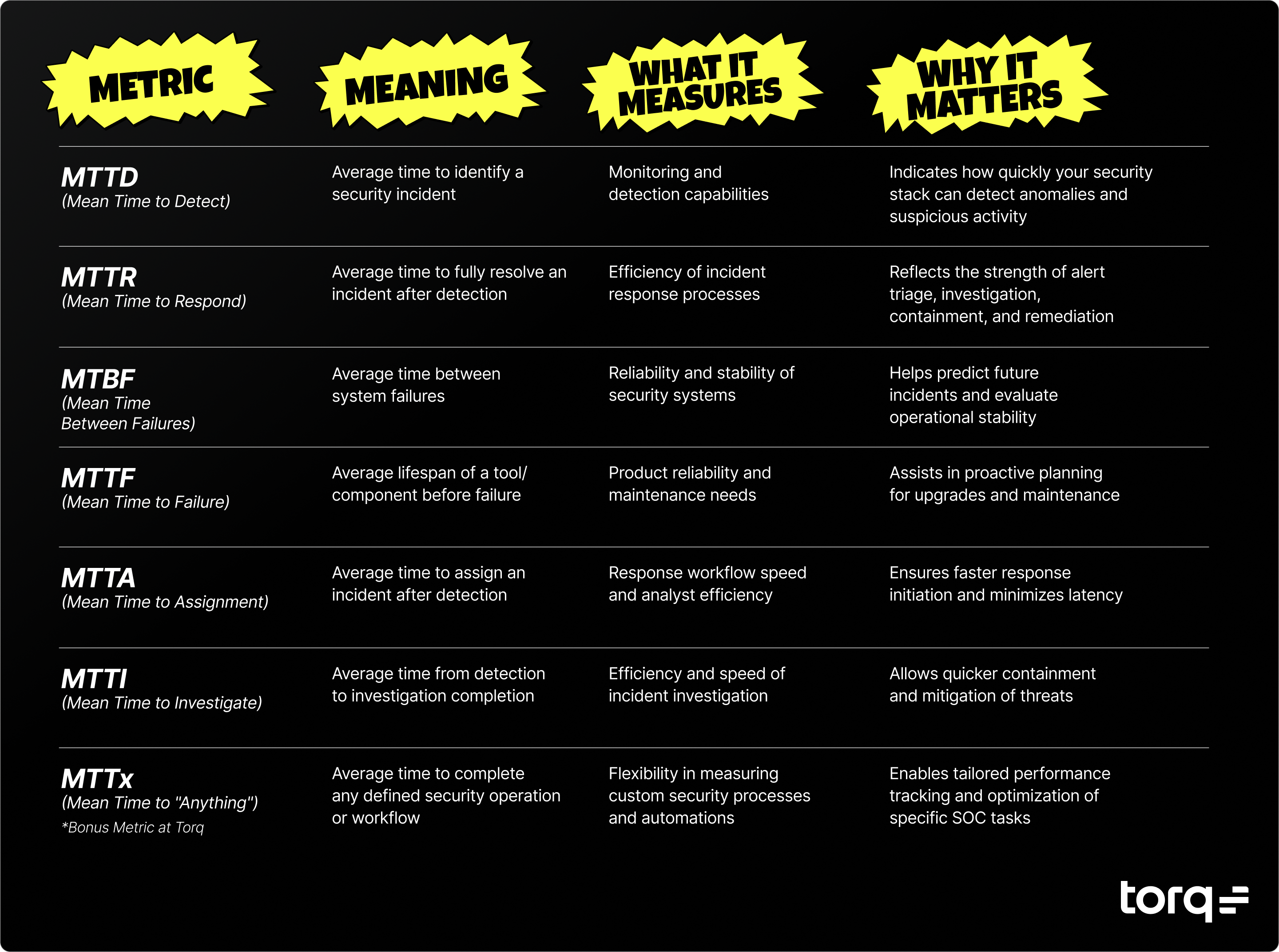
MTTD (Mean Time to Detect) measures the average time it takes your team to identify that a security incident has occurred. This metric primarily evaluates your monitoring and detection capabilities. A lower MTTD indicates your security stack can quickly recognize anomalies and suspicious activity.
MTTR (Mean Time to Respond) (sometimes called Mean Time to Resolve) tracks the average time required to respond to and resolve an incident fully. Speed matters; a recent SANS survey found that 33% of teams take hours to respond to threats. That’s too long. A shorter MTTR reflects strong incident response procedures and an agile, responsive security team.
MTTR often involves people and a series of steps that are needed to fix the issue. While MTTD may measure how well an automated alert system performs, MTTR often measures both your systems and the people you depend on to jump into action after an incident.
Together, these metrics illustrate your SOC’s maturity and operational effectiveness. Optimizing MTTD and MTTR directly reduces risk and overall damage from cybersecurity incidents.
How Automation Improves MTTD and MTTR
Security automation plays a pivotal role in dramatically enhancing both MTTD and MTTR, empowering security teams to scale detection and response effectively by:
Improving detection: Automated systems like SIEM, EDR, and XDR can swiftly correlate vast data sets, instantly surfacing anomalous activities. Automation reduces reliance on manual log analysis, ensuring immediate, accurate threat identification.
Accelerating response: Automation streamlines and accelerates incident response workflows. Tasks like enrichment, analysis, and containment that typically consume significant analyst time become nearly instantaneous. Automation eliminates the manual “grunt work,” allowing analysts to focus solely on complex or high-risk situations.
Reducing human error: With agentic AI handling the automation, repetitive tasks become consistently executed according to predefined procedures, drastically reducing the potential for mistakes and inconsistencies in handling security incidents.
Seamless integration: Hyperautomation platforms integrate seamlessly with SIEM, EDR, and XDR tools, delivering rapid data exchange, correlation, and enriched context. This tight integration creates an end-to-end, automated security ecosystem.
In short, automation significantly shrinks the time between detecting a threat and mitigating its impact, providing an immediate, measurable boost to your SOC performance.
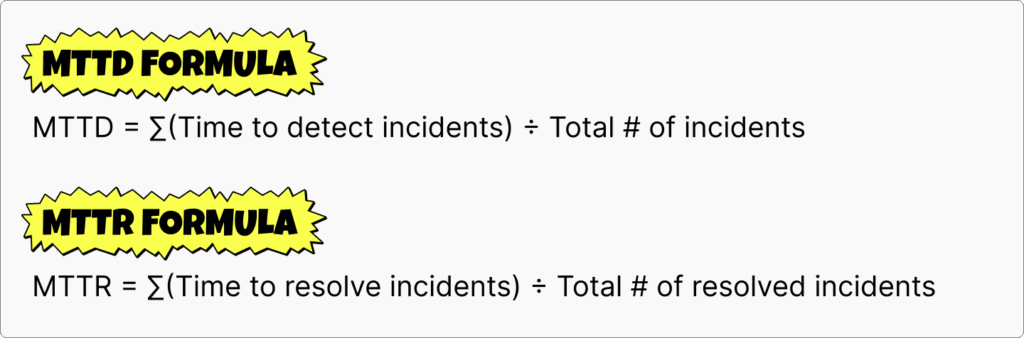
How to Measure MTTD & MTTR (with Formulas)
Quantifying your incident response effectiveness requires clear measurement methods. Here’s how you calculate each:
Below is some practical guidance for measuring MTTD and MTTR:
Consistent tracking: Record timestamps at every key incident stage (i.e., detection, acknowledgment, investigation, and resolution).
Aggregate metrics: Regularly aggregate these timings to spot trends or inefficiencies in your process.
Benchmarking: Establish baseline metrics to evaluate the impact of new tools, processes, or automation investments.
5 Related Incident Response Metrics You Should Know
MTTD and MTTR don’t exist in isolation. They are part of a broader landscape of incident response metrics that security teams should be tracking, including:
MTBF (Mean Time Between Failures): MTBF measures the average time between system failures. It’s useful for evaluating the reliability of security systems and predicting when future incidents might occur. A higher MTBF indicates stable security operations.
MTTF (Mean Time to Failure): MTTF tracks the average lifespan of a security tool or system component before a failure occurs. It’s commonly used to assess product reliability and helps organizations schedule proactive maintenance or upgrades.
MTTA (Mean Time to Assignment): MTTA is the average time it takes for an incident to be assigned to a specific analyst or team member after detection. Lower MTTA reduces response latency and enables teams to tackle threats more efficiently.
MTTI (Mean Time to Investigate): MTTI represents the average time taken from initial detection until the investigation is completed. Faster MTTI means threats can be understood and contained sooner, limiting potential damage.
MTTx (Mean Time to “Anything”): MTTx is a flexible metric used at Torq to track the average time to complete any defined security operation or workflow. It helps SOC teams measure efficiency across custom actions, automations, or specific tasks unique to their security processes.
Understanding these related metrics provides deeper insight into your security operations and helps identify specific bottlenecks or areas for improvement.
Key Incident Response Metrics Explained
The Hyperautomation Domino Effect in Incident Response
Improving MTTD and MTTR isn’t just about moving faster; it’s about removing the friction between each phase of the incident response lifecycle. Torq Hyperautomation connects the dots across the entire workflow — from detection to assignment, investigation to remediation — creating a seamless chain reaction of automation that compounds every efficiency. Here’s how that automation domino effect plays out in practice:
Faster detection (MTTD): Torq reduces noise by automatically filtering out low-priority alerts and surfacing real threats faster. This shrinks MTTD and ensures analysts aren’t wasting time chasing false positives.
Faster assignment (MTTA): Once a threat is detected, a case is immediately built and assigned to the right resource within Torq’s intelligent case management dashboard. Torq decides in real time whether Socrates — the AI SOC analyst that offloads 90%+ of Tier-1 cases — or a human should take the lead, dynamically reassigning ownership if the threat escalates. That means alerts don’t sit in limbo, waiting to be noticed.
Faster investigation (MTTI): By the time an analyst gets involved, much of the work is already done. Torq HyperSOC automatically enriches and correlates incident data, while AI agents generate case summaries and assign relevant case runbooks. This allows analysts to dive straight into meaningful analysis, not manual triage.
Faster response (MTTR): Response time is reduced by how quickly and efficiently action is taken. Analysts can trigger remediation with a single click or let Socrates respond autonomously in milliseconds. Whether isolating a device, disabling a user, or launching a complex remediation strategy, action happens at machine speed.
Each improvement compounds the next, like dominoes falling one after another. The faster a threat is detected and assigned to the appropriate resource, the faster those resources can be actioned. With Torq Hyperautomation, every second saved is multiplied across the incident lifecycle, delivering exponential gains in speed, accuracy, and scale.
Reduce Your MTTD and MTTR with Torq Hyperautomation
Effectively managing cybersecurity threats requires fast detection and even faster responses. Clearly differentiating MTTD vs. MTTR and understanding related metrics like MTBF, MTTF, MTTA, and MTTI enables SOC teams to target improvements strategically.
The Torq Hyperautomation™ platform offers a proven way to dramatically lower both MTTD and MTTR through real-time incident detection, streamlined automated workflows, and reduced analyst workload. Torq helps organizations minimize alert fatigue, decrease caseload per analyst, and improve overall compliance and efficiency.
Ready to drastically reduce your MTTx? Get practice advice from our Field CISO on how to make your SOC more efficient.
If you’ve been in cybersecurity longer than five minutes, you know one thing: legacy SOC architecture isn’t just showing its age — it’s creaking under the weight of today’s threats.
Cybersecurity analyst Francis Odum nailed it when presenting at Torq’s SKO 2025: “Legacy SOAR assumed everything starts in the SIEM. Now, teams connect automation directly to EDR, email, and identity systems.”.
This antiquated SOC architecture model, where every alert and log file is funneled into a Security Information and Event Management (SIEM) solution for analysis, is too slow, too rigid, and creates too many bottlenecks to support today’s exploding security event and data pipeline. Modern SOCs need speed, scalability, and a level of intelligence that legacy architecture simply cannot provide. They need a new approach that is purpose-built for the AI era.
What is AI SOC Architecture?
AI SOC Architecture
AI SOC architecture is a modern, AI-augmented design for SOCs that decentralizes data processing, automates low-level tasks, and enables agentic systems to proactively investigate, triage, and respond to threats.
AI SOC architecture is not just about adding AI to the stack — it’s about re-architecting the stack around AI. The traditional SOC model relies on aggregating data into a centralized point of analysis before taking action. In contrast, the AI SOC places agentic, AI-powered Hyperautomation at the center of operations — integrating directly with data lakes, security tools, and workflows to create a unified, AI-native control plane. This architecture ensures a single source of AI truth, distributed evenly across the entire security stack.
Shifting the SOC Foundation
“Architecture is changing. Automation tools like Torq are being plugged directly into FDR and identity systems — not after the SIEM, but before it.”
For years, the SOC has been centered around the SIEM. Disparate security vendor solutions would feed hundreds of thousands of logs, events, and alerts into the SIEM for security analysts to manually parse through, correlate, and eventually return to the respective point solution(s) to begin the remediation process. This model created a lot of friction, leading to several chronic problems, including:
Process debt: This process would cause what we in the biz call “swivel chair syndrome,” as it often isn’t as simple as a single straight line from detection to SIEM to remediation. Instead, the lengthy investigation had analysts swiveling back and forth between the SIEM and security tools several times before reaching a conclusion hours later.
Central bottlenecks: While a centralized approach to security event management once seemed favorable, SIEM solutions were not designed for the volume of data produced by the multi-cloud environments that organizations have built — let alone the deployment of AI to help alleviate the manual filtering of that data. This creates a massive data bottleneck and, worse, a single point of failure for the SOC to rely upon.
Reactive, delayed response: In addition to scalability concerns, this is also a largely reactive approach, requiring analysts to use the SIEM to begin the manual investigation process long after an incident occurs. This slows down critical SOC reporting metrics like Mean-Time-To-Detection (MTTD) and Mean-Time-To-Response (MTTR). Legacy SOAR solutions attempted to solve this problem but did not promise faster orchestration or response times due to limited and inflexible automation playbooks.
Between sifting through an overwhelming amount of logs in a centralized SIEM solution and battling the manual efforts of legacy SOAR automation, security analysts find themselves drowning in disconnected alerts and burning out at an alarming rate.
An AI SOC architecture flips this on its head, shifting the SIEM further left in the security event lifecycle, particularly as many organizations continue to adopt a multi-SIEM strategy to offset increasing storage costs from legacy SIEM vendors.
Gartner’s recent Reference Architecture Brief: SIEM-Centric Security Operations report points out that as the industry largely shifts away from legacy SOAR solutions, it is seeing more advanced capabilities come from platforms centered around AI SOC Analysts, which produce stronger outcomes for analyst augmentation and security automation.
What Does AI-Native SOC Architecture Look Like?
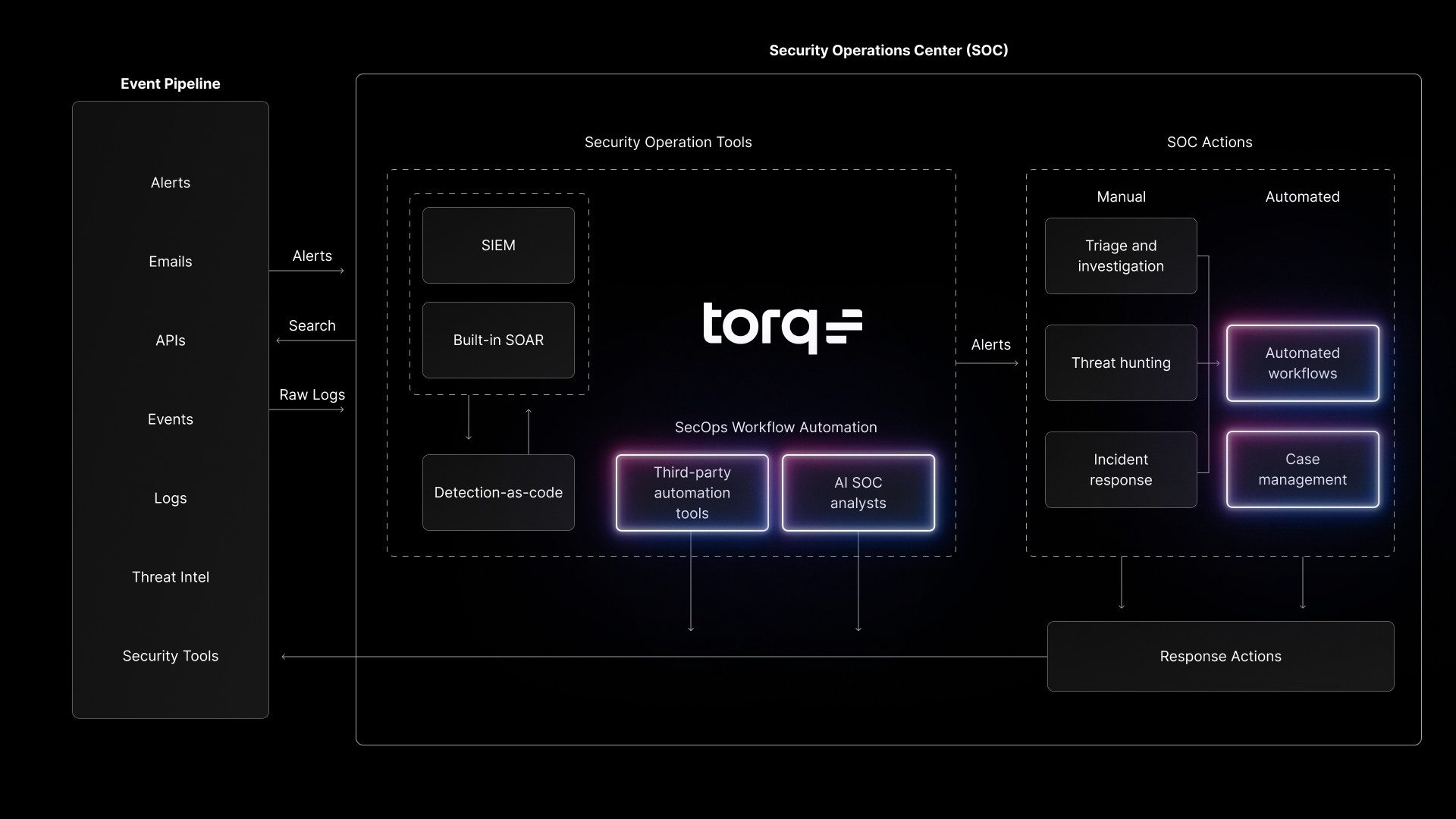
In the same report, Gartner breaks down the Security Operations Center architecture into two distinct components: Security Operations Tools (e.g., SIEM and Detection-as-Code solutions) and SOC Actions (e.g., manual triage, investigation, threat hunting, and response via the SOC Team). Gartner calls out SecOps Workflow Automation, which consists of third-party automation and AI SOC analysts, bridging the gap between these two pillars of the SOC.
This is the heart of the AI-native SOC Architecture — a foundation of agentic AI and Hyperautomation built for the modern cloud-first SOC environment and designed for simplicity, extensibility, and scale.
Torq unifies security tools with AI SOC analysts and Hyperautomated workflows — streamlining triage, case management, and incident response.
Agentic AI
Agentic AI sits at the core of the AI SOC architecture. Rather than burdening human analysts with manually piecing together thousands of logs and events, an AI-native SOC leverages a multi-agent system (MAS) to handle up to 90% of Tier-1 security analysts’ tasks. These specialized AI agents have a deep understanding of the SOC environment, allowing them to plan incident response, make complex decisions, and take remediation actions autonomously.
Hyperautomation
Hyperautomation is the engine that drives autonomous response and the glue that connects agentic AI with the rest of the SOC solutions to bridge the gap between Security Operations Tools and SOC actions. With limitless no-code or AI-generated integrations, the Hyperautomation engine is the delivery system allowing agentic AI to take action, automating anything from simple alert triage to complex, multi-step incident responses.
Enterprise-Grade Security Architecture
Unlike monolithic legacy SIEM and SOAR solutions, an AI-native SOC architecture is built for cloud-first scalability and flexibility. Underpinned by an extensible security architecture, horizontal and elastic scalability allows the SOC to dynamically process and prioritize hundreds of thousands of events from various data sources, ensuring the most critical information is surfaced without interruption.
Torq’s AI SOC Architecture
Torq is built for this moment. It’s not about retrofitting AI into a legacy architecture — Torq is an enterprise-ready, AI-native platform purpose-built from the ground up to solve existential SOC challenges like alert fatigue, tech sprawl, and analyst burnout.
Torq’s AI SOC architecture begins with the ability to integrate with any solution across the entire security stack and beyond — whether it’s EDR, IAM, email phishing, threat intelligence, collaboration and communication tools, and more.
This direct integration enables agentic AI to not only take autonomous remediation actions across Tier-1 and Tier-2 security use cases but also allows AI agents to retrieve and enrich data directly from the source, regardless of what data may be missing (or difficult to find manually) from SIEM logs. As the modern SOC scales to produce tens of thousands of alerts per day, Torq’s AI-SOC architecture can seamlessly handle massive alert volumes without creating single-point bottlenecks.
HyperSOC™
Torq HyperSOC, the AI-powered autonomous SOC solution, was also explicitly designed to support AI deployment across the modern SOC. While legacy SOAR solutions have bolted-on workarounds to handle case management once an analyst has manually pulled the relevant data from a SIEM tool, Torq HyperSOC is comprised of intelligent case management and Socrates, the agentic AI SOC Analyst, embedded directly in each security case. Socrates summarizes key findings, suggests next steps, and analyzes case runbooks for autonomous remediation.
The Multi-Agent System
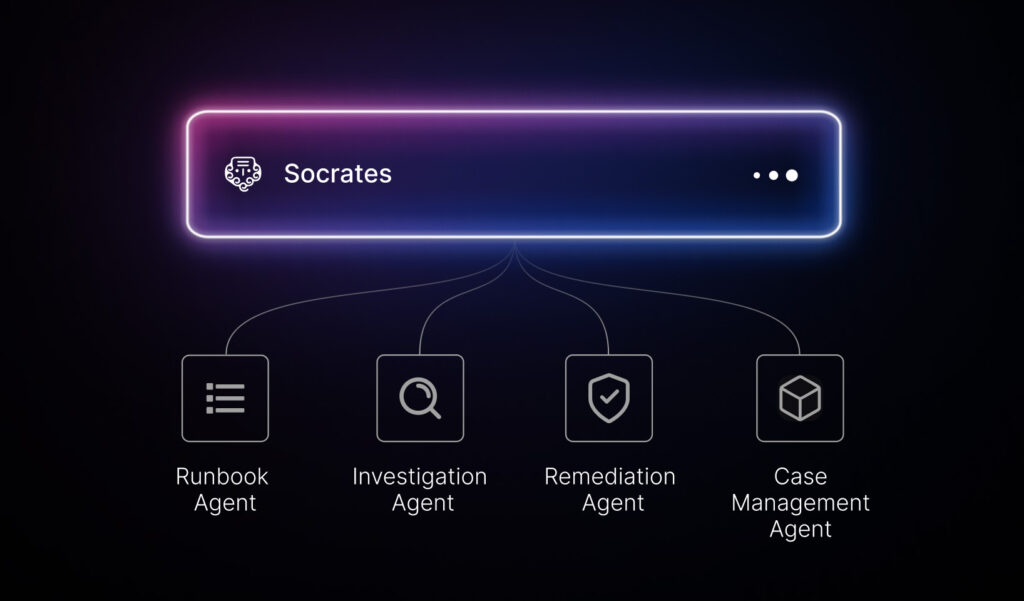
Socrates coordinates Torq’s multi-agent system, a team of AI Agents that can autonomously handle the vast majority of Tier-1 and Tier-2 use cases, reduce human analysts’ workload by over 95% from initial investigation to final remediation, and enable SOC teams to tackle up to 5x more security cases in a single day without adding headcount.
Socrates leads Torq’s multi-agent AI system, autonomously resolving cases, reducing analyst workload by 95%, and enabling SOC teams to handle 5x more incidents daily.
Model Context Protocol
To help Torq’s system of AI agents communicate reliably across a limitless amount of integrated security tools and other AI solutions deployed in the SOC, Torq’s AI SOC architecture also natively supports Model Context Protocol (MCP), an open protocol designed to standardize how applications provide context to AI Agents to retrieve contextual information from applications and systems.
Human-on-the-Loop AI Guardrails
Finally, this entire AI architecture is designed with the appropriate AI guardrails that provide the explainability, audibility, and control organizations require. These guardrails ensure there is always a human on the loop to avoid AI hallucinations and so SOC teams remain in control of critical decisions.
AI SOC Architecture in Action: Phishing Response
Here’s how AI SOC architecture changes the game for a common use case: phishing.
A phishing email lands in an employee’s inbox. In a legacy SOC, the detection fires into the SIEM, where it joins a queue of thousands of other alerts. An analyst eventually triages it, pivots to the email security tool to pull headers, checks threat intel for the sender domain, moves to EDR to scan the endpoint, switches to IAM to reset credentials, opens a ticket, documents everything, and notifies the user. Best case: 45 minutes. Realistic case: hours — if it doesn’t get lost in the noise entirely.
The SIEM bottleneck isn’t just slow; it’s a single point of failure that forces analysts into “swivel chair syndrome,” bouncing between tools while threats dwell.
With AI SOC architecture, automation connects directly to email security, EDR, and IAM — not after the SIEM, but alongside it. When the phishing email is detected, Torq’s agentic AI immediately:
Quarantines the email and extracts indicators of compromise
Enriches the alert with threat intelligence directly from the source
Scans the recipient’s endpoint for malicious payloads
Resets the user’s credentials and enforces step-up authentication
Creates a case with full context, AI-generated summary, and audit trail
Notifies the user with next steps
Organizations using Torq’s AI SOC architecture have reduced phishing response times from hours to under 60 seconds — a 95%+ improvement in MTTR. Analysts aren’t stuck on Tier-1 triage; they’re freed to focus on complex investigations that actually require human judgment.
From AI-Enabled to AI-Architected
Legacy SOC architecture isn’t just outdated — it’s actively holding organizations back. True AI-native SOC architecture, like Torq HyperSOC, breaks through these barriers. It offers immediate, measurable outcomes, dramatically improving analyst effectiveness, reducing costs, and transforming security postures from reactive to proactive.
In Francis Odum’s words: “The market is ready for next-gen, AI-powered solutions. These aren’t future-state ideas; they’re delivering real-world results right now.”
The future of cybersecurity isn’t just AI-enabled; it’s AI-architected.
Get the AI or Die Manifesto to learn strategic considerations and evaluation criteria for deploying AI in the SOC from the ground up.
AI SOC architecture is a modern design for security operations that places agentic AI and hyperautomation at the center of the SOC — not bolted on as an afterthought. Unlike traditional architectures that funnel everything through a centralized SIEM before taking action, AI SOC architecture integrates directly with security tools (EDR, IAM, email, cloud) to enable faster detection, autonomous triage, and real-time response.
How does AI SOC architecture enhance security operations?
AI SOC architecture eliminates the bottlenecks and manual handoffs that slow down traditional SOCs. By deploying agentic AI that can autonomously investigate, enrich, and remediate threats, organizations see dramatic improvements in key metrics: faster mean time to detect (MTTD), faster mean time to respond (MTTR), and up to 95% reduction in Tier-1 analyst workload. Security teams handle more cases without adding headcount, and analysts focus on high-value work instead of repetitive triage.
Why is Hyperautomation important in AI SOC architecture?
Hyperautomation is the engine that connects agentic AI to the rest of the security stack. Without it, AI is just another tool that generates recommendations that analysts still have to act on manually. Hyperautomation enables AI agents to actually take action — quarantining endpoints, revoking access, blocking IPs, creating cases — across hundreds of integrated tools.
What are the challenges of implementing AI SOC architecture?
The biggest challenges are organizational, not technical. Teams accustomed to legacy SIEM-centric workflows need to shift their mindset from reactive, centralized analysis to proactive, distributed automation. Integration sprawl can also be a concern — AI SOC architecture requires connecting to tools across the entire stack, which is why platforms like Torq offer limitless no-code integrations. Finally, governance matters: AI guardrails, explainability, and human-on-the-loop controls are essential to maintain trust and compliance.
How does AI SOC architecture integrate with existing systems?
Platforms like Torq integrate directly with SIEMs, EDRs, IAM solutions, email security, cloud platforms, ticketing systems, and collaboration tools via APIs, webhooks, and native connectors. The key difference is that automation no longer waits for data to flow through the SIEM first; it connects directly to sources for faster enrichment and response while still feeding relevant data back to the SIEM for logging and compliance.
In today’s enterprise environment, raw data flows in from countless sources — often messy, fragmented, and incompatible. Effective data transformation is essential for turning this fragmented data into actionable, compliant, and secure intelligence.
With Torq’s AI Data Transformation, organizations can achieve seamless, scalable data workflows without writing code, dramatically enhancing security operations and compliance.
The Role of Data Transformation in Cybersecurity
What is Data Transformation?
Data transformation is the process of converting, cleaning, and manipulating raw data into a structured format that is suitable for analysis or other data processing tasks.
Data transformation is critical for:
Data quality: Removing inconsistencies, duplicates, and errors.
Data compatibility: Ensuring different systems and workflows can use the same data formats.
Data reliability: Maintaining trust in analytics, compliance reporting, and operational decisions.
In a security context, data transformation keeps Hyperautomated workflows running smoothly by ensuring every downstream step receives data in the right format, at the right time. Without it, automation breaks, alerts go unprocessed, and compliance gaps widen.
How Data Transformation Works
Data discovery: Identify and profile raw data sources to understand structure, quality, and required transformations.
Data mapping: Define how fields will be transformed, matched, filtered, joined, and aggregated for the target system.
Data extraction: Move data from source systems (structured or unstructured) to a staging or target environment.
Code generation & execution: Use SQL, Python, or transformation tools to convert raw data into analytics-ready formats, running on a set schedule.
Review: Validate transformation accuracy, completeness, and alignment with business requirements.
Sending: Deliver transformed, structured data to its final destination, such as a data warehouse or analytics platform.
ETL and ELT in Data Transformation
In data engineering, ETL (Extract, Transform, Load) and ELT (Extract, Load, Transform) are proven methodologies for shaping and preparing information. ETL transforms data before loading it into a data warehouse, while ELT loads raw data first and performs transformation inside the warehouse. Both approaches are designed to ensure clean, structured, and trustworthy data for analytics, reporting, and compliance.
Types of Data Transformation
The main types of data transformation used in security automation include:
Aggregation: Summarizing multiple data points (e.g., calculating the average CVSS score).
Anonymization: Obfuscating personal information to protect sensitive data, essential for compliance with regulations like GDPR and HIPAA.
Filtering: Selecting only the most relevant records (e.g., isolating high-severity vulnerabilities).
Flattening: Converting nested or hierarchical data (such as JSON) into a flat, single-level table format so fields are directly accessible for querying, filtering, aggregation, and joining without complex parsing.
Conditional Logic: Applying predefined rules to determine which data proceeds through the workflow.
Data Cleansing: Removing invalid, duplicate, or incomplete data to improve accuracy.
Data Enrichment: Enhancing records with intelligence from external threat feeds or authoritative databases.
Whether you’re extracting key attributes from JSON logs or merging disparate datasets, these transformation types ensure raw data becomes structured and usable intelligence.
How AI Data Transformation Accelerates Security and Compliance
AI data transformation automates complex processes such as converting formats, improving data integrity, and enhancing data observability. AI significantly speeds up compliance reporting, streamlines incident response, and provides richer, actionable data for security analytics.
Torq’s AI Data Transformation translates natural language into precise data commands, making these sophisticated tasks accessible to all users. Torq’s AI Data Transformation brings automation and intelligence to the process along with:
Customizability: Edit or rewrite any command to suit your needs.
Testability and reproducibility: Test transformations and validate results for precise control.
Flexibility: Easily tweak transformations without disrupting your workflow.
Visibility: See prompts, code, and results at every step — zero guesswork.
While other solutions leave you in the dark, using monolithic parsing that makes it challenging to edit or troubleshoot, Torq keeps you in control through micro-transformations. Every transformation in Torq is testable, customizable, and modifiable with just a click, ensuring your automation runs precisely as intended.
For security teams, this means faster threat enrichment, streamlined compliance reporting, and better data lineage tracking — all with built-in data privacy compliance.
Getting Started with Torq’s AI Data Transformation Operator
The Torq AI Data Transformation Operator is a workflow step that lets you manipulate JSON data inside Torq without needing deep programming skills. It combines AI-powered natural language prompts with deterministic JSON processing using JQ, a high-performance JSON transformation language. AI helps you write transformations in plain language, then Torq converts them into JQ commands that execute consistently.
How It Works
Input your data: Pass JSON from a previous workflow step or paste it directly into the operator.
Describe your transformation in plain language. For example:
“Extract email, department, and action from each entry.”
“Remove results where department is equal to Engineering.”
“Group by department and count actions.”
AI converts your prompt to JQ: The operator generates JQ code from your instructions. The AI step ends here; the deterministic JQ engine handles the actual execution.
Chain multiple instructions: You can stack transformations — extraction, filtering, aggregation, string manipulation — all in one operator, with each step feeding into the next.
Preview and adjust: See the output for each step before finalizing, and tweak the natural language instructions or the generated JQ directly.
Save and reuse: If you create a transformation you’ll need often, you can save it as a custom step and reuse it across workflows or even share it across workspaces.
What You Can Do With It
The Data Transformation Operator supports a wide range of operations:
Mapping and extraction (pull only the fields you care about)
Renaming keys
Converting data types
Filtering and sorting
Conditional logic (if/else rules)
Math functions (averages, sums, etc.)
String manipulation (splitting, regex)
Restructuring JSON formats
Example Prompts
Need ideas? Here are a few natural language prompts and the associated JQ commands the Data Transformation operator could generate.
Natural Language Prompt
AI Translated JQ Command
Security Impact
“Extract all high severity vulnerabilities”
.vulnerabilities[] | select(.severity == “high”)
Quickly prioritize critical security threats
“Group alerts by source IP”
group_by(.source_ip)
Identify potential attack patterns or compromised assets
“Calculate the average CVSS score”
[.[].cvss_score] | add / length
Assess the overall vulnerability landscape
In security workflows, raw alerts and logs often come in messy, verbose JSON. The AI Data Transformation Operator lets you clean, normalize, and reformat that data on the fly, so the next steps in your workflow — whether enrichment, correlation, or reporting — get exactly the data they need in the right shape.
Torq Use Cases: Real-World AI Data Transformation in Security Operations
1. Normalizing SIEM Alerts Before AI Analysis
Challenge:SIEM alerts arrive in varied JSON formats depending on the source (cloud, endpoint, identity). Some include deeply nested keys or inconsistent field names.
Transformation:
Extract only relevant fields (timestamp, src_ip, dst_ip, event_type, username).
Rename fields for consistency (dst_ip → Destination IP).
Challenge: EDR telemetry is high-volume, and not every event is actionable (e.g., routine system updates).
Transformation:
Filter out entries where process_name equals known benign processes (e.g., svchost.exe in a non-suspicious path).
Keep only events matching defined high-risk criteria (e.g., unsigned binaries, rare parent processes).
Outcome: Reduces noise before enrichment, allowing workflows to trigger only on meaningful events.
3. Aggregating Failed Login Attempts for Brute Force Detection
Challenge:IAM tools generate individual failed login events, making it hard to see patterns.
Transformation:
Group events by username and source_ip.
Count the number of failed attempts per user per IP within a set timeframe.
Output only users exceeding a defined threshold.
Outcome: Aggregated insight triggers an automated account lockout or SOC escalation.
4. Enriching IOC Data Before Threat Hunting
Challenge: Incoming threat intelligence feeds may contain minimal metadata on indicators.
Transformation:
Attach GeoIP data for IP addresses.
Add WHOIS registration details for domains.
Convert lists into an array of {indicator_type, value, source, risk_score} objects.
Outcome: Analysts and automation workflows have full context without additional lookups.
6. Preparing Audit Logs for Compliance Reporting
Challenge: Audit logs contain extra data that auditors don’t need, making reports bulky.
Transformation:
Remove debug and low-value keys.
Sort events chronologically.
Output as a simplified JSON or CSV format matching compliance templates.
Outcome: Audit-ready reports generated instantly without manual editing.
These examples show how Torq’s AI Data Transformation Operator turns messy and inconsistent security data into clean, actionable intelligence that feeds directly into AI analysis, automation workflows, and case management.
Choosing the Right Data Transformation Tools and Software
Selecting the right data transformation software is critical for ensuring your workflows remain efficient, compliant, and adaptable as your organization’s needs evolve. When evaluating options, consider the following criteria:
Ease of use and no-code or AI-driven functionality: Look for platforms offering intuitive interfaces and visual or AI-generated workflow builders so technical and non-technical users can wrangle complex data without writing scripts. This reduces engineering bottlenecks and speeds up deployment.
Integration capabilities: Your data transformation tool should connect seamlessly with your existing security stack (SIEM, SOAR, EDR, threat intelligence feeds) and compliance systems (GRC, audit platforms). Native connectors and API support ensure smooth data integration across multiple environments.
Scalability: As data volumes grow, especially in large enterprise and SOC environments, the platform must handle high-throughput processing without latency issues. Real-time or near-real-time transformation capabilities are essential for automation-driven incident response.
Customizability and flexibility: Every organization has unique data mapping, aggregation, and enrichment needs. A robust platform allows you to tailor transformation logic, apply conditional rules, and reuse transformation templates without disrupting other workflows.
Data governance and compliance support: Choose a solution that offers data lineage tracking, audit logs, and privacy controls to meet data privacy compliance regulations like GDPR, CCPA, and industry-specific standards.
Why Torq Stands Out
Torq’s AI Data Transformation capabilities meet — and exceed — these criteria:
No-code AI workflows: Transform complex JSON or other structured data using plain-language prompts automatically converted into precise JQ commands.
Extensive integrations: 1,000+ prebuilt connectors for security, IT, and compliance tools.
Enterprise-scale performance: Designed to handle large-scale, real-time data transformations without performance degradation.
Full visibility and governance: Every transformation is testable, traceable, and compliant with your data governance policies.
Embrace AI-Driven Data Transformation
In a world where data flows faster and threats evolve by the minute, transforming raw, fragmented information into trusted, actionable intelligence is a competitive advantage. Torq’s AI Data Transformation delivers that capability, combining speed, compliance, and control in a no-code platform that works at enterprise scale. From unifying multi-source security alerts to streamlining compliance reporting, Torq ensures your workflows are reliable, transparent, and ready for whatever comes next.
See the difference for yourself. Request a personalized demo of Torq’s AI Data Transformation today and start turning your data into a decisive asset.
What is data transformation vs. AI data transformation?
Data transformation is the process of converting raw data from one format or structure into another to make it clean, consistent, and usable for analysis, storage, or automation. It typically involves tasks like data cleansing, mapping, aggregation, and enrichment.
AI data transformation uses artificial intelligence — often with natural language processing (NLP) — to automate these steps. Instead of manually writing scripts or queries, users can describe the desired transformation in plain language, and the AI generates the logic, executes it, and allows for easy customization. This speeds up the process, reduces technical barriers, and maintains accuracy and compliance.
What is a data warehouse vs. data lake?
A data warehouse stores structured, processed data in a consistent format, optimized for fast querying, analytics, and compliance reporting.
A data lake stores raw, unprocessed data — including structured, semi-structured, and unstructured formats — for flexible exploration, large-scale storage, and future processing.
Organizations often use both: the data lake for cost-effective retention of all data, and the data warehouse for ready-to-use insights that power day-to-day decision-making.
Why is data transformation important?
Data transformation is essential because it:
Improves data quality by removing errors, duplicates, and inconsistencies.
Ensures compatibility between different tools, systems, and formats.
Supports compliance by enabling privacy controls, audit trails, and data lineage tracking.
Enables better decisions by ensuring analytics, automation, and reporting run on reliable, well-structured data.
Speeds up workflows by making data ready for automation and integration without manual intervention.
In security operations, data transformation ensures that alerts, logs, and intelligence feeds can flow seamlessly into detection, investigation, and response workflows.
What is the difference between ELT and ETL?
ETL (Extract, Transform, Load): Data is extracted from sources, transformed into the desired format, and then loaded into a data warehouse or destination system. This is ideal when you need consistent, cleaned data before it’s stored.
ELT (Extract, Load, Transform): Data is extracted and loaded into the warehouse first, then transformed inside that environment. This approach is useful when storage is cheap and you want flexibility to transform data on demand.
Both approaches have their place, and modern AI data transformation tools like Torq can operate effectively in either ETL or ELT pipelines.
What are examples of data transformation?
Common examples include:
Format conversion: Converting XML to JSON.
Data mapping: Aligning “src_ip” and “source_address” fields into a unified “source_ip” field.
Filtering: Selecting only high-severity vulnerabilities from a dataset.
Aggregation: Grouping alerts by source IP or calculating average CVSS scores.
Enrichment: Adding threat intelligence data (e.g., IP reputation) to security alerts.
Data cleansing: Removing duplicate log entries or fixing malformed timestamps
Alert fatigue in cybersecurity is the desensitization and exhaustion analysts feel when a high volume of mostly false-positive alerts buries real threats. It leads to missed incidents, slower response, and burnout.
The biggest causes are excessive false positives, poorly tuned detection rules, missing context, manual triage, and rule-based automation that treats every alert the same way.
AI agents reduce alert fatigue by filtering noise, enriching context, correlating related alerts, and resolving low-risk incidents, so analysts spend their time on real threats.
A phased rollout that starts with the highest-volume alert types can show measurable response-time gains within 30 days. Torq customers commonly achieve a 60x increase in SOC throughput and a 90%+ reduction in mean time to respond (MTTR).
The Torq AI SOC Platform brings agentic triage, investigation, case management, and response into a single platform.
Every day, analysts face a mountain of low-value alerts, and teams expect them to triage, investigate, prioritize, and respond to every one of them faster, better, and with fewer people. That pressure creates cybersecurity alert fatigue, which can lead to missed threats, slower response times, and SOC analyst burnout.
The good news: SOC analysts can work differently. With the right kind of AI working alongside them, they can leave the noise behind. This guide covers what security alert fatigue is, what causes it, what it costs, and how AI agents help your SOC stop it. It also includes a step-by-step technical implementation guide and answers to the questions teams ask most.
What is Alert Fatigue?
Cybersecurity Alert Fatigue
Alert fatigue is one of the most common and costly problems in security operations, and a clear definition helps teams spot it early.
What Is Cybersecurity Alert Fatigue?
Alert fatigue in cybersecurity is the desensitization and exhaustion that security analysts experience when a high volume of security alerts overwhelms them, many of which are false positives or low-priority events. It can lead to missed or ignored true threats, which can cause significant security incidents and breaches.
More than half of security teams say false positives are a major problem, and 62.5% feel overwhelmed by sheer data volume. Without effective triage or prioritization, real threats become harder to separate from background noise. That slows detection and response, causes missed incidents, and adds stress to already stretched SOC teams, which in turn raises risk to the business.
What Causes Cybersecurity Alert Fatigue?
Alert fatigue comes from too many notifications with too little value, and it grows as security environments become more complex. Six drivers sit behind it.
Excessive False Positives
False positives occur when security systems flag benign events as threats. SOC teams that face a steady stream of them quickly feel overwhelmed and start to distrust alerts. A recent study indicated that more than half of security alerts are false positives, which leaves analysts skeptical about whether any given alert is legitimate. False positive reduction is the fastest way to give that time back.
Poorly Tuned Detection Rules
Security monitoring tools like SIEM and legacy security automation platforms rely on detection rules to trigger alerts. When teams do not tune or update those rules regularly, the rules generate an overwhelming volume of irrelevant alerts, which drives SIEM alert fatigue and automation alert fatigue.
Lack of Context in Alerts
Without context, analysts spend valuable time investigating alerts by hand to determine relevance and severity. Contextual information such as user details, historical activity, and threat intelligence supports quick decisions, and many systems do not provide it.
Manual Triage Processes
Manually sorting through thousands of daily alerts to decide which ones require attention is tedious and error-prone. Human analysts have limits on processing speed and focus, leading to mistakes, missed threats, and inevitable burnout.
Human Limits in Processing Volume and Urgency
Human cognition has built-in limits. When analysts face a high volume of urgent tasks, exhaustion sets in, effectiveness drops, and productivity falls, which adds to overall security team burnout.
Rule-Based Automation Without Context
Rule-based automation delivers real value for known, repeatable scenarios, and it can add to alert fatigue when it treats every alert the same way. Without context, it passes high volumes of data to analysts, adds cost with each new integration, and limits scale when it runs on-premises. AI agents turn that around by adding context, judgment, and prioritization to every alert.
Real-World Alert Fatigue Scenarios and Solutions
Alert fatigue plays out in specific, costly ways across every type of organization. These four scenarios are illustrative composites based on common patterns across enterprise SOC environments, not named customer results. They show what alert fatigue looks like in practice and what changes when AI agents handle the volume.
Enterprise SOC: Drowning in Volume
Challenge: A Fortune 500 financial services company’s SOC received more than 15,000 alerts daily, and roughly 85% were false positives. Analysts spent upward of six hours per shift on triage alone, missed approximately 12% of critical threats, and averaged 4.5 hours to respond to a confirmed incident.
Solution: The team implemented AI-driven alert correlation and agentic triage across its SIEM and EDR stack. AI agents filtered and closed low-confidence, low-severity alerts. They enriched medium-severity alerts with threat intelligence, user context, and asset criticality before the alerts reached an analyst. Only high-confidence, high-severity cases needed human review.
Outcomes: Daily alert volume dropped from 15,000 to roughly 2,000, and threat detection accuracy reached 95%. Mean time to respond fell from 4.5 hours to 45 minutes. Analyst overtime decreased by 30%, and attrition on the SOC team dropped over the following two quarters.
Implementation timeline: Integration and initial tuning took four weeks. Full agentic triage on production alerts ran by week eight, and continuous refinement through feedback loops continues.
Mid-Size Organization: The Tuning Trap
Challenge: A 200-person technology company with a three-analyst SOC generated 3,500 alerts per day from cloud security tools, endpoint protection, and a legacy SIEM. Nobody had updated its detection rules in 14 months, so 70% of alerts were noise, analysts triaged the same alert types repeatedly, and two of the three analysts had flagged burnout in their last performance reviews.
Solution: The team consolidated onto a security automation platform with built-in rule optimization and deduplication. The platform grouped correlated alerts into unified incidents with full context (user history, asset owner, related events) before surfacing them to analysts. Agentic remediation handled password reset requests, low-risk cloud misconfigurations, and known benign processes with no human touchpoint.
Outcomes: The false positive rate dropped from 70% to under 20% within 60 days, and analyst triage time per incident fell from 35 minutes to eight minutes. The team shifted from reactive work to proactive threat hunting for the first time, with estimated annual cost savings of $180,000 from avoided headcount.
Implementation timeline: Platform onboarding and integration took two weeks, rule rationalization and deduplication tuning took three weeks, and the first agentic remediation went live in week five.
Critical Infrastructure: When Alert Fatigue Becomes a Safety Issue
Challenge: A regional energy utility under NERC CIP compliance requirements managed alerts across OT and IT environments at the same time. Its five-person SOC fielded 8,000 alerts daily with no prioritization between IT noise and genuine OT anomalies, compliance reporting consumed 12 hours per week of senior analyst time, and one missed OT alert had already triggered a regulatory inquiry.
Solution: The team implemented SOC alert management with separate triage tracks for OT and IT environments, mapped to its compliance framework. AI-driven threat detection flagged OT anomalies with elevated priority by default, and the platform documented compliance-relevant events with full audit trails, which removed the manual reporting burden.
Outcomes: OT alert response time decreased from 3.2 hours to 22 minutes, and compliance reporting time dropped by 80%. The team recorded zero missed OT alerts in the six months after implementation, and audit preparation time fell from two weeks to three days.
Implementation timeline: OT and IT environment mapping and integration took three weeks, compliance automation went live in week six, and full dual-environment agentic triage ran by week 10.
Remote Work: The Distributed Workforce Alert Problem
Challenge: A global SaaS company with 1,800 employees across 14 countries saw its alert volume triple after shifting to fully remote operations. VPN anomalies, off-hours logins, and shadow IT usage generated thousands of daily alerts, most of them benign but all requiring investigation. Analysts worked across time zones with no unified handoff process, so incidents were duplicated or dropped between shifts.
Solution: The team deployed agentic incident correlation across identity, endpoint, and cloud sources, with shift-aware routing that assigned enriched cases to the on-call analyst by time zone and severity. AI-generated case summaries gave incoming analysts instant context on open incidents without handoff notes.
Outcomes: Duplicate investigations dropped by 65%, and shift handoff time fell from 45 minutes to under five minutes. Incident response time fell by an average of 58% across all severity levels, and analyst-reported job satisfaction scores rose 40% in the next engagement survey.
Implementation timeline: Identity and cloud integration took two weeks, shift-routing logic and case summary automation went live in week four, and cross-time-zone coverage was fully operational in week six.
The Cost of Alert Fatigue in Cybersecurity
Alert fatigue costs organizations in missed threats, lost talent, wasted budget, and higher breach exposure. Seven costs stand out.
Missed vulnerabilities and delayed incident response: When analysts grow numb to the constant flood of alerts, critical incidents can slip through unnoticed. Missed threats and delayed responses raise the likelihood of successful cyberattacks, which can lead to data breaches or significant operational disruptions.
Burned-out analysts and high turnover: Continuous high stress and repetitive tasks lead to analyst burnout. Studies indicate that more than 70% of SOC analysts report burnout, which drives skilled talent away and compounds the cybersecurity skills shortage.
Diminished trust in security systems: When false alarms dominate, analysts lose faith in their tools and processes. That can lead to poor decisions and weakens the entire security posture.
Increased exposure to threats: Overlooking genuine alerts because of fatigue raises vulnerability to cyber threats, and attackers can exploit that reduced responsiveness.
Wasted resources: Teams overwhelmed by junk alerts often ask for more headcount, which adds expense without fixing the cause.
Reputation damage: When a preventable breach hits the headlines, the fallout can be significant.
Legal and compliance issues: Missed threats can turn into breaches, and breaches bring SEC reporting, fines, investigations, and a lot of questions.
IBM’s 2026 Cost of a Data Breach Report puts the global average cost of a breach at $4.99 million. On the flip side, organizations that used security AI and automation extensively reduced breach costs by $1.93 million and shortened breach lifecycles by 65 days.
How Does Agentic Automation Help Beat Alert Fatigue?
Security automation has become essential for SOC teams that want to reduce cybersecurity alert fatigue, and agentic automation takes it further by adding AI agents that reason through each alert. Five capabilities address the core issues.
Alert enrichment at scale: AI agents add context automatically, including threat intelligence enrichment, historical user behavior, and asset criticality, which supports rapid, informed decisions.
Correlation and deduplication: AI agents correlate related alerts and remove duplicates, which sharply reduces noise. Analysts receive fewer, more complete, and more meaningful incidents, which improves efficiency and accuracy.
Routing to the right responder: AI agents route each alert to the right analyst based on expertise, urgency, or availability. That removes assignment delays, balances workload, and improves team responsiveness.
Agentic remediation of low-risk threats: AI agents resolve low-risk incidents autonomously, which cuts repetitive tasks and lets analysts prioritize high-severity threats.
Feedback loops for smarter alerting: AI agents learn from past incidents and refine detection logic continuously, which reduces false positives and improves accuracy over time.
How Do You Combat Alert Fatigue?
Automation is the key solution, and these best practices help your SOC team reduce alert fatigue even further.
Prioritization strategies: Define which alerts matter most based on business risk, and prioritize accordingly.
Enhanced alert context: Invest in tools that provide contextual intelligence so analysts quickly understand the nature of each alert.
Regular training and support: Give your team continuous education and training to build resilience and reduce burnout.
Centralized management: Consolidate alerts into a single case management platform to streamline processes and reduce duplication.
What Are the Benefits of Agentic Triage for Cybersecurity Alerts?
Agentic triage reduces alert fatigue and transforms the entire security operation. Five benefits stand out.
80% fewer alerts reaching human analysts: Agentic triage filters out irrelevant alerts, which sharply cuts the notifications analysts review and reduces alert fatigue.
Faster detection and response (MTTD and MTTR): Agentic triage reduces mean time to detect (MTTD) and mean time to respond, so analysts act swiftly and decisively when real threats appear.
Reduced analyst burnout and turnover: By offloading repetitive tasks, AI agents free analysts for more engaging, complex work that calls for critical thinking, which improves job satisfaction.
Higher confidence in escalated alerts: With fewer false positives and enriched context, analysts trust escalated alerts more and respond quickly and effectively.
Measurable reduction in false positives: Feedback loops continuously improve detection logic, so false positives fall over time and security alert overload eases.
Torq Auto Triage, the agentic triage engine in the Torq AI SOC Platform, averages 42 seconds per triage with 94% accuracy out of the box (as of May 2026).
How Does the Torq AI SOC Platform Prevent Cybersecurity Alert Fatigue?
The Torq AI SOC Platform prevents alert fatigue by combining agentic reasoning, case management, and automation to filter noise, enrich context, and resolve low-risk alerts before they reach an analyst.
Security teams have always relied on automation to streamline repetitive tasks, and traditional automation works best with human oversight and manual setup. Torq Hyperautomation™ raises that ceiling by combining deterministic automation with AI-driven, non-deterministic automation for real-time, adaptive decision-making. It handles high alert volumes at machine speed, dynamically filtering, enriching, correlating, and aggregating alerts so analysts see what matters.
Agentic AI adds the next layer: an intelligent system capable of autonomous reasoning, decision-making, and iterative planning. Torq HyperAgents® are specialized, customizable AI agents that filter noise, enrich data, correlate related alerts, and resolve low-risk incidents without human intervention. Torq Socrates™, Torq’s agentic SOC orchestrator, coordinates those agents, and the agents adjust their actions to live data and context.
With agentic AI, Torq replaces repetition with relevance. Torq’s Multi-Agent System takes on the tasks that drain analysts most, including triage, enrichment, correlation, case summaries, and even full remediation. Analysts no longer sift through countless meaningless alerts, because Socrates escalates only the cases that need human attention. That means fewer panicked 2am Slack messages and fewer “Why am I still doing this manually?” moments. Your team stays in control: analysts define the goals, authorize actions, and can override agent decisions, and every decision lands in an auditable log.
IDC’s report Achieving Machine-Speed Detection and Response found that Torq is the first solution that effectively mitigates key SOC challenges, including alert fatigue, false positives, staff burnout, and attrition.
The Torq AI SOC Platform delivers:
Auto-remediation of 95%+ of alerts: Socrates coordinates the Multi-Agent System to handle triage, investigation, and remediation of the most common security cases autonomously, which saves human expertise for critical incidents.
Real-time incident remediation: End-to-end response resolves low-risk threats autonomously, with no human intervention required.
Faster MTTD and MTTR: Torq customers commonly achieve a 90%+ reduction in MTTR.
Reduced analyst burnout and improved productivity: AI agents take over repetitive tasks, which frees SOC analysts for high-value activities that need human expertise.
With agentic AI handling the repetitive work, SOC analysts shift from constantly firefighting false positives to focusing their expertise on high-impact threats, the work that made them want to get into security in the first place.
How Does an AI SOC Compare to Legacy Security Automation for Alert Fatigue?
An AI SOC extends legacy security automation with agentic reasoning, which is where alert fatigue gets solved. The table below shows how the Torq AI SOC Platform improves on each area.
Area
Legacy Security Automation
The Torq AI SOC Platform
Prioritization
Alerts arrive as urgent, with limited intelligent prioritization
Agentic AI triages and prioritizes alerts with semantic, episodic, and procedural memory
Noise reduction and enrichment
SIEM-dependent pipelines with fixed logic
Agentic automation eliminates SIEM dependency and enriches data on the fly
Triage
Manual alert triage can lead to burnout and delays
AI-driven triage, investigation, and remediation reduce analyst burden
Architecture
On-prem architecture limits scalability and flexibility
Cloud-native architecture scales with your environment
Context
Siloed tools and alerts lack unified context
The Multi-Agent System correlates alerts into unified incidents with full context
Response time
Disconnected systems slow response
End-to-end agentic response delivers sub-minute response times
Retention
Alert overload and frustration drive analyst turnover
AI offloads repetitive work, which reduces burnout and improves retention
By taking over the repetitive, time-consuming tasks that drive SOC burnout, agentic AI lets analysts do the work that matters.
Alert Fatigue Solutions: Approaches and Comparisons
Alert fatigue solutions differ in how they handle noise, and knowing where each approach shines helps teams move from reducing noise to eliminating it.
How Do SIEM, Legacy Security Automation, and an AI SOC Compare?
The table below compares the three approaches across nine capabilities that matter for alert fatigue.
Capability
Traditional SIEM
Legacy Security Automation
AI SOC (agentic automation)
Alert processing speed
Batch or delayed
Near real-time
Real-time, machine speed
False positive handling
Manual tuning required
Rule-based filtering
AI-driven correlation and suppression
Context enrichment
Limited, manual
Partial, playbook-dependent
Automatic, multi-source
Integration depth
Broad but shallow
Moderate
Deep, bidirectional across the full stack
Scalability
Limited by on-prem architecture
Moderate
Cloud-native, elastic
Analyst involvement in triage
High
Medium
Low (by design)
Typical false positive rate
60-80%
40-60%
Under 20% with tuning
Implementation complexity
High
High
Moderate with modern platforms
Estimated annual platform cost
$80,000-$250,000
$100,000-$400,000
Varies; consolidation typically reduces total spend
How Do Rule-Based and AI-Driven Automation Differ?
Rule-based automation executes predefined logic: if this alert fires, run this playbook. It works well for known, stable threat patterns such as phishing triage, password resets, and known malware signatures. Its limit is rigidity. When attacker techniques evolve or environments change, static rules need constant manual tuning, and they offer no adaptive learning between incidents.
AI-driven automation approaches alert correlation differently. Instead of matching events to fixed rules, it reasons across multiple signals, including behavioral baselines, threat intelligence, asset context, and historical patterns, to assess the likelihood that an alert is a real threat. It improves over time through feedback loops, which reduces false positives without manual rule updates. For SOC alert management at scale, AI-driven approaches typically outperform rule-based systems on both accuracy and analyst workload reduction.
The practical difference: a rule-based system flags every off-hours login from a new IP. An AI-driven system flags the off-hours login from a new IP in an unusual country that follows a credential stuffing attempt on an account with privileged access, and it closes the routine ones automatically.
What Is Agentic Automation in Cybersecurity?
Agentic automation in cybersecurity combines AI, machine learning, robotic process automation, and intelligent decision engines to handle end-to-end security operations autonomously, from alert ingestion through threat response. Where basic automation executes linear playbooks, agentic automation reasons through context, adapts to novel scenarios, and chains investigative and remediation actions dynamically based on live data.
In a SOC, an alert triggers an AI agent rather than a script. The agent enriches the alert, correlates it with related events, assesses severity against business context, attempts remediation when confidence is high, and escalates to a human analyst when the situation warrants it, with a full case summary already generated.
What Should You Consider in an Implementation Approach?
Three decisions shape most alert automation rollouts.
Phased rollout vs. full deployment: A phased rollout reduces risk by automating the highest-volume, lowest-complexity alert types first, which frees analyst time immediately and builds team confidence in the system. Full deployment moves faster and calls for thorough integration testing upfront. For most teams, a phased approach that starts with agentic triage delivers measurable incident response time reduction within 30 days.
Cloud vs. on-premises: Cloud-native platforms scale elastically with alert volume and support distributed SOC teams across time zones. On-premises deployments offer greater data residency control and add scale constraints and maintenance overhead. Organizations with strict data sovereignty requirements increasingly find hybrid architectures viable.
Platform-agnostic vs. vendor-specific: Platform-agnostic automation integrates across your existing stack with no tool replacement. Vendor-specific solutions can offer deeper native capabilities, and they create lock-in and fragmentation when they do not connect cleanly to the rest of your environment.
What ROI and Success Metrics Should You Measure?
Effective alert fatigue reduction is measurable, and these are the KPIs security teams should track before and after implementation.
Metric
What it measures
Target benchmark
Mean time to detect (MTTD)
Speed from threat activity to alert
Within minutes with automation
Mean time to respond (MTTR)
Speed from alert to containment
Under 30 minutes for high-severity
False positive rate
Percentage of alerts that are benign
Under 20%
Alert-to-case ratio
How many alerts collapse into one case
10:1 or better
Analyst triage time per incident
Minutes spent per alert investigated
Under 10 minutes
Analyst utilization on high-value work
Percentage of time on Tier 2+ investigations
60% or above
Attrition rate
Annual SOC analyst turnover
Industry average is 30%+, and AI agents typically reduce it
Establish baselines on these metrics before implementation to show security automation ROI to leadership and justify continued investment. A former CISO’s view on measuring AI SOC ROI beyond hours saved adds a useful framework.
Technical Implementation Guide: Setting Up Alert Automation
Alert automation setup works best as a staged SOC implementation: assess, plan integrations, configure, test, and tune. This vendor-neutral guide gives security teams checklists, example logic, and a realistic timeline, and it notes where the Torq AI SOC Platform shortens the work.
What Should a Pre-Implementation Assessment Checklist Include?
A pre-implementation assessment sets the baseline you will measure against and the scope you will automate first. Complete these items before you build anything.
Measure daily alert volume by source and severity
Calculate the current false positive rate for each alert type
Record baseline MTTD, MTTR, and triage time per incident
List every tool that generates alerts (SIEM, EDR, identity, email, cloud) and confirm each has an API
Rank alert types by volume and repetitiveness to choose the first use cases
Document escalation paths, approval requirements, and compliance obligations
Name an owner for each use case and an analyst reviewer
How Do You Plan Integration Architecture for Alert Automation?
Integration architecture planning maps how an alert moves from its source to resolution, so every handoff happens automatically and gets logged. Seven stages cover the path.
Ingest: Connect alert sources through native integrations or APIs, and normalize field names for user, host, IP, and time.
Deduplicate and correlate: Group related alerts into one incident using shared entities and a time window.
Enrich: Add threat intelligence, asset criticality, user history, and ownership.
Triage: Score each incident for confidence and severity, then route it to auto-close, agentic remediation, or analyst review.
Respond: Run approved containment and remediation actions, with approval gates on high-impact steps.
Record: Write every decision and action to a case so the audit trail stays complete.
Learn: Feed analyst feedback and outcomes back into scoring and tuning.
When you select tools for each stage, compare API coverage, native integrations, support for bidirectional actions, governance controls (approval gates and audit logs), scalability, and how easily analysts can build and change logic. The Torq AI SOC Platform ships with 300+ native integrations, so many teams start this stage from existing connectors.
With Torq’s Agentic Builder, engineers describe the behavior they want in natural language and deploy an AI agent, and they keep full visibility into the agent’s logic, tools, and guardrails.
How Do You Test and Validate Alert Automation?
Testing builds trust in the output before agents act on production alerts. Work through these steps in order.
Replay historical alerts through the new logic in a test environment and compare outcomes with analyst decisions.
Run in shadow mode, where agents recommend actions while analysts handle alerts as usual, and measure how often they agree.
Review every disagreement and adjust thresholds or enrichment sources.
Enable auto-close and remediation for the lowest-risk alert types first, and keep approval gates on everything else.
Sample AI-closed cases weekly to confirm accuracy.
Confirm the audit log captures reasoning, actions, and approvals for each case.
Set an agreement threshold your team trusts before you enable auto-close, such as 95% for low-severity alert types.
What Are Common Implementation Pitfalls and How Do You Fix Them?
Most implementation problems trace back to a handful of predictable causes, and each has a straightforward fix.
Pitfall
What it looks like
Fix
Automating too much too fast
Errors reach production before the team trusts the output
Roll out in phases and start in shadow mode
Skipping baselines
No proof of ROI after launch
Record MTTD, MTTR, false positive rate, and triage time before go-live
Inconsistent field names
Correlation misses related alerts
Standardize user, host, IP, and time fields before building correlation
Over-aggressive auto-close
Real threats get closed
Start with low-severity types, keep approval gates, and sample AI-closed cases
Sources without API coverage
Manual handoffs remain
Check API coverage during the assessment and use native integrations
No feedback loop
Accuracy plateaus
Capture analyst overrides and feed them into tuning
Missing governance
Audit gaps appear
Log reasoning, actions, and approvals in a case, and set scope boundaries for agents
How Do You Tune Performance After Launch?
Tuning keeps accuracy rising as your environment changes. Use these habits during the first 90 days and beyond.
Review the false positive rate and alert-to-case ratio weekly
Retire or rewrite the detection rules that generate the most noise
Adjust confidence thresholds by alert type
Add enrichment sources where analysts still look things up by hand
Expand to the next highest-volume alert type once metrics hold for two to four weeks
Track the analyst override rate as an early signal of drift
AI Agents Are the Answer to Cybersecurity Alert Fatigue
The constant flood of alerts slows response times, erodes analyst trust, causes burnout, and raises your organization’s cyber risk. Addressing alert fatigue is one of the highest-impact moves a security strategy can make.
AI agents, driven by agentic automation, give SOC teams a decisive answer. By taking over routine, repetitive tasks and prioritizing real threats, they raise SOC efficiency and resilience. The Torq AI SOC Platform, with agentic triage, Torq HyperAgents, and Socrates, helps teams work smarter and spend their expertise where it counts.
Ready to take control of your alerts and bring SOC burnout to an end? Get theAI SOC Buyer’s Guide by John Whiteto learn how to evaluate AI SOC platforms and stop alert fatigue at the source.
Most teams see measurable response-time gains within 30 days of a phased rollout, and the scenarios in this guide reached production in five to 10 weeks. A typical sequence runs assessment in weeks one-two, integration in weeks two-four, shadow mode in weeks four-six, and limited auto-close in weeks six-eight. Starting with the highest-volume, lowest-complexity alert types frees analyst time first. See how incident response automation fits into that rollout.
What Percentage of Alerts Are Typically False Positives?
More than half of security alerts are false positives, according to a recent study. Typical false positive rates run 60-80% in SIEM-led environments and 40-60% with legacy security automation, and well-tuned AI-driven triage brings that figure under 20%. The enterprise scenario in this guide started at roughly 85% false positives before agentic triage and correlation cut daily volume from 15,000 alerts to roughly 2,000.
How Much Does Alert Fatigue Cost Organizations?
Alert fatigue raises costs through breach exposure, analyst turnover, and wasted headcount. IBM’s 2026 report puts the global average cost of a breach at $4.99 million, and organizations that used security AI and automation extensively reduced breach costs by $1.93 million. More than 70% of SOC analysts report burnout, and teams buried in junk alerts often ask for more headcount. One mid-size scenario in this guide estimated $180,000 in annual savings from avoided headcount. Explore how SOC teams put the Torq AI SOC Platform to work.
What Tools Are Best for Reducing Alert Fatigue?
The most effective approach pairs your SIEM for detection with an AI SOC platform that triages, enriches, correlates, and resolves alerts agentically, plus case management as a single source of truth. When you evaluate options, compare API coverage, native integrations, agentic triage accuracy, governance controls, and scalability. The AI SOC Buyer’s Guide walks through how to compare AI SOC platforms side by side.
How Do You Measure Alert Fatigue Improvement?
Track MTTD, MTTR, false positive rate, alert-to-case ratio, analyst triage time per incident, analyst utilization on high-value work, and attrition. Record baselines before implementation, then review them weekly for the first 90 days. Useful targets include a false positive rate under 20%, triage time under 10 minutes per incident, and 60% or more of analyst time on Tier 2+ investigations. The analyst override rate also signals when tuning is needed.
What Causes the Most Alert Fatigue in SOCs?
Excessive false positives cause the most alert fatigue, and poorly tuned detection rules and missing alert context usually drive them. Manual triage and rule-based automation that treats every alert the same way compound the problem, because analysts must investigate each alert by hand. AI agents address these causes by filtering noise, adding context, and correlating related alerts.
How Many Alerts Should Analysts Handle Per Day?
No universal benchmark exists, because the right number depends on alert complexity, team size, and tooling. A more useful goal is that analysts see only high-confidence, enriched cases while AI agents handle the rest. Aim for triage under 10 minutes per incident and 60% or more of analyst time on high-value work. In the enterprise scenario above, agentic triage reduced the daily alert load from 15,000 to roughly 2,000.
What Is the Difference Between SIEM and SOAR for Alert Management?
A SIEM collects log data, applies detection rules, and generates alerts, while SOAR automates response through predefined playbooks. An AI SOC adds agentic investigation on top of both: AI agents reason through each alert, enrich it, correlate it with related events, and resolve low-risk cases autonomously. Learn more in What Is an Agentic SOC?
What Are the Steps to Set Up Agentic Alert Triage?
Setting up agentic alert triage follows seven stages: ingest and normalize alerts, deduplicate and correlate them, enrich them with context, triage by confidence and severity, respond with approved actions, record every decision in a case, and feed analyst feedback back into tuning. Test the logic in shadow mode before you enable auto-close, and start with the lowest-risk alert types.
What Are the Common Challenges When Deploying Alert Automation?
Common challenges include automating too much too fast, skipping baselines, inconsistent data fields that break correlation, over-aggressive auto-close, missing feedback loops, and governance gaps. A phased rollout, shadow mode, approval gates on high-impact actions, and weekly sampling of AI-closed cases address most of them. See how teams automate SOC incident response with these safeguards in place.
Security teams today juggle an overwhelming mix of alerts, tools, and manual processes. Legacy SOAR platforms only add to the complexity with rigid playbooks, siloed data, and slow integrations. Analysts waste hours on repetitive tasks, policy updates slip through the cracks, and team collaboration breaks down.
That’s why more enterprises are turning to integrated security workflows powered by automation. By combining Notion’s knowledge hub, Torq’s Hyperautomation platform, and Slack’s real-time communication, organizations can streamline security services — reducing noise, accelerating response times, improving trust, and building a more resilient SOC.
What Does It Mean to Streamline Security?
Streamlining security solutions refers to simplifying, unifying, and automating security system processes so that teams can respond faster, reduce risk, and improve SOC efficiency and resilience without adding personnel or complexity. In practice, this means reducing alert noise, eliminating swivel-chair tasks, and connecting tools into an integrated security workflow.
Benefits of Streamlining Security
Faster response times: Automation reduces manual triage and remediation, shrinking mean time to detect (MTTD) and mean time to respond (MTTR).
Reduced analyst burnout: Consolidated workflows and fewer repetitive tasks free analysts to focus on strategic investigations.
Lower costs: Automating tasks and consolidating tools decreases overhead and reduces reliance on one-off scripts or custom code.
Improved compliance: Consistent, auditable processes mean fewer gaps and easier reporting during audits.
Greater resilience: Streamlined workflows ensure security coverage scales as threats, data, and tools grow.
How Organizations Can Streamline Security
Centralize knowledge: Use platforms like Notion to keep threat intel, policies, and training content accessible and up to date.
Automate workflows: Deploy a security automation platform like Torq to orchestrate alerts, remediation, and case management across your stack.
Enable real-time collaboration: Tools like Slack bring context and decisions into one place so SOCs can respond to an alarm quickly and consistently.
Adopt Security Hyperautomation: Move beyond one-off automations to full lifecycle orchestration with policy-driven, AI-enhanced workflows that scale with your environment.
Threat Intelligence Sharing with Security Process Automation
SOC teams rely on up-to-date threat intelligence to stay ahead of adversaries. But managing indicators of compromise (IOCs), threat reports, and vulnerability details across scattered spreadsheets or portals drains time and increases risk.
With Notion, security teams can create a single source of truth for threat data. Torq automates the process by ingesting intel from multiple feeds, enriching it, and updating Notion databases in real time. This eliminates manual data entry and ensures intel is always fresh and actionable.
Slack completes the workflow by delivering alerts to dedicated channels, where analysts can immediately discuss findings, launch playbooks, or escalate suspicious activity. By using security process automation for threat intel, enterprises reduce swivel-chair work, shorten investigations, and ensure it turns intel into action.
Automating Security Awareness Training for Enterprises
Employee security awareness is often the weakest link in cybersecurity for enterprises. Traditional annual training is stale, compliance-focused, and rarely keeps pace with evolving phishing, social engineering, and identity-based threats.
With Notion, organizations can centralize training content — from interactive quizzes to bite-sized video modules — and make it accessible across the enterprise. Torq then automates reminders, tracking, and progress updates so managers and employees never fall behind on training requirements. Slack drives collaboration and engagement. Dedicated channels allow employees to ask questions, share phishing examples they’ve seen, and reinforce lessons in real time.
The result is cybersecurity awareness for enterprises that actually scales. Training isn’t a one-time compliance checkbox, but a dynamic, ongoing process that keeps employees engaged and SOCs safer.
Security Policy Management in Integrated Workflows
Security policies are only effective if employees can find, understand, and follow them. Yet in many organizations, policies are buried in static documents, updated inconsistently, and communicated poorly.
With Notion, all policies live in one centralized knowledge hub, ensuring they’re always accessible and up to date. Torq automates policy distribution — sending reminders when changes are published and nudging employees who haven’t acknowledged updates.
Slack ties everything together by enabling real-time conversations around new or revised policies. Employees can ask clarifying questions, SOC teams can provide guidance, and managers can track adoption.
This integrated security workflow removes gaps between drafting, distributing, and operationalizing policies, helping enterprises maintain compliance with less friction.
Using Cybersecurity Risk Assessment Tools to Streamline Security Services
Security teams can’t fix what they can’t see. Cybersecurity risk assessment tools identify vulnerabilities across data centers, cloud environments, and SaaS applications, but too often their findings sit in siloed dashboards.
Torq connects these assessments directly into workflows. For example:
A vulnerability scanner flags an exposed storage bucket.
Torq enriches the alert with asset ownership and severity context.
The finding is logged in Notion for tracking and visibility.
Slack alerts the SOC and IT teams instantly, while Torq can auto-remediate low-risk issues or escalate higher-priority ones for review.
This seamless workflow turns cybersecurity risk assessment tools into streamlined security services — faster response, less noise, and clear accountability.
Why Enterprises Choose Notion, Torq, and Slack to Streamline Security
Each of these tools adds value on its own, but together they create a force multiplier:
Notion provides clarity and structure for policies, intel, and training.
Slack keeps collaboration flowing in real time so security teams never operate in isolation.
The benefits compound: fewer missed updates, faster MTTR, improved compliance readiness, and reduced analyst fatigue.
Streamline Your Security Stack with Torq
Enterprises can’t afford to let challenges like tool sprawl, manual processes, and alert fatigue define their security operations. By integrating Notion, Torq, and Slack, security teams unlock streamlined, automated security workflows that cut through the noise and empower analysts to focus on what matters most.
Threat intelligence is always current.
Security training is automated and engaging.
Policies are accessible, actionable, and enforced.
Risk assessments turn into orchestrated responses.
This is what it means to streamline security in the enterprise: less manual effort, stronger resilience, and a proactive SOC instead of a reactive one.
Ready to see how Torq connects your stack and streamlines your workflows? Get our Don’t Die, Get Torq manifesto.
To streamline security means simplifying and automating security processes so teams can focus on high-value analysis instead of manual, repetitive tasks. It reduces complexity, accelerates response times, and improves resilience across the SOC.
How does automation help streamline security operations?
Automation eliminates repetitive steps like enrichment, ticketing, and reporting. By connecting tools and workflows end-to-end, platforms like Torq Hyperautomation cut alert fatigue, shrink MTTR, and make processes more consistent and auditable.
What tools help enterprises streamline security services?
Enterprises use a mix of cybersecurity risk assessment tools, data center security management, and integrated security workflows across platforms like Notion, Torq, and Slack to streamline threat intel, policies, training, and remediation.
Why should enterprises focus on streamlining security now?
The scale of modern threats and the shortage of analysts make manual processes unsustainable. Streamlining security reduces costs, boosts efficiency, and gives organizations a proactive rather than reactive defense posture.
How do insurance requirements affect streamlining security services?
Many insurers require risk management, access control, and alert/alarm monitoring documentation. Automated, streamlined security services make providing compliance reports and proving resilience easier, lowering premiums and reducing liability.
How does a security consultation help streamline security services?Add Row
A consultation helps identify redundancies, gaps, and integration opportunities across alarms, access control, and SOC workflows. Organizations can streamline security services by aligning strategy and automation for stronger, more efficient protection.
What role does access control play in streamlining security services?
Access control systems integrated with automated workflows simplify identity verification, reduce manual oversight, and improve compliance. Streamlined security services connect access control with alarms, policies, and monitoring tools for complete coverage.
We live in a world where infrastructures reside entirely in the cloud, threats evolve faster than ever, and attackers never sleep. Manual security processes simply can’t keep pace. Cloud-native security automation is the critical solution for organizations to secure large attack surfaces.
This blog explores cloud-native security automation, why traditional methods no longer work in modern cloud-native environments, and how teams can transition from reactive security measures to proactive Hyperautomation. Let’s explore the transformative benefits and essential strategies for implementing cloud security automation effectively.
Cloud-Native Security 101
Before you can automate cloud-native security, you need to understand what makes cloud-native security fundamentally different.
In a cloud-native security model, security is integrated from the start, woven directly into both applications and infrastructure, not tacked on later. It relies on automated controls, DevOps alignment, and security teams equipped to navigate complex, fast-moving environments. The objective is to defend against the unique risks of cloud architectures while maintaining continuous compliance with evolving standards and regulations.
What is Cloud-Native Security?
Cloud-native security is an approach that embeds security into every layer of the cloud-native stack, from infrastructure to application code. Rather than adding security as a bolt-on, it’s integrated into the DevOps lifecycle using automated tools and policies. It addresses the unique risks of dynamic, distributed, and containerized environments.
The concept is structured around the 4Cs of cloud-native security:
Cloud: The foundational infrastructure provided by cloud vendors
Clusters: The orchestration layer (e.g. Kubernetes) or other orchestrators managing containers
Containers: The isolated runtime environments housing applications
Code: The actual application logic and configurations deployed across the stack
Key use cases of cloud-native security include identity management, access control, vulnerability scanning, runtime monitoring, and automated response. Together, these create a holistic, resilient security posture that protects organizations at every level of their cloud infrastructure.
A cloud-native security automation framework is a structured set of technologies, workflows, and best practices that automatically detect, prioritize, and respond to threats across cloud-native environments. It integrates security throughout the cloud stack — cloud, clusters, containers, and code.
Manual Cloud Security is Broken: Key Challenges
Traditional security operations can’t keep up with the pace and scale of cloud-native infrastructure. Human analysts struggle to keep pace with rapidly scaling environments and managing cloud-native applications, making manual methods prone to error and inadequate against modern threats. Here are some critical issues:
Bottlenecks: Manual processes delay threat detection and response, increasing exposure to potential breaches. Each delay amplifies the damage from vulnerabilities that attackers can exploit.
Security team burnout: Analysts overwhelmed with alerts face burnout, lowering efficiency and morale, and increasing the likelihood of missed threats. This persistent stress leads to higher staff turnover and reduces overall team productivity.
Inconsistencies: Manual security procedures are difficult to replicate consistently, causing varied security effectiveness across deployments. This inconsistency can leave critical assets exposed and vulnerable to attacks.
Diagnostic difficulties: Manually correlating events across disparate tools and environments leads to slow and often incomplete investigations. Without automated analytics and correlation, incidents are frequently misunderstood or missed entirely.
Automation addresses these manual shortcomings by significantly increasing efficiency, ensuring consistent and accurate enforcement of security policies, and substantially reducing human error, especially critical in complex and rapidly evolving cloud environments.
5 Benefits of Cloud Security Automation
Cloud security automation addresses these challenges, transforming security operations into proactive, efficient, and scalable processes. Here’s why you should automate everything.
1. More Efficient Operations
Automated processes dramatically speed up threat detection, response, and remediation, reducing operational friction and freeing analysts for strategic tasks. With automation, teams can shift focus from repetitive tasks to strategic, value-adding activities. This is especially crucial in Kubernetes-based, serverless environments where threats move fast.
2. Ensure Compliance
Automation helps consistently enforce security policies, compliance standards, and best practices, ensuring your infrastructure continuously meets regulatory requirements like HIPAA, SOC 2, and PCI-DSS. Automated audit trails and compliance checks further simplify adherence to industry standards.
3. More Accuracy
Automation reduces human error, delivering precise, reliable responses to security vulnerabilities every time. Automated security processes significantly decrease false positives and misconfigurations, improving the reliability of your security operations.
4. More Consistency
Automations ensure standardized security responses, reducing variability and improving overall security posture across every container and workload. This ensures a stable security posture — regardless of scale or complexity.
5. Scalability
Security automation scales seamlessly with your infrastructure, ensuring continuous protection as your organization grows. Automation tools effortlessly handle increased workloads, ensuring continuous security coverage even during rapid scaling.
How to Automate Cloud-Native Security: 12 SOC Use Cases
A cloud-native security automation framework doesn’t just respond to threats; it transforms the way SOCs operate. Below are key use cases that demonstrate how automation accelerates security operations across cloud environments.
1. Identity and Access Management (IAM)
Automate user provisioning, access approvals, and credential rotation across cloud-native applications to minimize manual errors, prevent unauthorized access, and maintain compliance at scale.
2. Automated Threat Hunting
Continuously scan cloud workloads, Kubernetes clusters, and logs for indicators of compromise. Enrich findings with threat intelligence and behavioral analytics to detect and respond to advanced threats proactively.
3. Cloud Security Posture Management (CSPM)
Monitor multi-cloud environments for misconfigurations and policy drift. Automatically trigger remediation workflows that maintain a strong security posture and ensure compliance across dynamic cloud-native infrastructure.
4. Email Security
Integrate with cloud-based email and endpoint platforms to instantly detect phishing campaigns, quarantine malicious messages, and update protection rules, without SOC analyst intervention.
5. Self-Service Chatbots
Deploy chatbots in platforms like Slack or Teams to handle common security tasks, such as password resets or access revocations. Reduce SOC workload while improving speed and user experience.
6. Incident Response Automation
Automatically triage alerts, contain threats, execute auto-remediation, and notify stakeholders. Every step — from detection to documentation — is orchestrated for speed and accuracy across cloud-native systems.
7. Application Security Automation
Integrate with CI/CD pipelines to detect vulnerabilities and misconfigurations early. Automate fixes or escalate issues directly in tools developers already use, enabling secure cloud development without delay.
8. Phishing Detection and Response
Correlate email, endpoint, and identity signals to identify phishing attempts. Automate investigation, response, and user notifications to neutralize threats quickly and consistently.
9. Continuous Vulnerability Management
Scan containers, serverless functions, and cloud-native applications for known risks. Prioritize and remediate vulnerabilities using contextual insights, before attackers can exploit them.
10. Threat Intelligence Enrichment
Automatically enrich findings with threat intel: IP geolocation, known malware hashes, adversary infrastructure, and MITRE ATT&CK mappings. Boost detection fidelity and decision-making confidence.
11. Suspicious User Behavior
In real time, detect anomalous user activity — like impossible logins or privilege escalations. Instantly respond with MFA challenges, session termination, or account lockdown.
12. Sensitive Data Access Controls
Enforce zero trust access controls for critical assets by automating policy checks, alerting on anomalies, and verifying user actions across containerized and multi-cloud environments.
Hyperautomation: The Future of Cloud Security Automation
Looking ahead, cloud security automation will increasingly use AI to enhance detection, reduce false positives, and predict potential threats. AI-driven SOC solutions will automate complex decision-making, streamline compliance, and dynamically adapt security measures, ensuring organizations maintain resilient defenses even as threat landscapes rapidly evolve.
The future of cloud security also involves empowering non-technical stakeholders through SOC automation platforms like Torq. This democratization of security allows everyone to contribute to security practices, fostering a broader organizational security culture.
Torq HyperSOCTM is a cloud-native security automation tool, offering comprehensive, no-code solutions that enable teams to easily automate their security operations, including advanced container security, efficient management of serverless and microservices, and full integration with CNAPP capabilities.
With Torq’s no-code platform, security teams — and even non-technical stakeholders — can define rules, mitigate threats instantly, and ensure consistent security across complex multi-cloud and hybrid cloud environments, significantly reducing vulnerability risks and enhancing overall security posture.
By leveraging Hyperautomation and agentic AI with Torq, security teams can:
Automatically detect, investigate, and remediate threats across all cloud environments
Streamline identity and access management, CSPM, threat intel enrichment, and more
Orchestrate complex workflows across tools like Wiz, Sweet Security, CrowdStrike, SentinelOne, and AWS
Scale effortlessly across cloud-native applications, multi-cloud, or hybrid environments without code or configuration overhead
Cloud-Native Security Automation in Action: Torq + Wiz
To see a cloud-native security automation framework in action, look no further than the powerful partnership between Torq and Wiz. These two platforms combine seamlessly to provide an end-to-end automation solution purpose-built for securing today’s sprawling cloud environments.
Wiz delivers deep visibility into cloud risk — surfacing everything from misconfigurations to toxic combinations of exposure and permissions. Torq turns that insight into instant, intelligent action. Together, they automate everything from detection to remediation, improving cloud security posture, reducing attack surface, and accelerating response without burdening analysts.
With Torq and Wiz, teams can automatically remediate issues like:
Publicly exposed AWS S3 bucketscontaining sensitive data: Torq receives alerts from Wiz, validates the bucket’s status, and updates access policies automatically, or routes the issue for human-in-the-loop approval via Slack or Jira.
Unencrypted cloud storage: When Wiz detects a storage bucket with encryption disabled, Torq prompts the bucket owner to enable it or does so automatically, ensuring data in the secure cloud stays secure.
Open SSH access on EC2 instances: Torq instantly correlates alerts, confirms owner identity, and applies remediation by removing the risky access rule or prompting the appropriate user to take action.
Together, Wiz Defend and Torq HyperSOC™ form a powerful defense loop for cloud-native security: Wiz delivers deep visibility and precision threat detection across dynamic environments, while Torq transforms those insights into immediate, intelligent, and fully automated response. It’s the fastest path from detection to resolution, built for the demands of modern multi-cloud, serverless, and container-driven architectures.
Ultimately, Torq and Wiz help organizations move beyond traditional security bottlenecks and into a future of truly autonomous, scalable, and resilient cloud-native operations. They are a cornerstone for any organization looking to build or strengthen a modern cloud-native application security automation framework. Watch the demo here.
Don’t Let Manual Security Hold You Back
Cloud-native environments demand cloud-native security. The only way to keep up with the speed of infrastructure — and the speed of attackers — is to automate everything that can be automated.
“Chatbot” might bring to mind clumsy retail pop-ups asking if you need help finding shoes — not exactly the stuff that gets a SOC analyst’s pulse racing. But in modern security operations, chatbots are no gimmick.
AI-powered security chatbots are transforming the SOC into a faster, more collaborative, and more proactive environment. They don’t just chat; they alert, enrich, and execute. From posting high-fidelity threat notifications the instant they occur, to triggering automated remediation workflows, to centralizing every decision in a shared channel, chatbots act as a real-time command interface for your security stack.
When embedded in platforms like Slack or Microsoft Teams (and powered by a robust automation backbone), chatbot automation becomes the front door to your SOC, accelerating response, eliminating silos, and putting the entire security team on the same page in seconds.
What Is Chatbot Automation?
Chatbot automation uses software bots — often enhanced with artificial intelligence (AI) and natural language processing (NLP) — to execute tasks, provide information, or trigger workflows automatically in response to user input or predefined events.
Automated chatbots vary in sophistication and design.
Rule-based chatbots: Operate on predefined rules and decision trees. They’re quick to deploy and easy to maintain, but limited to the scenarios they’ve been programmed to handle.
Artificial intelligence chatbots: Powered by natural language processing (NLP), these bots understand context, adapt to user input, and can autonomously handle complex requests.
Hybrid chatbots: Blend rule-based logic with AI-driven intelligence. They follow decision trees for routine interactions but switch to AI for nuanced queries and can seamlessly escalate to a human analyst when needed.
How Chatbot Automation Works
Receives an alert or request from a connected system (SIEM, EDR, IAM, etc.) or directly from an analyst in chat.
Understands the command or message using rule-based logic or AI/NLP to interpret intent.
Fetches relevant data from integrated tools (e.g., threat intel feeds, asset inventory, HR systems).
Executes pre-defined playbooks or auto-remediation actions, like disabling an account, quarantining a device, or escalating a ticket.
Confirms completion and logs results directly in the chat thread for transparency and collaboration.
Learns and adapts (if AI-powered) to improve accuracy, speed, and relevance over time.
Torq’s Approach to Chatbot Automation
Torq’s chatbot automation furthers this concept by embedding hybrid chatbot capabilities into the Torq HyperautomationTM Platform. This means:
Deterministic precision for critical actions: Pre-approved, policy-driven case management runs instantly for high-trust commands like blocking users, isolating endpoints, or enforcing compliance controls.
AI-powered intelligence for dynamic requests: Through Torq Socrates, the AI SOC Analyst, the chatbot can interpret natural language queries, enrich alerts, and guide analysts with context-aware recommendations.
Direct integration with your stack: With 300+ native integrations, Torq’s chatbot can orchestrate actions across SIEM, SOAR, EDR, IAM, SaaS, and cloud environments, all from Slack, Teams, or other chat platforms.
Built for SOC speed: By keeping analysts in the conversation and automating enrichment, remediation, and documentation, Torq’s AI-powered chatbot reduces MTTR and centralizes collaboration without requiring console-hopping.
With Torq, chat platforms like Slack or Teams become real-time SOC command centers, enabling security teams to detect, investigate, and respond in seconds, directly from the tools they already use every day.
How to Set Up a Security Chatbot with Torq
Integrating AI Chatbots into Slack, Teams, or Other Tools
Torq natively integrates with popular chat applications, making setup quick and seamless.
Connect your chat platform: In the Torq console, select your target app (Slack, Microsoft Teams, etc.) and authorize the integration.
Map to security workflows: Choose which workflows you want to make accessible through chat commands, anything from IP lookups to full remediation playbooks.
Define permissions: Restrict sensitive commands to specific channels, users, or groups to ensure only authorized personnel can execute critical actions.
Go live instantly: Once linked, the bot is ready to execute workflows in real time from your chat interface.
Because the integration leverages Torq’s automation engine, any workflow you build is instantly available via chat, no separate scripting or API work needed.
Customizing Chatbot Commands for Security Workflows
Torq’s no-code/low-code visual editor allows you to design security chatbot commands that match your security team’s exact needs. Examples include:
/torq block-user jane.smith: Disables a user account in Okta, Azure AD, or other IAM systems in seconds.
/torq isolate-endpoint host123: Triggers EDR isolation on a compromised asset.
/torq get-case-status 457: Returns the current investigation status from Torq’s case management.
Each command can be as simple or complex as you like. You can chain multiple actions together, like enriching a domain, checking for internal access logs, and disabling an account, all from one chatbot command.
Torq automatically posts an alert in your SOC Slack channel: “Potential phishing detected for user [email protected] – Click for details.”
An analyst replies in the same thread: /torq get-domain-reputation malicious-link.com
The bot instantly responds with: “Domain is confirmed malicious. Reputation score: High Risk.”
The analyst executes: /torq disable-user john.doe
Torq triggers the remediation workflow, disabling the account in Okta, notifying the IAM team, and updating the case in Torq’s system.
Total time to containment:Under two minutes, without leaving Slack.
From Alerts to Actions — All Inside Your Chat Window
By integrating Torq into your chat tools, you:
Reduce context switching: Analysts stay in the same interface while taking action.
Accelerate response time: Critical commands are only a message away.
Enforce consistency: Chatbot commands execute the same workflows every time.
Enable collaboration: All actions are visible in-channel, improving transparency and shared awareness.
How Chatbots Enhance Security Operations
AI-powered chatbots aren’t just another channel for alerts; they reshape how SOCs operate. By embedding automation in familiar chat environments, they:
Improve speed: Analysts can take action without leaving the conversation.
Increase visibility: Every stakeholder sees the same updates in real time.
Enhance collaboration: Security, IT, and DevOps can coordinate instantly during incidents.
A chatbot can notify the team of a phishing attempt, fetch related logs when asked, and even block the malicious domain, all within the same thread. That’s ChatOps for security in action.
Top Use Cases for Automated Chatbots in the SOC
Automated threat detection and alerts: Automated chatbots can serve as the first point of contact for high-priority alerts, eliminating delays between detection and analyst awareness. By integrating directly with SIEMs, EDRs, cloud security tools, or Torq workflows, bots can instantly post curated, high-fidelity alerts into a shared SOC channel.
This means analysts get notified in seconds — not minutes — and can immediately start collaborating on next steps. For example, when a suspicious login from an unusual geo-location is detected, the bot posts the alert along with initial context such as user, source IP, and device type.
Collaborative incident response via ChatOps: An AI chatbot turns your chat platform into an incident war room. Instead of jumping between ticketing systems, consoles, and email, analysts and incident responders coordinate directly in a single thread. They can request enrichment from the bot (e.g., “Get file hash reputation”), pivot to related indicators, or even pull up historical case data. Follow-up actions, such as assigning remediation steps or requesting additional context, happen in real time, with everyone on the same page.
Faster access to threat intelligence and logs: In a traditional SOC, pulling a file hash verdict or log snippet can mean logging into multiple systems, navigating dashboards, and running queries. With a chatbot, the process is as simple as asking: /torq get-file-verdict 123abc…
The bot queries integrated threat intelligence platforms (like VirusTotal, Recorded Future, or internal IOC repositories) and posts the result in seconds. This approach removes the friction of multiple logins and speeds up the enrichment phase of an investigation.
Triggering remediation workflows via chat: The real power of ChatOps comes when a bot isn’t just delivering data — it’s taking direct action. With Torq, a chatbot can trigger pre-approved remediation workflows instantly on command, such as:
Quarantine a suspicious endpoint in EDR
Disable a compromised Okta account
Block a malicious IP at the firewall
Because these workflows are automated, they execute in seconds with full consistency, and permissions can be tightly controlled to prevent misuse.
Creating a record of incident response: Everything that happens in a chatbot conversation is automatically logged in the chat history. This provides a searchable, time-stamped record that can be invaluable during audits, compliance reviews, and post-mortems. SOC managers can quickly reconstruct who did what, when, and why, without chasing down fragmented notes or emails.
Key Benefits of Chatbot Automation in Cybersecurity
24/7 availability and communication: Security doesn’t stop when the SOC is offline. AI-powered Chatbots operate around the clock, instantly notifying the right team members no matter the hour.
Centralized security conversations: Everyone sees the same alerts, context, and decisions in one channel.
Improved visibility and traceability: Every action and decision is captured in chat, creating a verifiable audit trail.
Reduced analyst workload: Bots handle routine lookups, enrichment, and workflow triggers — freeing humans for complex analysis.
Chatbots vs. Traditional Security Tools: What’s the Advantage?
While dashboards and consoles are powerful, they require manual navigation, context-switching, and trained operators. Automated chatbots bring:
Real-time interaction in a familiar interface: Analysts can query threat intel, pull logs, or trigger workflows directly in the chat window they already use for coordination. This eliminates the mental and operational overhead of learning and navigating multiple security consoles.
Faster decision-making with instant context: As soon as it posts a notification, a chatbot can enrich it with relevant details — like reputation scores, related incidents, or asset ownership — giving analysts everything they need to act without hunting for additional information.
Fewer workflow breaks: In traditional SOC workflows, collaboration happens in one tool, investigation in another, and remediation in yet another. With ChatOps, all three occur in the same thread. Context isn’t lost; decisions can be executed immediately while everyone involved stays in sync.
Security chatbots aren’t here to replace your SIEM, or EDR. Those platforms provide the detection logic, deep investigation tools, and specialized responses your SOC needs. Intelligent chatbots act as the connective tissue, making these tools more responsive, accessible, and collaborative by bringing their capabilities into a single, shared interface.
The result is faster MTTR, higher SOC throughput, and less analyst fatigue, without sacrificing the depth and power of your existing security stack.
The Case for ChatOps-Driven Security
Automated chatbots are a strategic interface for modern SOC automation. By combining AI-powered decision-making with automated workflows inside your team’s everyday chat tools, security teams gain a real-time, collaborative command center that eliminates silos and accelerates incident response.
With conversational AI and artificial intelligence–driven logic, Torq’s chatbots can interpret text commands, fetch context from threat intelligence, trigger remediations instantly, and keep the conversation flowing across all stakeholders, without requiring console-hopping or manual lookups. Whether it’s powered by machine learning for adaptive insights or rule-based precision for deterministic actions, the result is faster MTTR, reduced analyst fatigue, and higher operational consistency.
As threats accelerate, the speed of your response matters more than ever. See how Torq Hyperautomation brings instant, intelligent, and collaborative security operations to your team.