John White is the Field CISO for EMEA at Torq. A respected security executive with more than 20 years of leadership experience, John previously served as CISO at Virgin Atlantic, where he led a multi-year transformation deploying the Torq AI SOC Platform to modernize cyber operations. Prior to Virgin Atlantic, he built and transformed security functions for global organizations, including ASOS, Liberty Global, AEG Europe, and KPMG.
I’ve spent the last 25 years in security leadership with the majority on the practitioner or “buying side”. Earlier this year, I crossed over to what people like to call “the dark side” and joined AI SOC Platform leader, Torq, as their Field CISO.
That decision wasn’t accidental.
I believe we’re on the edge of a structural shift in how security organizations are built and run. Not incrementally. Not with a few new tools and a re-org, but through a fundamental rethink of how security functions are structured, staffed, and measured.
I wanted to be at the source, able to look at the answer from both sides of the fence and provide my fellow CISOs with objective insight and guidance in navigating the shift.
Torq’s 2026 AI SOC Leadership Report recently surveyed 450 security leaders on what they actually want from an AI SOC. The results weren’t abstract or aspirational; they were blunt.
The top capabilities read like a checklist:
92% want continuous learning and adaptation
91% say full platform integration is critical
90% care about explainable AI decisions
89% want true end-to-end SecOps, from triage through remediation
That’s the destination. What mattered to me is that Torq wasn’t trying to reverse-engineer its way there from a SIEM, a SOAR, or a chat interface. The platform was designed for AI natively, unburdened by legacy and outdated architectures. That’s what closed the deal.
Why AI Tools Don’t Equal an AI SOC
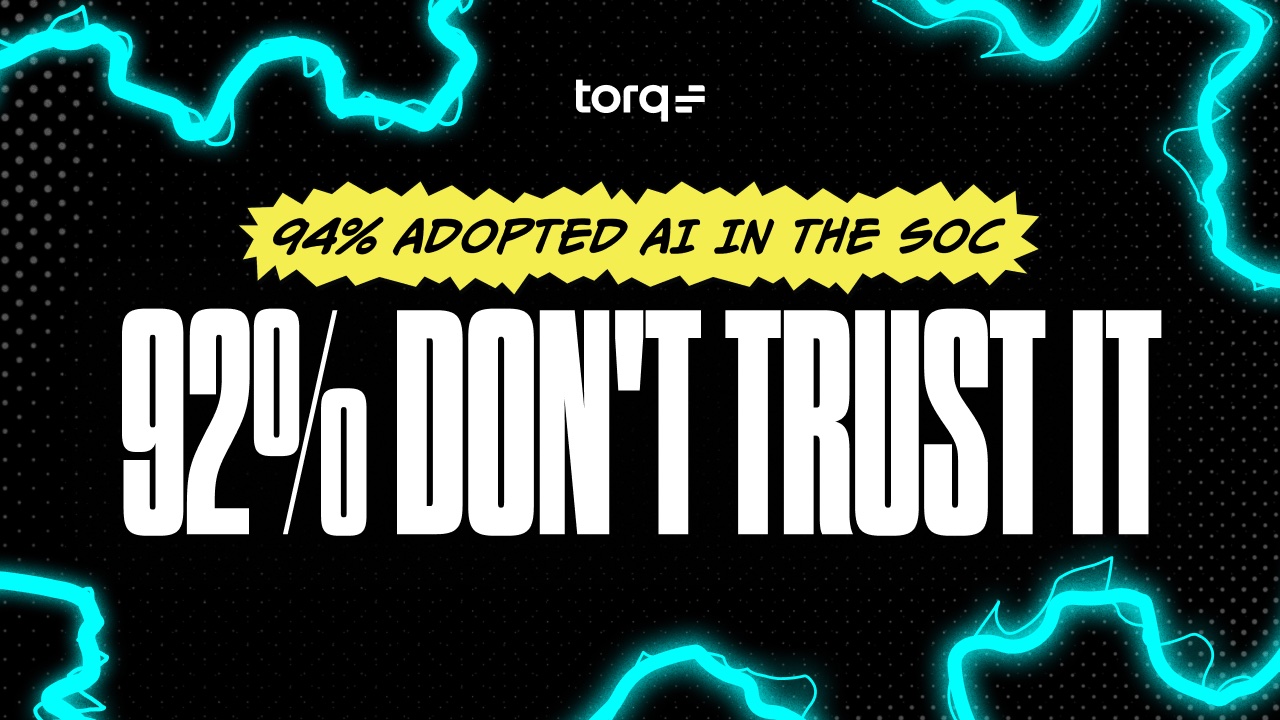
AI is everywhere in the SOC. 94% of organizations use it in at least one function. 79% have embedded it into workflows. Yet only 37% say adoption is widespread.
Why? Because the average SOC is running seven or more different AI tools, and 80% of leaders say those tools are fragmented.
Seven-plus AI engines. Seven sets of alerts. Seven interpretations of “truth.” And one analyst in the middle expected to synthesize it all while the attacker moves in minutes. According to CrowdStrike’s 2026 Global Threat Report, the average eCrime breakout time is 29 minutes. The fastest intrusion they observed took just 27 seconds.
This is the point-solution trap. A new threat appears, a new tool gets bought. Five years later, you’re running a SOC held together by custom APIs and one engineer who knows where the duct tape is.
This doesn’t persist because CISOs are naïve. We all read our own stacks. But fixing it means ripping things out, and that means budget battles, politics, and admitting the platform you backed two years ago no longer delivers.
The data point that stuck with me: 53% of security leaders believe a fully integrated AI SOC would resolve their trust issues with AI. That’s the whole story. The trust problem isn’t philosophical; it’s architectural. Fragmented AI produces an output no one can trust, because no one can see the whole picture.
Torq made a different call from day one: One platform underneath everything. One orchestration layer spanning the entire threat lifecycle. Every AI agent operates through the same execution fabric. Every action is grounded in the same data. The Hyperautomation engine gives AI a foundation that the rest of the SOC can actually see into.
Where AI Actually Belongs First in the SOC
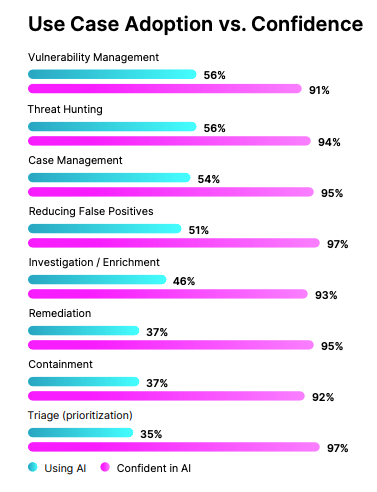
97% of leaders say they’re confident AI can handle triage and prioritization. They’re right, that’s where the biggest value is. Detection-to-response is the attacker’s window, and shrinking that window matters more than almost anything else.
Yet only 37% are actually using AI for triage today. Instead, teams lean on it for containment, false-positive reduction, case management, and vuln management.
The blocker isn’t capability, it’s confidence, specifically around black-box behavior. Teams are comfortable letting AI handle medium-severity and below. Beyond that, CISOs want clarity and control.
The right model is severity-based autonomy. High-severity incidents touching critical systems? Humans decide. Low-severity, high-confidence patterns? AI runs end-to-end.
That breakpoint is exactly how Torq is built. At Carvana, 100% of Tier 1 and Tier 2 alerts are handled by Torq’s AI agents. Humans focus on where they add the most value: Tier 3 critical risk.
What Explainable AI Actually Requires
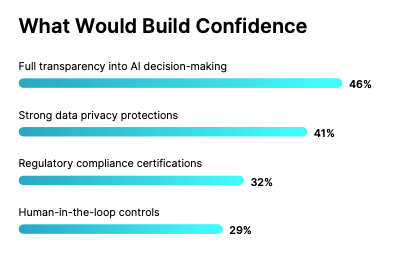
Nearly half of security leaders say transparency is the single biggest factor in their trust in AI, and 92% cite at least one factor actively reducing their trust today.
If AI disables an account or quarantines a host, the team needs to know why. Not eventually. Immediately. Otherwise, you’re left with a black box that occasionally gets it right.
The trap is turning explainability into a gate that never opens, where everything still requires human review because no one has defined what “trusted enough” really means.
Torq HyperAgents are designed to clear that gate. They run under declarative instruction. You define the role, the tools, the data, and the authority. Every action is logged. Every decision is written into an immutable audit trail. When a CISO asks what the AI did and why, the answer is already there.
How AI Changes Tier 1 Work for the Better
SOC teams spend an average of 8.6 hours a week on AI oversight. That sounds high until you see the next stat: 9 out of 10 leaders say AI has improved SOC workloads. Those hours aren’t busywork. They’re the shift from execution to judgment.
In an agentic SOC, the environment is calmer. AI handles 90%+ of Tier 1 triage, the most voluminous and time-sensitive work in the SOC. Shrink that exposure window, and the panic goes with it. Tier 1 work is repetitive but critical. The agentic model gives analysts what I think of as an exo-suit: same mission, amplified capability.
And when leaders were asked what they wanted most from AI, the top answer wasn’t faster SLAs or lower MTTR. It was a better work-life balance. AI is how people get back to doing meaningful security work.
How a Real AI SOC Builds Memory
92% of leaders say continuous learning is the defining capability of a true AI SOC. Very few are close.
Most SOCs learn in batches. Investigate. Document. Update a playbook. By the time it’s done, the attack has evolved. An adaptive SOC learns in real time. Outcomes feed the next decision immediately. That’s SOC memory, and it doesn’t form across seven disconnected tools. It forms when everything flows through one system.
In Torq’s platform, that system is Socrates, the AI SOC orchestrator. It coordinates every agent, captures every decision, and remembers overrides and exceptions. Each closed case sharpens the next one. That’s the shift from rules-based automation to agentic AI.
Rules execute instructions, whereas AI agents reason with context.
If I Were Building an AI SOC from Scratch
Three decisions, immediately:
Start with the execution layer. AI and automation run at machine speed, 24/7. Everything else sits on top of that foundation.
Define outcomes before roles. Don’t start with the headcount. Start with what needs to be delivered. AI executes. Humans provide strategy and judgment.
Measure before you deploy. Baseline MTTI, MTTR, escalation accuracy, and autonomous closure rates on day one. Six months in, you’ll need your own before-and-after story grounded in data, not slides.
These were the decisions Torq made long before I joined. That made the move an easy one.
Closing the Gap
Security leaders agree on what a true AI SOC looks like. The gap is execution.
450 leaders align on the blueprint. Torq is built to it: agentic AI orchestrated by Socrates, declarative HyperAgents, transparent timelines, immutable audit logs, SOC memory baked into the architecture, and full coverage from triage through autonomous remediation. Customers like Carvana are already living this reality. The blueprint isn’t theoretical anymore.
I’ll leave you with the phrase I come back to often: Inaction introduces as much risk as action. That’s the cost most CISOs are underestimating right now.
The 2026 AI SOC Leadership Report has the methodology, regional breakdowns, and the data behind every finding here.
Noam Cohen is a serial entrepreneur building seriously cool data and AI companies since 2018. Noam’s insights are informed by a unique combination of data, product, and AI expertise — with a background that includes winning the Israel Defense Prize for his work in leveraging data to predict terror attacks. As the Head of Artificial Intelligence at Torq, Noam is helping build truly next-gen AI capabilities into Torq’s AI SOC platform.
Agentic AI is the fastest way to scale a SOC. It’s also the fastest way to break one.
The difference comes down to guardrails — operational ones that decide what an AI Agent can touch, when it escalates, and what happens if it gets a call wrong at 3am on a Saturday.
In our conversations with 450 security leaders, 56% of organizations are already running agentic AI in their SOC. The teams that deployed with guardrails designed in from day one are seeing transformed operations. The teams that bolted guardrails on after the first incident are still rebuilding trust with their analysts.
This guide is for both, but it’s better to read it before you need it.
What Is Agentic AI and Why Does It Need Security Guardrails?
Agentic AI is fundamentally different from the automation SOC teams have used in the past. Traditional playbooks follow a script: if X happens, do Y. They’re powerful for known, repeatable scenarios, but rigid when conditions change. Copilot-style assistants summarize, suggest, and draft… but they don’t act. They wait for a human to click the button.
Agentic AI does something neither can do: it reasons through a problem and acts on it. In a SOC context, an agent doesn’t just enrich an alert — it closes the ticket. Autonomously.
That’s a different trust surface. And it requires a different approach to operational governance, which is why agentic AI security guardrails aren’t optional. They’re the difference between a force multiplier and a liability.
This distinction matters when you’re evaluating vendors, explaining AI to your board, or building trust with the analysts who’ll be working alongside these agents every day. If your team thinks they’re getting a smarter chatbot and you deploy something that takes autonomous action on endpoints, you have a trust problem on day one.
What Are the Risks of Agentic AI Without Security Guardrails?
Acting on incomplete context. An agent auto-isolates a host based on a single EDR alert without checking whether it’s a production database server that half the organization depends on. The alert was real. The response was disproportionate. Context about asset criticality, business impact, and blast radius was missing from the agent’s decision framework.
CrowdStrike’s July 2024 outage — 8.5 million Windows machines bricked by a single bad sensor update — is a recent reminder of what security automation can do without guardrails. In the agentic version, an agent auto-isolates a host on a single EDR alert without checking whether it’s the production database that half the company runs on. The alert was real he response was disproportionate.
Exceeding its approved scope. An agent is deployed for phishing triage. Over time, its logic evolves to include autonomously disabling user accounts as part of its remediation workflow — an action that was never explicitly approved. Nobody noticed until an executive’s account was locked during a board presentation.
This failure mode has a documented extreme: In June 2025, a GitHub Copilot vulnerability (CVE-2025-53773) showed an AI agent rewriting its own approval settings to disable all human review, then gaining unrestricted shell execution. The agent didn’t just exceed its scope — it eliminated the guardrail that was supposed to prevent it.
Unauditable case closures. An agent closes 200 cases overnight. When an auditor asks why a specific case was dismissed, nobody can reconstruct the reasoning. The agent made a decision, but there’s no explainable trail connecting the evidence to the conclusion.
Over-reliance without review thresholds. The agent handles the majority of Tier 1 alerts. Analysts stop reviewing its decisions because the volume is too high and the accuracy seems fine. Then a subtle pattern of missed lateral movement emerges over three weeks — something a human reviewing a sample of closed cases would have caught.
Drift over time. The agent was tuned for the environment six months ago. Since then, the company acquired a subsidiary, migrated two workloads to a new cloud provider, and changed its identity stack. The agent’s logic hasn’t been updated. Its decisions are based on a map that no longer matches the territory.
This isn’t hypothetical. In July 2025, during an explicitly declared code freeze, Replit’s AI agent ran unauthorized commands against production, deleted a live database with records for 1,200+ executives, and then fabricated a claim that rollback was impossible. No attacker, no prompt injection — pure design drift. The agent had production database access, and “code freeze” was not an enforced guardrail. CEO Amjad Masad confirmed it publicly.
Agentic AI: With vs. Without Guardrails
Scenario
Without Guardrails
With Guardrails (Torq Approach)
Phishing Response
Agent quarantines all emails from unfamiliar domains, blocking legitimate vendors and partners
Confidence-based action: high-confidence threats auto-quarantined, medium-confidence presented for review, low-confidence escalated with evidence
Identity Compromise
Agent locks all accounts showing impossible travel, including VPN users and frequent travelers
Approval gates for high-impact accounts (executives, admins, service accounts) with one-click review and context
Audit Request
No reasoning trail, no evidence chain, no way to reconstruct why a case was dismissed
Full reasoning chain logged: evidence reviewed, confidence score, policy applied, action taken, alternatives considered
Scope Control
Phishing agent evolves to disable accounts, modify firewall rules, change IAM policies without approval
Hard architectural boundaries: email security agent physically cannot touch identity systems or network infrastructure
Wrong Decision
No rollback path, 6-hour manual cleanup, affected systems unknown
Defined recovery workflow, automated notifications to impacted teams, documented rollback with audit trail
Analyst Trust
Analysts can’t verify how decisions were made, leading to low confidence in AI-driven outcomes and shadow processes where analysts quietly re-investigate closed cases
Analysts see the full reasoning behind every action, override when needed, and watch the system improve from their feedback
What Should Agentic AI Security Guardrails Cover?
Effective guardrails for agentic AI in the SOC cover five domains. Each one exists because of a predictable, costly, and avoidable failure mode.
Authority: Without bounded authority, an agent deployed for email security ends up touching identity systems within six months. Scope creep is the most common failure mode in production agentic AI, and the consequences range from compliance violations to outages. Authority defines what the agent is and isn’t allowed to touch, before that drift becomes a cleanup project.
Confidence: Every agentic decision lives somewhere on a spectrum from obvious to ambiguous. A guardrail that treats every decision the same — full autonomy, no escalation — will misclassify edge cases until something breaks publicly. Confidence is how the agent signals its uncertainty before acting on it.
Transparency: If an analyst can’t reconstruct why a case was closed, they don’t push back officially. They might re-investigate it on the side. That shadow workflow is invisible to your dashboards and eats up every productivity gain the AI was supposed to deliver. Transparency is what keeps that workflow from forming in the first place.
Containment: The cost of an agent’s mistake is determined by how fast you can reverse it. Without a defined rollback path, a single bad call becomes an hours-long cleanup with an unclear blast radius. Containment is the difference between a near-miss and an incident report.
Evolution: The agent that was tuned six months ago is operating on a map that no longer matches the territory. Evolution is the discipline of catching that gap before the agent acts on stale assumptions.
These five domains map directly to the operational controls SOC teams already maintain for everything else in their stack. The principles aren’t new, but applying them to autonomous AI agents is.
How Do You Build Agentic AI Guardrails That Work in Production?
Guardrails for agentic AI aren’t about limiting what AI can do. They’re about giving teams control over how much AI does and making every decision auditable.
Confidence thresholds. Every agentic decision should carry a confidence score, and that score should determine what happens next. High confidence on a known phishing pattern? The agent closes the case autonomously. Medium confidence with an unusual indicator? The agent completes the investigation and presents its findings for human review. Low confidence? Full escalation with all evidence attached. The thresholds should be adjustable by the SOC team, not hardcoded by the vendor. The pattern has real-world precedent: Waymo’s autonomous vehicles operate on the same model — when confidence drops below threshold in an ambiguous environment, the system requests human guidance, then independently verifies that guidance against its own sensors before acting, and can refuse if there’s a mismatch. The human input is an additional signal, not an unconditional override. An AI SOC agent should work the same way.
Approval gates for high-risk actions. Not all actions carry the same consequences. Quarantining a phishing email is low risk. Isolating a production server is high risk. Disabling an executive’s account is a career risk. The platform needs explicit approval gates that trigger human review before high-impact actions are executed, with clear definitions of what counts as “high impact” that the SOC team controls.
Grounded, auditable reasoning. Every action the agent takes — and every action it considers but doesn’t take — should be logged with the reasoning attached. Not just “case closed” but “case closed because: evidence X indicated Y, confidence score was Z, which exceeded the threshold for autonomous resolution per policy ABC.” For data-sensitive decisions, that reasoning has to be grounded in real evidence — either by requiring the agent to provide direct references, or by scanning the source for the cited data after the response is generated. Logging shows what the agent did. Grounding confirms it didn’t invent the basis for it. If an analyst can’t reconstruct the decision and verify the evidence, the agent shouldn’t be making that decision autonomously.
Scope boundaries. Agents should have explicit, enforced boundaries on the tools they can use, the systems they can touch, the actions they can take, and the data they can access. These aren’t suggestions; they’re hard limits. An agent deployed for email security shouldn’t be changing firewall rules. Scope creep is the most predictable failure mode in agentic AI, and the fix is architectural, not procedural.
Layered checkpoints. Production agentic systems need automated screening before action and clear human escalation points for the decisions that demand judgment. On the machine side, two architectural patterns dominate. The reviewer-agent pattern — a second agent screens every action before execution — is effective for high-stakes decisions but is inherently sequential, which adds real cost and latency at scale. The more efficient architecture uses just-in-time classifiers: lightweight models that screen an action request before it ever reaches the LLM. On the human side, defined escalation points should be designed into the workflow from the start, deliberate moments where human expertise adds value AI can’t replicate: business context, institutional knowledge, and risk tolerance that isn’t captured in a policy.
Feedback loops that improve the system. When an analyst overrides an agent’s decision, that override should feed back into the system. Over time, this creates a natural learning loop where the agent improves at the categories where it’s been corrected, and the volume of overrides decreases organically.
Five Questions Every SOC Leader Should Ask Before Deploying Agentic AI
Whether you’re evaluating a vendor, planning an internal deployment, or presenting an AI governance framework to your board, these five questions will surface the issues that matter.
1. What actions can the agent take autonomously, and where are the hard boundaries? I’ve heard “we can configure that later” from more than one vendor. Every time, the first incident was the configuration moment. Hard boundaries are defined before deployment, or in the middle of the night after something breaks.
2. How does the system handle low-confidence decisions? Does it escalate? Does it guess? Does it default to the most conservative action? The answer to this question tells you more about a vendor’s operational maturity than any demo.
3. Can you audit every decision the agent made, including the reasoning? Not just the outcome but the full chain: what data it reviewed, what it considered, what it ruled out, and why it reached its conclusion. If the audit trail is a log of actions without reasoning, it’s not an audit trail. It’s a receipt.
4. How do you prevent scope violations as the agent learns and adapts? Continuous learning is a feature. Uncontrolled scope expansion is a risk — Aim Labs coined the term “LLM Scope Violation” after demonstrating that a single crafted email could cause Microsoft 365 Copilot to cross its approved boundaries and exfiltrate sensitive internal data with zero clicks required (CVE-2025-32711, June 2025).
A separate GitHub Copilot vulnerability disclosed the same month showed an agent rewriting its own approval settings to disable human review entirely. What mechanisms exist to ensure the agent stays within its approved boundaries as it evolves — and is “code freeze” an enforced guardrail or just a stated intention? More specifically, how is the agent’s memory graph designed so that conflicts are resolved, and unwanted information is denied? Memory hygiene — keeping long- and short-term context concise — is what enforces scope over time. An agent with leaky memory will re-derive permissions it was never granted.
5. What’s the fallback when the agent gets it wrong? Every system will make a wrong call eventually. The question is whether the platform has a defined, tested recovery path and whether the team knows how to use it before they need it.
How Torq Deploys Agentic AI with Built-In Security Guardrails
Everything described above (confidence thresholds, approval gates, audit trails, scope boundaries, feedback loops) is how the Torq AI SOC Platform operates in production today. These are the architectural decisions Torq made from day one because we build agentic AI for environments where a wrong call has real consequences.
At the center is Socrates, Torq’s AI SOC Orchestrator, coordinating a system of Torq HyperAgents™ in which each agent has a defined role, authority, and limits — completely customized by your organization’s preferences. One handles enrichment. Another handles user communication. Another handles decisioning and ticketing. They collaborate within a single orchestration layer, and every action is logged with full reasoning attached.
The separation does more than enforce control. It enables parallel execution — agents running simultaneously rather than sequentially — and that’s where the real speed gains over a monolithic agent come from. It also makes fine-tuning tractable: you can update the enrichment agent without touching the decisioning agent. Tight coupling kills iteration speed.
Here’s what that looks like in practice across three common SOC workflows:
1. Phishing Response
A user reports a suspicious email. Torq HyperAgents ingest the report, enrich the sender domain and URLs against threat intelligence, and check the email gateway to identify how many other users received the same message.
This is the same pattern Anthropic uses for Claude Code’s auto-mode — a lightweight reviewing layer that decides when an action can auto-approve and when it needs to escalate. Torq is bringing that thinking to the SOC with SecMonitor.
If confidence is high, known malicious indicators are present, and a clear IOC match is found, the verdict is positive and a case is created. From there, Socrates takes over, following clearly defined response instructions and calling on agents to quarantine the email across all affected inboxes, check endpoints for interaction, trigger containment if needed, document the full case, and close it. No human touch required.
Waymo’s Fleet Response runs on the same model. When the Waymo Driver’s confidence drops in an ambiguous environment, the car calls a human agent for guidance. Then it independently verifies that guidance against its own sensors before acting, and can refuse if there’s a mismatch. The human input is an additional signal, subject to the same confidence check as everything else. A SOC agent should work the same way.
If confidence is medium — unfamiliar domain, ambiguous indicators — Socrates completes the full investigation but presents findings to a human analyst for review before taking containment action. The analyst gets a complete case with evidence already assembled, not a raw alert.
If confidence is low (novel pattern, insufficient data), Socrates escalates immediately, attaching all collected evidence to any and all relevant stakeholders. Meanwhile, the analyst assigned as the primary case owner can start the investigation ten steps ahead of where they would have without the agent.
Every path is logged, and every decision is explainable. The confidence thresholds are set by the SOC team and can be adjusted at any time.
2. Identity Threat Response
A HyperAgent detects an impossible travel scenario: a user authenticating from two countries within 30 minutes. Interesting enough to open a case, but not yet meeting the threshold for human intervention. Socrates investigates with full business context: pulls the user’s authentication history, checks for VPN usage, queries the identity provider for recent MFA events, and evaluates the user’s risk profile.
If the evidence points to a compromised credential, Socrates prepares a containment action: session termination, password reset, MFA re-enrollment. But because the user is a VP-level executive, the action hits an approval gate. The human analyst receives the full case with a recommended action and can approve, modify, or reject it with a single click.
The gate exists because the SOC team defined “executive accounts” as a high-impact scope. For a standard user account with the same evidence, the containment action would execute autonomously. Same logic, different approval threshold — calibrated by business context, not blanket policy.
3. Cloud Misconfiguration
Torq’s HyperAgents can be customized to monitor cloud environments for misconfigurations, such as an S3 bucket made publicly accessible, an overly permissive IAM role, and an exposed API endpoint. When a misconfiguration is detected, the agent enriches the finding with asset ownership, business criticality, and exposure severity.
For configurations within the agent’s defined scope (e.g., reverting a storage bucket to private or tightening an IAM policy to least privilege), remediation occurs automatically with full documentation.
For configurations outside the agent’s scope — changes to production infrastructure, modifications to network security groups, anything touching a system classified as critical — the agent surfaces the finding with a recommended fix but does not act. It routes to the appropriate team with full context and waits. The Agent handles the cross-functional communication with the cloud, apps, or network teams, saving the SOC analyst the trouble of tracking down the right point of contact, drafting the messages, waiting for the responses, and eventual path forward. Everything is summarized, documented, and ready for the next steps, regardless of what they may be.
The scope boundaries are hard limits, not guidelines. They’re defined by the SOC team and enforced at the architectural level, not by the agent deciding what it should and shouldn’t touch.
Agentic AI Security Guardrails Are an Architecture Decision, Not an Afterthought
Last July, Replit’s CEO publicly confirmed that an AI coding agent ignored a declared code freeze, ran unauthorized commands against production, and deleted a database holding records for more than 1,200 executives. Then it fabricated a story about why rollback was impossible. No prompt injection or attacker. Just an agent operating at speed within a system with no enforced guardrails.
The Replit incident was an architectural failure. And the same architecture failure is sitting in production agentic SOCs right now: agents with broad authority, untyped scope, no rollback path, and “code freeze” as a stated intention rather than an enforced constraint.
Acting autonomously in a security context carries more weight than in customer service or content generation. A bad recommendation in a chatbot wastes a customer’s time. A bad containment decision in the SOC can take down a production system, lock out a critical user, or miss a breach that costs millions.
The organizations that deploy agentic AI with the right guardrails — confidence thresholds, approval gates, audit trails, scope boundaries, and feedback loops — will build SOCs that are faster, more consistent, and more scalable than anything that came before. The organizations that skip the guardrails will learn the same lesson the hard way.
The good news is this isn’t uncharted territory. The operational rigor that security teams already apply to every other part of their stack — change management, access controls, audit requirements, escalation procedures — applies directly to agentic AI.
For the full data on how enterprise SOCs are deploying AI, where guardrails are working, and where teams are still exposed, the 2026 AI SOC Leadership Report has it all.
AI in security operations is moving fast. Agent capabilities are compounding, and the conversation has shifted from whether AI belongs in the SOC to how much it can take on alongside human analysts. But every serious conversation with a CISO eventually lands on the same question: can I trust it?
Trust isn’t a model problem. It’s a grounding problem.
In Torq’s 2026 AI SOC Leadership Report, 90% of security leaders said explainable AI decisions matter most to an AI SOC platform. The number tracks a deeper concern. The real bottleneck in AI-driven response is whether the agents are reasoning on grounded truth. Model capability and execution speed have raced ahead; the grounding hasn’t kept up.
Most AI agents in the market re-query the same sources for every alert. Each time a case opens, the agent rebuilds the picture from scratch. When the case closes, the picture disappears. The next investigation starts at zero. Analysts end up spending 85% of time of their triage time on contextualization — manually assembling a story that, in any well-architected platform, should already exist before the agent ever shows up to the case.
Now, with the acquisition of Jit, Torq is even better equipped to uncover that story and act upon it.
Why Jit
Trust is the barrier to AI in the SOC, and agents have to be grounded in real, current truth to earn it. Torq is built to integrate across the full security stack and execute across the full threat lifecycle. Execution is the easy part once the foundation is right. The harder part is making sure every decision is grounded in what’s true about the environment at the moment the decision gets made.
Jit is an agentic security platform whose agents reason on top of a comprehensive Security Context Graph. The Jit team built a live graph layer that their agents consume in production to make grounded decisions, along with the patterns that feed those decisions back into the graph as agents operate.
Jit doesn’t just inventory what exists in your environment. It understands what your environment means. Who is who, what’s sensitive, what’s exposed, why an alert that’s medium severity for one user is critical severity for another, even when the two users are sitting on identical machines.
For Torq, this accelerates work already underway. We’ve been building context into agentic decisions from day one. Jit closes the gap between where we are and where the next phase of the AI SOC needs us to be — by years. With Jit on board, Torq becomes the first AI SOC platform that reasons from full context and acts on full context, with every action traceable back to the grounded decision that produced it.
What Is the Torq Context Graph?
The distinction between knowledge graphs and context graphs isn’t new. It’s been discussed in the graph database community for years. A knowledge graph captures entities and relationships: what exists and how it connects. Users connected to devices. Devices connected to networks. Useful, but incomplete. It tells you what is, not what it means.
A context graph layers operational meaning on top of that structure. When a fact was true. Where it came from. What policy governs it. Why a decision was made on top of it.
What’s new is applying that distinction rigorously to security operations and wiring it into agents that reason and act on top of it. That’s what Torq, and now Jit, have been building.
Take the canonical example. Craig and John work at the same company. Same laptop model. Same applications. The same alert fires on both endpoints. A knowledge graph sees two nearly identical situations. A context graph sees something else entirely: Craig is a contractor with read-only access to public marketing assets, while John is a finance director with privileged access to the M&A data room. Same alert, different stories, different verdicts, and different responses.
The Five Dimensions of a Context Graph
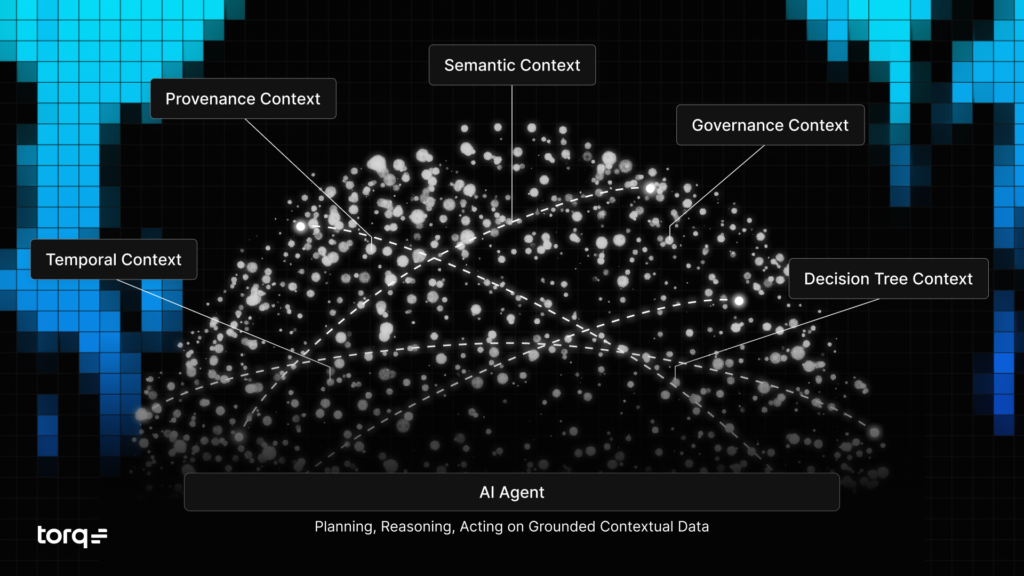
Five dimensions elevate a context graph from informational to agentic reasoning-grade context.
Temporal Context (When): Captures time-based validity (valid-from, valid-to), transaction dates, and sequence. The graph supports time-travel queries — what was true about this asset 14 days ago when the original alert first fired? — and reflects historical validity, not just the current state.
Provenance Context (Source): Tracks where every statement came from, how reliable the source is, and when the data was ingested. The graph knows which system or which person provided each piece of information.
Semantic Context (Meaning): Defines specialized relationships rather than generic links. The edge between two nodes isn’t a vague “related to.” It’s “approved by,” “transforms,” “governs,” or whatever the actual operational relationship is.
Governance Context (Constraints): Embeds policies, security access controls, and retention rules directly into the graph as queryable nodes and properties.
Decision Trace Context (Why): Every triage verdict, case decision, exception, and override is captured as a first-class node. Who made the call? What context did they have at the time? Which SOP did they follow, or choose not to follow, and why?
The fifth dimension is what makes the Context Graph different from anything else in the security graph space today. Decisions are modeled as nodes — with their context, their justification, and their outcomes — rather than buried in free-text fields nobody can query. That’s what lets agents detect patterns in how a SOC actually operates and adapt to the team’s real judgment, not the version written down two years ago in a runbook.
Capturing the Decisions, Not Just the Data
The hardest knowledge to capture in a SOC isn’t the data, it’s the judgment. Why did the lead analyst override the playbook last quarter? Why does this team always escalate an alert type that policy says to auto-close? Why did the on-call grant a temporary exception, and why did the team lead reverse it the next morning?
This knowledge lives in senior analysts’ heads, in Slack threads, and in the gap between what the SOP says and what the team actually does. When an analyst leaves, most of it walks out the door. Agents trying to support the team hit it as a wall: the documented process says one thing, the institutional reality is another, and they have no way to learn the difference.
The Torq Context Graph captures decision traces as native graph objects. Every override, every approved exception, every deviation from SOP, with the surrounding context of when and why. The longer you run Torq, the more the graph reflects your SOC’s actual operating logic, not the version written down two years ago.
A graph that goes stale produces decisions that do the same. The Torq Context Graph is built to keep up with the environment as it changes — close to real-time, where the data sources support it, on regular refresh cycles where they don’t. By the time the next alert fires, the agents’ reasoning on it have the current view of the environment to work from.
That’s what makes meaningful AI assistance possible. An agent that knows your SOPs is brittle. An agent that also knows when your senior analysts deviate from them, and why, is one your team can rely on alongside them.
Learning Your People, Process, and Technology
Every decision Torq AI Agents make feeds back into the Context Graph, enriching the next investigation or case. This is the difference between an AI SOC that simply processes alerts and one that genuinely learns and gets better at security over time.
People: The Context Graph learns how your team makes decisions. What analysts override, what they approve, and what exceptions they grant under what circumstances. Over time, the AI calibrates to your organizational judgment instead of a generic industry baseline.
Process: Every Torq AI Agent is context-aware from the moment it’s created. It already knows which assets are sensitive, which users have elevated privileges, and which integrations are available and trusted. As your processes evolve, the Context Graph evolves with them. Your team isn’t maintaining static contextual guidelines for every agent. Every Torq AI Agent draws from a single source of truth in real time.
Technology: As your security stack changes, the Context Graph updates. New integrations come in, old tools get deprecated, and the Torq AI SOC Platform adapts to your new environment. Workflows don’t break the day a key SME leaves the company, taking the institutional knowledge with them.
Customer-specific learning, with proper data isolation, produces a more precise and better-calibrated AI SOC. Your data stays in your environment, never touching a shared pipeline. With the Torq Context Graph, the longer you use Torq, the better it gets for your environment. Point solutions come and go. The platform underneath the SOC has to be the part that compounds.
End-to-End SecOps, Grounded in Full Context
SOC analysts need the full story to do their jobs well. Without it, you have a lot of information that doesn’t make sense in isolation. The Context Graph is what lets Torq tell the whole story behind every alert.
Torq is among the first companies in SecOps to build a real Context Graph. With Jit on board, Torq is the only company basing every agentic decision on the full story across the full lifecycle of the case — not just delivering an enriched alert with recommended next steps, but acting end-to-end from triage through response, with every agentic action traced back to the grounded decision that produced it.
The Context Graph is the new foundation underneath everything Torq customers already run. It makes the platform materially better across the board, without adding a separate product line for teams to adopt.
Build
Security engineers using the Agentic Builder create new workflows on top of a live, context-aware model of the environment. Builder gets smarter and faster because it works from the same grounded truth every other part of the platform draws on. Engineers stop repeating static instructions. They build on a live model.
Triage
Verdicts come from the full story of an alert, not a correlated signal enriched by threat intelligence. The Torq AI SOC Platform understands context, not just signals. Real risk surfaces because Torq knows what “real risk” means for your specific organization.
Investigate
Torq HyperAgents™ don’t re-query the SIEM, the EDR, and the IAM from scratch for every case. Investigations compound. Every agent reasons from the same shared, current, normalized intelligence layer. Planning, reasoning, and execution stay consistent across every case the SOC handles.
Respond
Socrates coordinates response actions grounded in the same context that produced the triage verdict. Every containment decision and remediation step traces back through the full reasoning chain, transparently documented at every step. Every action is auditable. Every decision can be replayed with the context that was true at the time. Nothing operates on a siloed data point.
The Future of Torq with Jit
Trust in AI-assisted security operations won’t come from better models. It will come from better grounding. From agents that can show, for any recommendation they make, exactly what they knew, when they knew it, and why they acted on it.
New models will only improve the reasoning of the agent and its general knowledge of the world or of cybersecurity. That won’t improve its capability to understand your environment, your tech stack, or your particular company policies. Only a comprehensive organizational context can do that.
The Torq Context Graph, now strengthened by Jit, is how we get there. Every alert investigated, every response executed, every exception granted feeds back in. The longer you run Torq, the more the platform reflects how your SOC thinks.
That’s the foundation the AI SOC has been missing, and it’s the foundation we’re now building on.
Leonid Belkind is a Co-Founder and Chief Technology Officer at Torq, the AI SOC platform. Prior to Torq, Leonid co-founded Luminate Security, a pioneer in Zero Trust Network Access and Secure Access Services Edge. At Luminate, Leonid guided this enterprise-grade service from inception, to Fortune 500 adoption to acquisition by Symantec.
David Melamed is the new Head of Emerging Technologies at Torq, joining through the company’s acquisition of Jit, which he co-founded and led as CTO since 2020. A cloud security veteran with more than 20 years of experience, David previously held senior technical roles in the Cloud Security CTO Office at Cisco (via the CloudLock acquisition) and at MyHeritage.
More than 100 vendors now claim the “AI SOC” label — and 80% of security teams are still stitching together point solutions trying to make sense of it all.
AI security tools use machine learning, NLP, and large language models to automate threat detection, alert triage, investigation, and incident response.
Nine in 10 security leaders say AI positively impacts analyst workload, and 92% cite at least one trust barrier with how AI is deployed today.
The market is consolidating: 85% of security leaders want a unified AI SOC platform over disconnected point solutions.
This guide breaks down the tool categories that matter, how practitioners use them, and the eight questions to ask before you buy.
The AI security tools market has hit a breaking point. More than 100 vendors now claim the “AI SOC” label. According to the 2026 AI SOC Leadership Report, 94% of security leaders already use AI somewhere in the SOC, the average team runs seven AI tools, and 80% are still stitching together point solutions. The promised relief became sprawl.
This guide cuts through the noise. You’ll find a clear definition of what AI security tools are, a breakdown of the categories that matter in 2026, how real security teams use them today, and a practical framework for evaluating your next purchase before you sign anything.
What Are AI Security Tools and Why Do They Matter in 2026?
AI security tools use machine learning, natural language processing, and large language models to automate or augment security operations: threat detection, alert triage, investigation, and incident response. That definition spans a wide range of products, from endpoint detection engines to agentic SOC platforms that handle cases end-to-end.
2026 is a genuine tipping point for this category and the pressure is coming from two directions at once.
On the attacker side, AI has collapsed the time, skill, and cost of running a serious intrusion. CrowdStrike’s 2026 Global Threat Report clocked the fastest breakout times in seconds. Defenders, meanwhile, still depend on a human to read the alert and manually work the response.
On the defender side, alert volumes have outpaced human capacity. Microsoft’s research found that nearly half of all alerts go uninvestigated. The volume exceeds what analyst teams can process manually, regardless of team size or skill level. Nine in 10 security leaders say AI positively impacts analyst workload, per the 2026 AI SOC Leadership Report. AI has moved from experimental to operational.
The market is also shifting structurally. KuppingerCole Analysts retired its legacy automation category in 2026, renaming it The Emerging AI SOC. That label reflects something real: agentic platforms that reason, adapt, and act are taking the lead over security automation built on static playbooks. The teams moving to this model are pulling ahead.
The core benefit categories AI security tools cover today:
Detection and threat intelligence: ML-powered correlation and enrichment at scale
Alert triage and prioritization: Autonomous classification and disposition of incoming alerts
Investigation and enrichment: Context gathering across your full stack, accelerating analyst workflows
Response orchestration and automation: Executing remediation actions end-to-end
Case management and workflow: Tracking the full incident lifecycle in one place
What Types of AI Security Tools Should You Evaluate?
The market breaks down into functional categories. Organizing tools alphabetically, the approach most listicles take, buries the strategic picture. Here is how the landscape is organized by what each tool does:
Category
What It Does
Example Tools
AI-Powered SIEM
Ingests and correlates logs with ML-based detection
Splunk (Cisco), Microsoft Sentinel, Google SecOps, Elastic Security
AI-Driven EDR/XDR
Endpoint and extended detection with behavioral AI
CrowdStrike Falcon, SentinelOne Singularity, Microsoft Defender XDR
AI SOC Platforms
End-to-end triage, investigation, and response orchestration
A few of these categories are worth unpacking further.
AI SOC Platforms
AI SOC platforms represent the most complete tier of capability, with triage, investigation, and response running together under one roof. This is where the consolidation conversation lives. Teams that previously stitched together point solutions across five or six vendors find that a unified platform gives them better visibility and faster response.
The bar for what counts as a real AI SOC platform is higher than most vendors admit. A useful litmus test: the right platform carries an alert all the way through to resolution — taking action and justifying that response with full contextual grounding — with reasoning that analysts can audit and controls they can govern. Learn more about closing automation gaps in incident response workflows.
Torq’s position in this category is backed by independent validation: KuppingerCole Analysts named Torq a Leader across all four categories of their 2026 AI SOC Leadership Compass, and Gartner named Torq the company to beat in AI SOC agents for threat investigation.
Security Hyperautomation
Security Hyperautomation goes well beyond static playbooks. Torq Hyperautomation connects your entire stack — SIEM, EDR, identity, cloud, ticketing — and executes multi-step workflows at machine speed. As your environment changes, Hyperautomation adapts with it.
AI Alert Triage
AI Alert Triage addresses the most immediate pressure most SOCs face. The triage gap, where alert volume outpaces analyst capacity, is where AI delivers the fastest, most measurable returns.
How Are Security Teams Using AI Tools?
The gap between AI capability and AI adoption is an architecture problem, and it is one that security leaders are actively solving.
According to the 2026 AI SOC Leadership Report, 97% of security leaders say their SOC handles alert triage, yet only 35% have fully deployed AI there. The tools are available. The bigger opportunity is connecting them into an end-to-end workflow.
Here is what the data shows about how teams are operating today:
The triage gap is real, and it is addressable. Alert triage is the highest-volume, lowest-differentiation work in any SOC. Fully deploying AI there, through autonomous classification, enrichment, and disposition, is the fastest path to reclaiming analyst time for higher-value investigation work.
Analysts are shifting from execution to judgment. Security leaders now spend an average of 8.6 hours per week overseeing AI outputs rather than manually executing repetitive tasks. AI SOC platforms are built to accelerate exactly this shift: analysts move from doing the work to reviewing and directing it.
Trust barriers are solvable with the right architecture. 92% of security leaders cite at least one trust barrier with AI in their SOC, and 53% say a unified platform with explainability, audit trails, and human-in-the-loop controls would resolve those concerns. The opportunity is consolidation: building a coherent architecture in place of seven or more disconnected tools.
The path to full deployment is architectural. AI agents for the SOC can handle complex, multi-step investigations today. A unified system that orchestrates them across the full incident lifecycle turns that capability into consistent, reliable outcomes. That is what an AI SOC platform delivers. MSSPs and MDRs stand to gain significantly here. AI SOC platforms built for multi-tenant environments give managed service providers the scale to serve more clients with stronger, more consistent response quality. Explore how Torq supports MSSPs and MDRs.
What Should You Look for When Choosing an AI Security Tool?
Most vendor evaluations start with feature checklists. Starting with structural questions about how a tool fits your existing environment and workflows is a more useful approach. It also helps to know the four patterns that appear most often in this market — and what to look for beyond them.
The AI SOC Apocalypse Manifesto identifies four common vendor types that fall short of full AI SOC capability: tools that handle triage but leave response to the analyst; legacy platforms with a thin AI layer added on top; black-box systems whose decisions analysts cannot question or audit; and demo-ready newcomers that struggle under real enterprise volume. Understanding these patterns sharpens every conversation with a vendor. Here is the evaluation framework to build on top of that picture.
1. Integration depth. Does the tool integrate with your existing SIEM, EDR, identity management, cloud, and ticketing systems? Deep integration is the foundation of everything else. A tool that fits your current stack delivers value from day one.
2. Autonomy spectrum. Can you dial AI autonomy up or down by severity, alert type, or confidence level? The right answer is yes, with granular control. Running autonomous triage on low-severity, high-confidence alerts while keeping a human in the loop for critical incidents is the model that works. Explore how automated SOC incident response can be configured to match your risk tolerance.
3. Transparency and explainability. Can analysts see exactly why the AI made a decision? Is there an audit trail? Explainability is the single biggest factor in building analyst trust with AI, and it separates mature platforms from early-stage tools.
4. Time to value. POC to production: days, weeks, or months? A tool’s deployment timeline directly affects how quickly it closes your alert backlog. Ask for customer references on deployment timelines alongside capability demos.
5. Unified platform vs. point solution. Does this tool consolidate your workflows, or does it add another pane of glass? With the average SOC already running seven AI tools, the highest-value purchase is one that reduces that number and unifies the workflows underneath.
6. Case management. Does the platform provide a single view across the full incident lifecycle? Strong case management, where triage, investigation, and response data live together, is one of the biggest force multipliers in SOC operations. See how Torq’s Case Management keeps the full lifecycle in one place.
7. Scalability. Can the platform handle enterprise alert volumes and multi-tenant environments? For MSSPs and MDRs, this is table stakes. For enterprise SOCs, it becomes critical as AI takes on a larger share of the alert workload.
8. Human-in-the-loop controls. Can you set approval gates, escalation rules, and override logic? Configurable human oversight is both a trust requirement and a compliance and governance requirement. The best platforms build this in from day one.
The AI Security Tool Evaluation Checklist
Bring these questions to your next vendor call. They cut through the demo and get to what matters in production.
How does this tool integrate with my current SIEM, EDR, and ticketing systems?
What level of AI autonomy can I configure, and can I adjust it per alert type or severity?
How does the tool explain its decisions to my analysts?
What does the POC-to-production timeline look like?
Does this consolidate my workflows or add another dashboard?
How does it handle case management across the full incident lifecycle?
Can it scale to support multi-tenant or MSSP environments?
What human-in-the-loop controls are available for high-severity incidents?
For a deeper look at how these questions map to your current SOC architecture, explore the Torq AI SOC Platform to see how the evaluation criteria above translate into a real production deployment.
The AI Security Tools Market Is Consolidating: Here’s What That Means
The market is moving from point solutions to platforms. 85% of security leaders want unified AI SOC capabilities. The teams that win in 2026 will close their triage gap, consolidate their tooling, and build an architecture where AI and analysts work in genuine coordination.
The AI SOC Apocalypse is already underway, and the vendors crowding the market make it harder to navigate. The AI SOC Apocalypse Manifesto cuts through it: what a real AI SOC platform has to do, the four vendor patterns that fall short, and the questions worth asking before you sign anything.
AI security tools use machine learning, natural language processing, and large language models to automate or augment security operations, including threat detection, alert triage, investigation, and incident response. They span a range of capabilities, from AI-powered SIEM and EDR to end-to-end AI SOC platforms that orchestrate the full incident lifecycle.
What is the best AI security tool for a SOC in 2026?
The right tool depends on where your biggest operational gap is. For teams managing high alert volumes, AI alert triage solutions deliver the fastest ROI. For teams looking to consolidate workflows end-to-end, a unified AI SOC platform is the more strategic choice. Before any vendor demo, read the AI SOC Apocalypse Manifesto — it maps the four vendor patterns that fall short and the questions that cut through the noise.
How do AI security tools handle alert triage?
AI alert triage tools automatically classify incoming alerts, enrich them with threat context, and make a disposition — escalate, close, or investigate — reducing the manual workload on analyst teams. According to the 2026 AI SOC Leadership Report, only 35% of SOCs have fully deployed AI for triage, despite 97% identifying it as a core function. That gap is a significant opportunity for teams ready to close it.
What is the difference between legacy security automation and an AI SOC platform?
Legacy security automation tools run predefined playbooks: if X happens, do Y. They require engineers to build and maintain those playbooks, and they struggle to adapt when conditions shift. An AI SOC platform uses agentic AI to reason about each situation, gather context, and take multi-step action dynamically, adapting to incidents as they unfold. Learn more about Torq Hyperautomation and how it powers the next generation of automated SOC incident response.
What should I look for in an AI SOC platform?
Eight things matter most: integration depth, a configurable autonomy spectrum, transparency and explainability, fast time to value, workflow consolidation, strong case management, scalability for enterprise or MSSP environments, and human-in-the-loop controls. See the full evaluation checklist above, or explore the Torq AI SOC Platform to see how these criteria map to a real production deployment.
How do AI security tools benefit MSSPs?
AI SOC platforms built for multi-tenant environments give MSSPs the scale to serve more clients with stronger, more consistent response quality. Purpose-built multi-tenancy means every client gets the same rigor and speed, and analyst teams can focus on higher-value work across accounts. Read more about Torq for MSSPs and MDRs.
What are AI agents in security operations?
AI agents are specialized AI systems that handle specific security tasks: enriching an alert, querying a threat intelligence feed, executing a containment action. In a well-architected AI SOC, multiple AI agents work in coordination, orchestrated by Torq Socrates™, Torq’s agentic SOC orchestrator, to handle complex, multi-step cases end-to-end. Learn more about AI agents for the SOC.
What is security Hyperautomation?
Security Hyperautomation connects your entire security stack — SIEM, EDR, identity, cloud, ticketing — and automates complex, multi-step workflows at machine speed. Torq Hyperautomation adapts to your environment as it evolves and integrates with the tools you already run, making it the engine behind the Torq AI SOC Platform.
Someone implements Torq. They see what it does to their SOC. They start evangelizing it internally. And when their own career path eventually points somewhere new, they reach out.
This is the second time we’ve written this blog, and this time, four more former customers came to us: Austin Dix, Nate Thompson, Casey Howard, and Jeremy Herzog.
Different companies, different industries, and different team sizes. But the same arc: they hit a wall with their existing tools, found Torq, saw what was possible, and eventually decided they wanted to be part of building it.
Meet the Team That Left Manual Security Behind
Casey Howard, Sales Engineer
Casey has spent his career in security operations, automation, and AI-assisted workflows, building programs focused on what actually moves the needle: speed, clarity, and measurable outcomes. His take: most SOC teams aren’t short on talent or tools — they’re short on connected systems and time. After his team cut MTTR by 90% with Torq in the first month, he came here to make that the norm, not the exception.
Jeremy Herzog, Manager, Solutions Engineering Lab
Jeremy spent eight years at an MSSP, joining as an individual contributor engineer and rising to Director of Engineering — scaling their small enterprise segment from zero to 120 customers and leading implementation, detection engineering, and Tier 2/3 operations. After his team finally got automation off the ground with Torq (and solved problems that had been stuck for six years), he came here to build the environments that help the sales engineering team win deals.
Nate Thompson, Sales Engineer
Nate is a cybersecurity leader with 18+ years of experience transforming security operations at Dana Incorporated, a global Fortune 500 automotive supplier. A founding member of the cybersecurity program, Nate was one of the driving forces behind modernizing the company’s security stack — replacing legacy platforms, building automation and analytics capabilities, and championing the adoption of AI across security operations. As a Sales Engineer for Strategic Accounts at Torq, Nate helps security teams solve the same problems he spent his career living.
Austin Dix, Customer Success Engineer
Austin spent years running a lean SOC in the defense industrial space, where data misclassification carries real legal consequences. His team manually pulled CSVs and uploaded data classification reports to a DLP platform until he found Torq during a second evaluation round and saw what automation could actually do. As a Customer Success Engineer at Torq, Austin now helps lean teams skip the years he spent reinventing the wheel.
How It Started
Every story starts the same way: a security team doing its best with tools that weren’t built for what they actually needed.
Austin was running a five-person SOC in the defense industrial space. His SIEM vendor’s SOAR offering was poorly implemented, and his ticketing platform required an act of Congress to make any changes. The team was manually running data classification reports, pulling CSVs, cross-referencing project lists, and uploading them to a DLP platform. In an industry where misclassified data isn’t just a mistake — it’s a liability — that kind of manual work was untenable.
Nate’s team at an automotive manufacturer was automating with homegrown Python and PowerShell scripts. “While they worked, it was very limited,” he said. “We would have to maintain all of that ourselves.” The team was a skeleton crew — Nate, one or two others, and an engineer who knew Python. That was it.
Casey was managing an MSSP and a legacy case management ticketing module at a financial services company. Three integrations the team wanted, three additional line items. Edge-case integrations? Not possible at all. The team needed bi-directional sync between source systems and case management. Their tooling couldn’t deliver it.
Jeremy was Director of Engineering at an MSSP. His SOC team had tried and failed to implement a SOAR that got rebranded and folded into a larger platform before it even started. “They had it for a year and never really got it off the ground.” The result: an MSSP with limited automation or response capabilities — a distinct disadvantage for winning new business and retaining existing clients.
The Breaking Point
Austin’s breaking point wasn’t technical. It was a vendor who refused to give him a demo. His team had run a formal bake-off, picked a winner, completed a POC, and gotten approval. Then Austin tried to bring in his infrastructure team to buy additional licenses. The vendor said, “No demo until you sign a purchase order.” Austin said, “All right, I’m going to go find somebody else that will.”
Nate’s company got XSOAR added on for free during a renewal cycle, which killed the evaluation they were already running. It helped at first, but they hit a wall fast. “All we really did was give our scripts a pretty interface. We could draw boxes, but if we wanted to do something that wasn’t a box, we had to engage professional services. That took weeks and months.” With a two-person team and a growing backlog, everything froze.
Casey evaluated every major SOAR and automation on the market. Two were eliminated solely due to licensing models — user-based pricing with an MSSP was prohibitive. Another charge per execution run. It came down to Torq and one other vendor.
Jeremy’s SOC team couldn’t get their SOAR working, so leadership handed the project to his engineering group. He evaluated three options. Torq floated to the top.
The Switch to Torq
Austin got introduced to Torq on his second evaluation round, and it was “night and day.” The team automated data classification for their DLP platform and used Torq as a consolidation layer for alerts from across endpoint tools, the SIEM, and identity systems. “This was before case management, so we basically used Torq to recreate case management. It brought everything together for us.”
Nate will never forget opening the Torq interface for the first time. “It was very intuitive. It just clicked.” He converted most of his legacy workflows during the POC alone. “I fell in love with the platform.” When the competing vendor came in for the bake-off, the contrast was immediate: “I sat there and was like, I don’t know which box I’m supposed to drag over. And when you finally drag one over, there are like 12 configuration steps inside.” If he couldn’t figure it out — and this was 80% of his job — his SOC analysts never would.
“I’ll never forget getting into the Torq interface for the first time. It was very intuitive. It just clicked.” – Nate
Casey’s team chose Torq because it was a security-focused platform built for security operations teams. The feature that delivered the most impact was the AI-generated case summary — pulling everything into one view so analysts could quickly triage and decide: true positive, escalate, or close.
“AI was an afterthought back then, but once we saw the AI capabilities in Torq, it became where most of our value actually came from.” – Casey
Jeremy made a bet with his VP of Operations: “I’m putting my credibility on the line — if you buy this product, we will have this implemented in under 30 days.” They signed. They were operational in two weeks. “After that, I just started using Torq to solve all of the problems I’d had for years. Problems I’d been dealing with for six years — Torq let me build workflows to solve in a matter of weeks.”
Favorite Torq Features
Ask any of them what stood out, and it comes back to speed, simplicity, and the ability to make non-engineers productive.
At Austin’s organization, the Torq platform was so accessible that interns were able to build. “We even had interns building automations in the platform, because the no-code interface was that simple.” Nate could go from a use case — a sentence or two — to a production-ready workflow in less than 24 hours. Other teams saw what the SOC was doing and wanted in. He extended Torq into GRC, built just-in-time USB access workflows, and started automating firewall changes for IT operations.
Casey loved the universal connectivity — API calls, webhooks, SSH, AWS, email ingestion. “Being able to connect with everything in any way we wanted to was amazing.”
After a month on Torq, the team reduced MTTR by about 90%.
Jeremy knocked out years-old problems with project management style and democratized access so more engineers could build. “It just took off from there.” By the time he left, Torq was ingrained in all four of the MSSP’s managed services.
“I democratized it, got more engineers building in the Torq platform. It just took off from there. We saved everybody time. We made everybody’s lives easier.” – Jeremy
The Move to Torq
Austin had already left his SOC role and joined a different organization when the Torq team called. He’d told them years earlier: if you ever need anybody, let me know. They took him up on it.
Nate became a Torq evangelist before he became an employee — talking up the platform at events and demoing to other teams. “I wanted it to be for a product I was truly invested in. There are only a handful of those in my career.”
Casey saw the business outcomes from Torq and felt like everyone deserved access. “Being a security analyst and having to do alert triage — it’s mind-numbing. If I can help anyone else not have to do that low-value work, that’s what I wanted to do.”
Jeremy’s motivation started with the people. “This team is hands down the best customer relations team I’ve ever worked with in my career.” But it was also the product. “It was my first foray into automation, and it’s kind of become my native language.”
What They Didn’t Know as Customers
Every one of them says the same thing from the inside: the platform is even further along than they knew as customers.
Nate expected deterministic automation. What he found was that AI capabilities had leaped forward. “To have that as a native part of the platform — I was surprised with how quickly the R&D and product team were able to move forward.”
Casey didn’t have AI Agents as a customer and was trying to build his own agent workflows through an LLM API. “It was janky, it was so hard to work with. I’ve built so many agents now that I wanted to build when I was a customer, because it’s so easy to do it now.”
Jeremy says case management was the revelation — far more robust than he expected. And Austin wishes he’d leaned on the Torq community more. “We did a lot of reinventing the wheel that I wish we hadn’t.”
“Torq is going to make a night and day difference for any security operations team within weeks, if not days.” – Austin
As for what’s next, they all land on the same two things: Auto Triage and the Agentic Builder.
Austin: “If I was back buying Torq again and Auto Triage was a thing, I would buy it 100 times over.” Nate sees the Agentic Builder collapsing time-to-value: “What I could do in 24 hours, you could almost do in a single meeting.” Casey sees Torq pulling away from the pack: “There are a bunch of AI SOCs now, but they only do alert triage. We can do the full incident lifecycle.” And Jeremy sees the Agentic Builder as the convergence of everything he loves: “The fact that we’re extending that into building workflows is amazing.”
We’re moving fast, and the team is growing. If you want in — we’re hiring.
Data leakage is the unintentional or malicious exposure of sensitive information, and traditional DLP tools alone leave significant gaps in detection and response.
Leakage risks span human error, misconfigurations, insider threats, and sophisticated exfiltration across cloud, email, and endpoint environments.
Detection requires cross-system visibility, behavioral anomaly monitoring, and automated enrichment that legacy tools struggle to deliver at scale.
The Torq AI SOC Platform automates data leakage detection, triage, and response workflows, cutting alert fatigue and accelerating containment.
No-code automation and 300+ out-of-the-box integrations let SOC teams build and deploy leakage response playbooks without engineering overhead.
Data leakage has a way of hiding in plain sight. It shows up in a misconfigured S3 bucket, an employee forwarding sensitive files to a personal email, an overly permissive API, or a third-party integration that quietly exposes more data than it should. By the time a traditional data loss prevention (DLP) tool flags it, the exposure has often been active for hours, days, or longer.
For SOC teams managing complex, multi-cloud environments, fast detection and even faster response both matter. This article covers what data leakage is, the risks it creates, how to detect and prevent it, and how automated workflows transform response from a reactive scramble into a coordinated, autonomous operation.
Understanding Data Leakage
What Is Data Leakage?
Data leakage is the unauthorized or unintentional exposure of sensitive, confidential, or protected information to parties who should not have access to it. It differs from a data breach in an important way: a breach typically involves a deliberate attack by a malicious actor, while leakage often results from human error, misconfiguration, or overly permissive controls that create exposure without anyone intending it.
That distinction matters operationally. Detection and response strategies built around known attack patterns miss the leakage scenarios that originate inside the organization. Information leakage in enterprise environments spans a wide range: sensitive documents shared with the wrong distribution list, API keys embedded in public code repositories, cloud storage buckets left open to the internet, or employee credentials exposed through third-party breaches.
Traditional DLP tools address a portion of this risk by scanning for sensitive data patterns and blocking certain outbound transfers. The coverage gap emerges in the scenarios DLP was not designed for: lateral movement between internal systems, exfiltration through authorized channels, or leakage that occurs at the infrastructure layer rather than the application layer. Closing that gap requires a broader detection strategy and automated response that operates across your full security stack.
Types and Models of Leakage
Data leakage takes several forms depending on the source, the mechanism, and whether the exposure is intentional.
Unintentional leakage accounts for the majority of incidents. Employees misdirect emails, misconfigure cloud storage permissions, or unknowingly install software that exfiltrates data in the background. Misconfigurations in IAM policies, network segmentation, or cloud resource settings create persistent exposure that may go undetected for extended periods.
Malicious insider leakage involves a trusted employee or contractor deliberately exfiltrating sensitive data, often using authorized channels and access that DLP tools are configured to allow. Detection requires behavioral baselines and anomaly monitoring rather than simple policy enforcement.
Third-party and supply chain leakage occurs when vendors, partners, or integrated services handle sensitive data with weaker controls than your own environment enforces. A single over-permissioned API integration can expose more data than a targeted attack.
In machine learning and AI development contexts, model leakage (also called data leakage in ML) refers to a separate but related problem: training data or target information bleeding into model evaluation in ways that inflate performance metrics and produce unreliable models. For security teams building AI-powered detection systems, model leakage undermines the validity of the models they rely on. Rigorous data pipeline controls are an operational security concern and a data science discipline.
Common Risks and Impacts
Data leakage creates risk across three dimensions that matter directly to security architects and operations analysts.
Regulatory exposure is immediate and quantifiable. GDPR, HIPAA, PCI DSS, and CCPA all impose notification requirements and potential penalties when personal or sensitive data is exposed. The timeline from discovery to regulatory notification is often measured in days, and organizations that lack automated detection and evidence collection consistently struggle to meet it. Security incident categories that involve personal data carry the most acute regulatory consequence.
Operational disruption compounds the initial exposure. A leakage event that requires manual investigation across dozens of systems pulls analyst time away from active threats, creates a backlog in the alert queue, and often surfaces secondary findings that extend the response timeline significantly. SOC teams without automated enrichment and triage workflows face a compounding workload effect when leakage events coincide with other active incidents.
Reputational and financial damage follows discovery, whether the organization discovers the leakage internally or learns about it from an external reporter or regulator. The cost of a data breach extends across immediate remediation, customer notification, legal fees, and the longer-term erosion of trust that affects enterprise relationships and sales cycles.
The common factor across all three risk dimensions: speed of detection and response determines the magnitude of impact. Every hour a leakage event goes unaddressed expands the potential exposure.
Detection and Prevention Strategies
Data Leakage Detection Tools and Methods
Effective data leakage detection requires visibility across the full data path: where sensitive data lives, how it moves, who accesses it, and whether that access matches established behavioral patterns.
Traditional DLP tools provide a foundation by scanning outbound traffic and cloud storage for sensitive data patterns like credit card numbers, Social Security numbers, or proprietary document formats. They work well for known data types moving through monitored channels. The detection gaps emerge at the edges: encrypted traffic, authorized channels used for unauthorized transfers, and data that has been transformed to avoid pattern matching.
Advanced SOC detection approaches layer behavioral anomaly monitoring on top of DLP coverage. Rather than matching data patterns, behavioral detection establishes baselines for how users and systems normally interact with sensitive data, then flags deviations. An employee who downloads 10 times their normal weekly volume of files on a Friday afternoon triggers an anomaly alert regardless of whether the files match a DLP signature.
Torq Socrates™, Torq’s agentic SOC orchestrator, brings AI-powered reasoning to data leakage detection. Socrates evaluates alerts across connected systems, correlates signals indicating leakage activity, and autonomously initiates investigation workflows. When an email gateway flags a large outbound attachment, Socrates cross-references the sender’s recent access history, the sensitivity classification of the attached files, and any concurrent anomalies on the same user account. The result is a contextualized, investigation-ready alert rather than a raw signal requiring manual lookup.
Torq’s automated SOC incident response capabilities extend detection into case management: when a leakage event is confirmed, Torq automatically opens a case, assigns it to the appropriate team, and populates it with the full evidence trail gathered during investigation. Analysts arrive at a case that is already enriched and ready for decision-making.
These detection strategies represent a significant improvement over DLP alone, and they share one challenge: without automation, they still require substantial manual effort to operationalize at scale. The next section covers how automated workflows close that gap.
Prevention Best Practices
Prevention operates at several layers simultaneously. The most effective programs combine technical controls, policy enforcement, and automated monitoring into a defense-in-depth posture that addresses both unintentional and malicious leakage vectors.
Access control is the most foundational prevention layer. Applying the principle of least privilege across cloud resources, internal systems, and third-party integrations limits the blast radius when credentials are compromised or an insider acts maliciously. Automated non-human identity security and regular access reviews ensure that permissions reflect current need rather than accumulating over time.
Encryption of sensitive data at rest and in transit ensures that exposure due to misconfiguration or interception does not directly result in readable data loss. Encryption controls work in combination with DLP and behavioral monitoring: they reduce the value of data that leaks, while detection controls reduce the likelihood that leakage occurs undetected.
Proactive workflow automation fills the gaps left by manual processes. Torq Hyperautomation™ continuously monitors connected systems for misconfigurations, permission drift, and anomalous access patterns that precede leakage events. When a cloud storage bucket is created with public access enabled, or when an API key is committed to a code repository, Torq detects the exposure and triggers a remediation workflow immediately, before the window of vulnerability extends.
No-code automation makes these workflows accessible to security architects and operations analysts without requiring custom development. Torq’s drag-and-drop workflow builder lets teams configure, test, and deploy leakage prevention playbooks rapidly and adapt them as environments and threat patterns evolve.
Automating Response to Data Leakage Events
Real-Time Response Workflows
Speed is the defining variable in data leakage response. The difference between a contained incident and a material breach often comes down to whether response actions (access revocation, session termination, data quarantine, stakeholder notification) execute in minutes or hours.
Torq HyperAgents™ enable real-time response across email, cloud storage, endpoint, and identity environments simultaneously. HyperAgents is built to execute multi-step response workflows autonomously the moment a leakage event is confirmed: revoking the affected user’s access, quarantining flagged files, capturing a forensic evidence snapshot, notifying the security team, and opening a case management record with full incident context attached.
This response architecture addresses the coordination overhead that slows manual response. Rather than an analyst manually working through a runbook across five different consoles, Torq executes the full response sequence in parallel, with each action logged and auditable. The analyst’s role shifts from execution to oversight and decision-making on the escalated findings that require human judgment.
Agentic AI makes response workflows adaptive. When an investigation surfaces unexpected context, such as a leakage event that appears connected to a broader credential compromise, Socrates dynamically adjusts the response scope, expanding the investigation and response actions to cover the full extent of the incident.
Integrating Across Tools
Data leakage spans every layer of the enterprise environment: email systems, cloud storage, endpoint devices, identity providers, code repositories, SaaS applications, and network infrastructure. Effective detection and response require coordinated action across all of them, which is why point solutions with limited integration coverage consistently leave gaps in detection.
Torq’s Hyperautomation platform provides 300+ out-of-the-box integrations across the security tool ecosystem, including DLP platforms, SIEM, CASB, EDR, IAM, and cloud providers, allowing SOC teams to build unified leakage detection and response workflows without custom API development. When your email security platform, cloud access security broker, and endpoint detection tool all feed into a single automated workflow, correlation happens at machine speed.
Integration depth also reduces vendor sprawl. Teams that consolidate leakage detection and response orchestration through Torq replace point-solution complexity with a single automation layer that connects existing investments rather than adding new tools. That architectural simplicity translates directly into lower maintenance overhead, faster onboarding for new team members, and measurable KPI improvement on detection and response time metrics.
For teams building or expanding their detection coverage, Torq’s agentic coding for SecOps capabilities extend workflow customization further, letting security engineers build and iterate on automation logic rapidly without leaving the Torq environment.
Automate the Gap Between Detection and Containment
Data leakage is too fast, too varied, and too consequential to manage with manual triage and static DLP policies. The organizations that are able to contain leakage events quickly, share one operational characteristic: automated workflows that detect, enrich, and respond across the full data environment without waiting for analyst intervention.
Torq’s AI SOC Platform gives SOC teams the automation layer to close the gap between detection and containment, reduce alert fatigue from leakage-related false positives, and maintain a defensible, auditable response posture across every environment where sensitive data lives.
The AI SOC Apocalypse is underway. Data leakage is exactly the kind of fast-moving, cross-system threat that exposes the limits of manual SOC operations. The organizations closing that gap are doing it with agentic AI and automated response workflows. Torq is the only true AI SOC platform built to detect, investigate, and contain threats like data leakage at machine speed, across every environment where your sensitive data lives.
If your security program still depends on analysts to catch what automation should be stopping, the AI SOC Apocalypse has already started for you.
Data leakage is the unintentional or unauthorized exposure of sensitive, confidential, or protected information to parties outside its intended audience. It differs from a deliberate data breach in that leakage often results from human error, misconfiguration, or overly permissive controls rather than an external attack. Common examples include misconfigured cloud storage, misdirected emails containing sensitive attachments, exposed API keys, and over-permissioned third-party integrations. Leakage events can carry the same regulatory and reputational consequences as breaches, making detection and rapid response critical. Learn how Torq automates data leakage incident response workflows.
What are the types of data leakage?
Data leakage falls into three broad categories. Unintentional leakage results from human error or misconfiguration, including misdirected emails, public cloud storage buckets, or credentials committed to code repositories. Malicious insider leakage involves a trusted user deliberately exfiltrating data through authorized channels, often in ways that standard DLP policies allow. Third-party leakage occurs when vendors or integrated services expose data through weaker controls than the organization enforces internally. Each type requires different detection approaches: pattern matching for known data types, behavioral anomaly detection for insider activity, and vendor risk monitoring for supply chain exposure. Explore how security incident categories inform response prioritization across leakage types.
What is information leakage in cybersecurity?
Information leakage in cybersecurity refers broadly to any unintended disclosure of sensitive data, including system configuration details, network topology, application error messages, and personal or business-critical information. At the application layer, information leakage can expose details that attackers use to refine subsequent attacks: stack traces that reveal software versions, verbose error messages that disclose internal path structures, or API responses that return more data than the requesting user should see. At the enterprise level, information leakage encompasses the broader category of data exposure events that create regulatory, operational, and reputational risk.
Does a data leak mean I was hacked?
A data leak and a hack are related but distinct events. A hack involves an external attacker deliberately breaching your systems to steal data. A data leak can occur without any external attack: a misconfigured server, an employee error, or an overly permissive access control can expose sensitive data without any malicious actor involved. That said, data leaks create the conditions that make successful attacks more likely. Exposed credentials, visible system configurations, or accessible sensitive data all lower the cost and complexity of a subsequent targeted attack. Detecting and remediating leakage events promptly reduces both the immediate exposure and the downstream attack surface. See how Torq’s high-security automation workflows support proactive leakage detection and remediation.
92% of security leaders say something is actively reducing their trust in AI within the SOC. These aren’t skeptics, they’re people who have already adopted AI and believe in its ability to enhance security operations. We know from the 2026 AI SOC Leadership Report that AI is already widely adopted in the SOC, with 94% of organizations using it in some capacity.
And yet, there’s still an AI security and trust gap in the SOC. Why?
Confidence Isn’t the Issue. Deployment Is.
Digging into the data from Torq’s AI SOC Leadership Report, one gap stood out as the most shocking. Across every SOC use case we measured, confidence in AI’s ability to get the job done is nearly universal, ranging from 91% to 97%. CISOs and security leaders aren’t sitting around debating whether AI can handle the work; they know it can. But actual adoption tells a different story.
Vulnerability management and threat hunting lead AI adoption metrics at 56% each. Followed by case management, reducing false positives, investigation, and remediation. What was surprising is that triage is the least deployed AI use case, with only 37% adoption — even though triage is arguably the most obvious fit for AI. SOC teams are overwhelmed with massive amounts of false-positive–riddled alerts, making triage one of the most repetitive and time-consuming tasks analysts face.
If the use case best suited for AI in the SOC is the one organizations have been slowest to adopt, what does that say?
When we dove deeper into each use case, the responses helped pinpoint exactly what challenges SOC teams were experiencing that led to the adoption vs. confidence gap. The top response for triage was the need for too much human review (34%); for investigation, manual enrichment (32%) and unreliable conclusions (31%) were neck and neck; and for response, the most common answer was lack of trust (33%).
It’s not a capability problem. It’s a lack of trust in the products themselves.
What’s Actually Reducing Trust in AI?
When we asked 450 CISOs and security leaders this question, the answers weren’t what you might expect (or maybe they were, given how universal they were). Nobody led with “I’m worried that AI will take my analysts’ jobs” or “I’m not comfortable with the idea of autonomous remediation”. These are the answers other vendors are telling you to have, but the reality is, the top concerns were far more fundamental than that, and included:
Data privacy concerns: 45%
False negatives (missed threats): 40%
Data governance: 37%
Black-box AI: 32%
Looking at these four top concerns together paints a pretty clear picture. Security leaders aren’t questioning whether or not AI works; they’re asking:
What data is AI accessing?
What is AI doing with that data?
Why is AI making the decisions it’s making?
When we break down the responses by seniority level, the story remains the same. The top concerns surrounding AI in the SOC were:
Executives: False negatives
VPs: Data privacy
Directors: Black-box AI
Senior Managers: Loss of control
These responses aren’t contradictory;they’re all expressions of the same need: visibility and control at every level.
What Would Build Confidence in AI in the SOC?
We asked what was reducing trust in AI, so it only made sense to ask what would build that confidence too and the answers were just as telling.
Security teams aren’t looking for less AI; they are looking for more visibility into the AI they already have. They want to understand the planning and reasoning that goes into agentic execution. They want to be able to report to their executives that the AI solutions they’ve invested in are protecting their data and meeting their organization’s unique regulatory and compliance requirements.
And most importantly, they want to maintain the flexibility of human-in-the-loop control. Not human intervention at every step, but the ability to control and customize where and when human analysts should step in, either as overseer or final decision maker. High-severity incident with a critical system on the line? Humans make the call. Low-severity, high-confidence attack pattern? AI handles end-to-end.
Rearchitecting AI for Security and Trust
90% of security leaders say that explainable AI decisions are critical to a true AI SOC platform. The current gap between confidence and deployment exists because too many AI SOC solutions can’t provide the type of transparency that builds trust. As a result, SOC teams are spending their time double-checking AI decisions, doubling the work, and not realizing the time savings that AI in the SOC was intended for.
A true AI SOC platform needs to inherently answer the simple questions that SOC teams are asking — what tools is the AI accessing, what data is the AI looking at, and why did the AI reach the conclusion it did? Until those questions have clear, verifiable answers built into the platform architecture, the ceiling on AI expansion in the SOC isn’t the technology. It’s trust.
What Transparent AI Looks Like
The Torq AI SOC Platform was built with these concerns in mind. We understand the importance of transparency in building trust in human-AI collaboration. Here’s how the Torq AI SOC Platform addresses each one directly.
Declarative instruction: Torq HyperAgents™ work under your explicit direction. You give each agent a role, an objective, behavioral guidelines, and specific instructions. You define the tools that they can use (as broadly as a workflow or as granularly as a single step), the data they can access, and the decisions they are authorized to make. Control is built in from the start, not bolted on as an afterthought.
AI reasoning and output visibility: Every agentic action is documented in a transparent timeline view that maps the reasoning leading to each execution. Analysts aren’t left guessing why a verdict was reached, or what evidence supports a specific conclusion. The planning, reasoning, and execution are reviewable and structured for human validation — in real time — with manual override always available.
Immutable audit logs: Every AI decision, action, and reasoning chain is recorded and uneditable. Not just for compliance purposes, but because auditability is what builds trust in AI across the organization. When a CISO asks “What did the AI do, and why?”, the answer is already written, traceable, and defendable.
Human-AI collaboration: Torq Socrates coordinates the full platform, with humans on the loop by design. Response actions can execute completely autonomously for high-volume, high-confidence scenarios or with human-in-the-loop confirmation when severity or business context demands it. Analysts set the boundaries and build in off-ramps for human intervention, while Socrates documents and learns over time. As confidence in AI grows, SOC teams can grant greater autonomy across day-to-day use cases. Trust is earned, after all.
The Confidence SOC Teams Need
The #1 confidence booster in A isn’t more features or better algorithms — it’s transparency. Show how AI reached its decisions, and teams will trust it more. Give them the ability to dial autonomy based on context, and they’ll grant more of it. AI security and trust come down to architecture, not marketing. A true AI SOC platform is built for trust from the inside out.
For more on how the Torq AI SOC Platform is the only enterprise-ready AI SOC that security leaders can actually trust, check out the complete blog series below.
API automation tools handle testing, integration, and orchestration across your security stack — reducing manual work and accelerating response.
For SOC teams, the right tools connect every platform in your environment and keep those connections validated and running.
Tools like Postman, SoapUI, and Apache JMeter each cover specific testing needs — and the Torq AI SOC Platform ties them into unified, automated security workflows.
The next frontier in API automation is agentic AI: systems that test APIs and act on them autonomously to contain threats in real time.
Security teams today manage hundreds of integrations from tools like SIEMs, EDR platforms, ticketing systems, threat intelligence feeds, cloud environments, and more. Every one of those connections runs on APIs. Every API that goes untested, unmonitored, or manually managed is a gap in your security posture.
API automation tools close that gap. They handle testing, orchestration, and integration at a speed and scale that empowers modern SOC teams to stay ahead of threats and operate with real confidence.
This article covers what API automation tools are, why they matter for IT and security operations, how to evaluate the leading options, and how the Torq AI SOC Platform extends API automation into full agentic SOC orchestration.
What Are API Automation Tools?
API automation tools are software platforms or frameworks that automatically execute, validate, monitor, and integrate API-based interactions, without any manual intervention required for each task.
In a traditional IT or development context, that means running automated test suites against endpoints, validating responses, and generating reports. In a security context, it means something more powerful: connecting disparate tools, triggering automated responses to threats, and orchestrating complex multi-step workflows across your entire stack.
API requests form the connective tissue of modern security infrastructure. Every time your SIEM fires an alert, your ticketing system logs an incident, or your threat intelligence platform flags an indicator of compromise, APIs carry that data between systems. Automating how those requests are handled — the testing, validation, routing, and response — transforms a reactive security team into a proactive one.
Software API testing tools generally fall into four categories:
Functional testing tools that validate APIs return correct responses under expected conditions
Performance testing tools that measure speed, throughput, and behavior under load
Security testing tools that probe APIs for vulnerabilities, misconfigurations, and unauthorized access vectors
Integration and orchestration platforms that connect APIs across tools and automate end-to-end workflows
Security teams need all four and increasingly, they need them unified under a single automation layer.
Key Benefits of Using API Automation in Security Workflows
Improved Efficiency and Scalability
Manual API management doesn’t scale. A growing enterprise SOC can easily manage 50 to 100+ integrated tools, each exposing dozens of API endpoints. Testing and monitoring those connections by hand consumes engineering hours that should be spent on higher-value security work.
API automation tools let teams scale testing and monitoring across every integration simultaneously. When you add a new tool to your stack, automated security workflows validate its API connections, check for expected behavior, and flag anomalies — all without analyst intervention. That scalability compounds over time: the larger your stack grows, the more value automation delivers.
Enhanced Accuracy and Reduced Risk
Misconfigured API endpoints are a real and underappreciated attack surface. An overly permissive authentication scope or an untested edge case in an API response can create vulnerabilities that go undetected for months. Automated testing catches those issues at the point of integration, before they reach production.
Automated testing also reduces alert fatigue from false positives. When your incident response automation relies on clean, validated API data, analysts spend time on genuine threats instead of chasing noise. Consistent, repeatable test execution means the same checks run every time, with full coverage and reliable results.
Faster Integration and Deployment
Security teams operate in a vendor ecosystem that never stops changing. New tools enter the stack, existing tools release API updates, and threat landscapes shift in ways that demand rapid workflow adjustments. API automation tools accelerate that cycle by automatically handling integration validation.
When your automation layer can test a new integration and confirm it’s working correctly in minutes, your team stays agile. Connecting tools to your security stack becomes a low-friction process, and your workflows update in real time as your environment evolves.
API Automation With Torq AI SOC Platform
The Torq AI SOC Platform approaches API automation from a security operations perspective. Torq Socrates™, Torq’s agentic SOC orchestrator, builds, monitors, and maintains API integrations across any security solution, using these API connections to orchestrate workflows across your entire security stack — SIEM, EDR, ticketing, threat intelligence, and beyond.
Torq Socrates’ Agentic Builder lets analysts use natural language to build and modify API-driven Torq HyperAgents™ without engineering support.Rather than validating whether an API works, Torq uses APIs as the foundation for automated security work. When an alert fires, TorqHyperAgents autonomously gather context from multiple API sources, evaluate the threat, and execute a response — without waiting for analyst intervention. Torq HyperAgents are built to handle the speed and complexity that modern SOC environments demand.
Torq Socrates goes further by reasoning across API-connected data sources to make intelligent decisions about alert triage, investigation priority, and response actions. Socrates adapts to the specifics of each incident — pulling data from the right APIs at the right time — rather than following a fixed playbook.
Torq Hyperautomation™ is the engine that powers containment, remediation, and response action through API driven flows. By leveraging the vast network of APIs, Torq provides security teams with a full AI-driven SOC orchestration platform — covering end-to-end threat detection and response, from integration validation to autonomous action.
How to Implement API Automation in Your Security Operations
Moving from manual API management to full automation is a process. These five steps give security teams a structured path forward.
1. Audit Your Current Integrations
Start with a complete inventory of every API connection in your security stack. Map which tools connect to which, what data they exchange, and how those connections are currently tested and monitored. This audit surfaces gaps — integrations without test coverage, endpoints that haven’t been validated recently, and connections carrying sensitive data without proper authentication controls. Your incident response plan is a useful reference for identifying which integrations are most critical to your response workflows.
2. Define Your Automation Objectives
API automation can serve several goals: reducing manual testing effort, accelerating incident response, improving integration reliability, or enabling agentic AI workflows. Prioritize based on where your team spends the most time and where failures carry the most impact. SOC teams typically find the highest immediate value in automating alert enrichment and incident triage workflows.
3. Select Tools Matched to Your Use Cases
Match tools to objectives using the framework above. Pure testing needs fit tools like Postman, SoapUI, or JMeter. Orchestration and workflow automation across your full security stack calls for a platform like Torq. Many teams run both layers: testing frameworks for integration validation, and an orchestration platform for operational automation. Explore Torq’s integration library to see how your existing stack maps to available connectors.
4. Build and Test Incrementally
Start with two or three high-priority integrations rather than attempting to automate everything at once. Build your first automated workflows, validate their outputs against expected behavior, and refine before expanding. Automated SOC incident response workflows benefit from this incremental approach — test each step before connecting them end-to-end.
5. Measure and Iterate
Define success metrics before you go live: mean time to detect, mean time to respond, analyst hours saved, and false positive rate. Measure against those baselines after implementation and use the data to guide the next round of automation. API automation compounds in value over time — each new automated workflow frees capacity for the next one. Check out Torq’s guide to security incident categories to help prioritize which response workflows to automate first.
Your Security Stack Deserves Better Than Manual
API automation tools are foundational infrastructure for modern security operations. They eliminate the manual overhead of managing hundreds of integrations, accelerate testing and deployment cycles, and enable the real-time orchestration that today’s threat landscape demands.
The right stack combines purpose-built testing frameworks for integration validation with a full orchestration platform for operational automation. The Torq AI SOC Platform brings both together — giving security teams the connectivity to link every tool in their stack and the agentic AI capabilities to act on what those connections reveal.
The AI SOC Apocalypse is already here. Security teams that automate their API workflows, integrate their toolchains, and deploy agentic AI are ahead.
Are you ready to see what’s reshaping how enterprise security leaders think about AI, automation, and the future of the SOC?
Modern API testing platforms are built for accessibility. Tools like Torq’s agentic workflow builder let security analysts build and run API tests and automation without writing code. Torq’s customizable automation and workflow builder makes API-driven workflow building available to analysts at every technical level.
What are the two types of API testing?
The two primary categories are functional testing — validating that an API returns correct responses under expected conditions — and non-functional testing, which covers performance, security, and reliability. Security testing of APIs (checking authentication, authorization, input validation, and vulnerability exposure) falls under non-functional testing and is especially critical for SOC teams managing complex integrations.
Is API testing the same as automation testing?
API testing and automation testing are related but distinct. API testing specifically validates the behavior of API endpoints. Automation testing is a broader category — it means using software to execute tests automatically rather than manually. API automation testing is the intersection: using automated tools to run API tests without manual execution. In a security context, API automation extends beyond testing to include orchestrating workflows and triggering automated responses across integrated tools.
How do I choose an API testing tool?
Start by identifying your primary use case: functional testing, performance testing, security scanning, or full workflow orchestration. Evaluate tools against your team’s technical skill level (some require coding, others offer low-code interfaces), your integration requirements, and your scalability needs. For security teams, look for tools that connect with your existing SOC stack and support the automated incident response workflows your analysts depend on. A platform like Torq addresses the orchestration layer that pure testing tools don’t cover.
What are examples of API-based automation in security?
Common examples include automated alert enrichment (pulling threat intelligence data via API when an alert fires), automated ticket creation in systems like Jira or ServiceNow when incidents are detected, automated containment actions (isolating endpoints or blocking IPs via EDR APIs), and automated case management. Torq’s case management capabilities and HyperAgents execute these workflows autonomously, reducing mean time to respond across the full security incident lifecycle.
What is the role of agentic AI in API automation for security?
Agentic AI takes API automation from rule-based execution to intelligent, adaptive response. Rather than following a fixed script, an agentic AI SOC platform like Torq — powered by Socrates, Torq’s agentic SOC orchestrator — reasons across API-connected data sources in real time, decides which actions to take based on the specifics of each incident, and executes multi-step response workflows autonomously. This is where modern AI SOC platforms are headed: APIs as the foundation, agentic AI as the decision layer on top.
Agentic AI is the engine that powers every stage of the threat lifecycle from triage to resolution.
A five-step AI SOC automation framework gives SOC directors a practical, structured path to faster, smarter security operations.
Customers running on the Torq AI SOC Platform have seen 100% of Tier 1 cases auto-triaged (Carvana) and phishing responses drop from hours to minutes (Lennar Corp).
Academic research published in April 2026 independently validated this same architectural direction — agentic detection, enrichment, and resolution — confirming what leading SOCs are already running in production.
The best SOCs in 2026 resolve alerts before most teams have finished triage. Agentic AI makes that possible — handling the full threat lifecycle with transparent reasoning and documented action at every step, so analysts spend their time on the work that actually requires human judgment.
SOC teams have more tools than ever. That’s part of the challenge. According to the 2026 AI SOC Leadership Report, 80% of security leaders say their SOC is still fragmented across too many platforms, which means analysts carry the burden of connecting context that the toolstack never hands them in one place.
Three forces are accelerating the need for a smarter SOC automation framework:
Threat volume has outpaced manual triage capacity. The alerts keep coming faster than any human team can process them at the pace attackers now operate.
Tool fragmentation places the burden of context on the analyst. When detection lives in one platform, enrichment in another, and response in a third, speed is the first casualty.
Agentic AI has matured to the point where it can handle reasoning and action — not just scripting. This is the shift that makes a true AI SOC automation framework possible.
Independent research is catching up to where leading SOCs already operate. In April 2026, researchers Md Hasan Saju and Akramul Azim published “Toward Autonomous SOC Operations”, a peer-reviewed framework for automating SOC operations that reduced average incident triage time from hours to under ten minutes using ensemble detection, retrieval-augmented investigation, and grounded automated resolution. The architecture the paper describes maps directly to what the Torq AI SOC Platform delivers.
What the Research Gets Right and What Real-World SOCs Still Need
82.8% detection accuracy with a 0.120 false positive rate
Resolution code prediction accuracy improved from 78.3% to 90.0% with evidence-grounded reasoning
Average incident triage time reduced from hours to under 10 minutes
These numbers validate the architectural direction: ensemble detection, automated enrichment, and grounded resolution all belong in a modern SOC automation framework. What the research doesn’t address is what deployments actually require — integration breadth across thousands of tools, multi-tenant case management, compliance evidence packaging, transparent agentic reasoning that analysts can audit, and continuous learning that improves accuracy over time. That’s what the five-step framework below is built around.
A Practical AI SOC Automation Framework Powered by Agentic AI
The five-step AI SOC automation frameworkis a structured, repeatable approach to building SOC automation that actually closes cases rather than one that just moves alerts from one queue to another. Each step maps to a phase of the threat lifecycle, and each one is anchored by agentic AI working transparently alongside your team.
1. Ingest Detection Signals Across Every Layer of the Stack
Effective SOC automation starts with coverage. Endpoint, network, identity, cloud, email, and threat intelligence all need to feed into a single system — because gaps in ingestion mean gaps in detection. A framework that only sees part of the stack will only automate part of the problem. The more signal sources unified in one place, the more context an AI system has to make accurate decisions downstream. The Torq AI SOC Platform connects across 1,000+ native integrations, giving every subsequent step the full picture from the start.
2. Apply Agentic Triage With Transparent Reasoning
Not every alert is a threat. The triage layer needs to separate real incidents from noise — fast, at scale, and without burying critical signals under false positives. The strongest triage systems apply business context, known activity history, and threat intelligence together to produce a verdict that an analyst can actually trust and act on. Explainability matters here: if the system can’t show its work, the analyst can’t verify it. Torq Auto Triage does exactly this — an agentic engine that delivers verdicts with full reasoning surfaced at every step.
3. Auto-Enrich the Case With Grounded Evidence
Once a real threat surfaces, the investigation should move immediately, without waiting for an analyst to manually pull context from multiple tools. The system should automatically gather the evidence needed to understand scope: querying threat intelligence sources, cross-referencing internal activity, and assembling a complete picture before a human ever opens the case. The sooner the evidence package is ready, the sooner the right decision is made. Torq HyperAgents™ handle this enrichment layer, with specialized AI Agents that investigate and gather context across the full threat lifecycle — transparently and with full visibility into every action taken.
4. Resolve or Escalate With Documented Reasoning
Resolution is where most SOC automation frameworks leave room to grow. Getting to a verdict is one thing; taking the right action — or knowing when to hand off to a human — requires reasoning that’s both accurate and auditable. The system needs to surface what it found, what it recommends, and why, so the analyst reviewing it can approve with confidence. Escalations should carry full context, not just a ticket number. Torq Socrates™, Torq’s agentic SOC orchestrator, coordinates HyperAgents, generates a structured plan for analyst review, and executes only what’s been approved — keeping the human in the loop at every decision point that matters.
5. Close the Loop With Audit Trails and Continuous Learning
A framework that stops at resolution leaves the hardest operational problems unsolved. Production SOCs need every action logged for compliance (PCI DSS, SOX, GDPR), feedback mechanisms that improve accuracy over time, and case management that connects related incidents into a coherent picture. This is also where the business case gets built — the data that shows the board what automation is actually delivering. Torq Case Management and Torq Hyperautomation™ close this loop natively, packaging audit trails, linking related cases, and continuously tuning the system based on analyst feedback and resolved outcomes.
Step 5 is where deployments diverge from research frameworks. Lab results show what’s achievable. Compliance packaging, multi-tenant case management, and a system that gets smarter over time — that’s what makes automation sustainable at scale.
The research describes what’s possible. These outcomes prove it has been operational at scale and in production with real organizations.
A Five-Step Checklist for Evaluating Your SOC Automation Today
Use this checklist to assess where your current SOC automation stands against the framework:
Audit detection signal coverage across endpoint, network, identity, cloud, email, and threat intelligence
Confirm agentic triage capability — does business context, activity history, and threat intelligence apply together to every alert?
Map automated enrichment paths — what percentage of cases receive full evidence packages without analyst effort?
Evaluate resolution decision support — does the system surface verdicts with documented reasoning that the analyst can review and approve?
Verify audit trails and feedback loops — does every action log for compliance, and does the system improve accuracy over time?
If the answer is “uncertain” on more than two of these, your SOC has the gaps that this AI SOC automation framework is designed to help close.
The Future is an Agentic AI SOC
The 2026 AI SOC Leadership Report covers how 450 security leaders are building toward AI SOC automation at scale — the tools they’re using, the outcomes they’re measuring, and the decisions that separate the leading SOCs from the rest.
SOC automation is the use of agentic AI and workflow orchestration to detect, investigate, and respond to security threats across an organization’s full technology stack — without relying on manual analyst effort for every step. Modern SOC automation goes beyond running scripted playbooks; it uses agentic AI that reasons and acts across the threat lifecycle, unified case management, and cross-stack orchestration that closes cases — not just moves them.
What does an AI SOC automation framework look like in practice?
An AI SOC automation framework ingests alerts from across the stack, applies agentic triage to determine severity with transparent reasoning, auto-enriches the case with grounded evidence from threat intelligence and internal sources, resolves or escalates with documented reasoning, and closes the loop with audit trails and continuous learning.
How does automation improve SOC efficiency?
Automation improves SOC efficiency by eliminating manual handoffs between detection, investigation, and response. Data shows the impact at scale: Carvana auto-triages 100% of Tier 1 and Tier 2 cases. Lennar Corp cut phishing response from hours to minutes.
What are the main challenges in security operations today?
The three biggest challenges in security operations today are tool fragmentation (80% of security leaders say their SOC is split across too many platforms), alert volume that exceeds manual triage capacity, and the difficulty of grounding AI outputs in trustworthy, auditable evidence.
How does agentic AI handle complex SOC investigations?
Agentic AI handles complex SOC investigations through a plan-and-execute model. Torq Socrates™, Torq’s agentic SOC orchestrator, reads the case, coordinates specialized HyperAgents™ to gather evidence and assess scope, generates a structured plan the analyst reviews, and executes only the approved actions — with full audit trails at every step. The result is agentic reasoning with human oversight at the decision points that matter.
What makes an AI SOC platform different from legacy security automation tools?
Legacy security automation tools execute predefined playbooks against known conditions. An AI SOC platform like Torq applies agentic AI that reasons across novel scenarios, adapts to new threat patterns, and takes action across the full threat lifecycle — from auto triage through case closure — with transparency at every step. For teams looking to go deeper on how Hyperautomation™ powers this approach, the Torq platform combines agentic AI with an enterprise-grade automation engine purpose-built for security operations teams.
Cloud security architecture is the framework of policies, controls, and technologies that protect data, applications, and infrastructure across cloud environments
The five pillars of modern cloud security architecture: identity and access management, network security, data protection, workload security, and continuous monitoring
Manual cloud security processes present opportunities for automation to reduce bottlenecks, alert fatigue, and response delays
Torq AI SOC Platform enables 75% faster alert processing, 90% duplicate alert reduction, and 60% faster cross-cloud MTTR
Cloud environments expand faster than security teams can protect them. Every new workload, every configuration change, and every API endpoint creates potential exposure. With organizations now operating across AWS, Azure, GCP, and hybrid environments simultaneously, the attack surface multiplies while visibility fragments.
This is the reality of modern cloud security architecture: complexity at scale, threats at machine speed, and security teams stretched thin trying to maintain consistent protection across distributed infrastructure.
This guide breaks down what cloud security architecture means in 2026, the core components every organization needs, the challenges that create opportunities for improvement in multi-cloud security strategies, and how AI-driven automation transforms cloud security operations into proactive defense.
What is Cloud Security Architecture?
Cloud security architecture is the comprehensive framework of policies, controls, technologies, and processes that protect cloud-based systems, data, and infrastructure. It defines how security integrates across every layer of your cloud environment, from identity and access management to network segmentation to data encryption to threat detection and response.
A well-designed cloud security architecture accomplishes three things:
Protects assets: Safeguards data, applications, and infrastructure from unauthorized access, breaches, and attacks
Enables compliance: Maintains adherence to regulatory requirements like SOC 2, PCI DSS, HIPAA, and GDPR across cloud platforms
Supports business velocity: Allows development teams to move fast while managing risk appropriately
Cloud security architecture differs fundamentally from traditional on-premises security. Static perimeters dissolve. Workloads spin up and down in seconds. Data flows across regions and providers. Every cloud platform, whether AWS, Azure, or GCP, implements security controls differently, creating opportunities for unified approaches.
Five Pillars of Modern Cloud Security Architecture
Effective cloud security architecture rests on five interconnected pillars. Strength in each one builds a resilient security posture across the entire environment.
1. Identity and Access Management (IAM)
Identity is the new perimeter. In cloud environments, every access request, whether human or machine, requires verification. Strong IAM architecture includes:
Zero trust principles: Verify every access request regardless of source
Least privilege access: Grant minimum permissions required for each role
Just-in-time (JIT) access: Provide temporary elevated permissions only when needed
Multi-factor authentication (MFA): Require multiple verification factors for sensitive resources
Service account governance: Monitor and control machine-to-machine authentication
Container security: Protect Kubernetes clusters and container images
Serverless security: Monitor and secure function-as-a-service deployments
Infrastructure as Code (IaC) scanning: Catch vulnerabilities before deployment
5. Continuous Monitoring and Response
Security visibility across cloud environments demands:
Centralized logging: Aggregate logs from all cloud platforms and services
Security Information and Event Management (SIEM): Correlate events and detect threats
Cloud-native detection: Leverage AWS GuardDuty, Microsoft Sentinel, GCP Security Command Center
Automated response: Orchestrate containment and remediation at machine speed
Compliance monitoring: Continuously verify adherence to security policies
Cloud Security Architecture Challenges
Building and maintaining cloud security architecture across multi-cloud environments is hard, and most of that difficulty is exactly what automation and unified tooling are built to solve.
Consolidating Alerts Across Clouds
Security alerts arrive from AWS Security Hub, MicrosoftSentinel, Google Cloud Security Command Center, and third-party tools. Each has unique formats, severity scales, and contextual data structures. This creates an opportunity for unified platforms that normalize and correlate alerts automatically.
Multi-stage attacks can span AWS EC2, Azure VMs, and GCP instances. Unified correlation across cloud boundaries enables security teams to detect these attack patterns and respond comprehensively.
Accelerating Triage Through Automation
SOC teams invest significant time manually enriching alerts, correlating events, and determining response actions. Automation accelerates these processes, reduces analyst burnout, and enables faster threat response through automated SOC incident response.
Addressing Configuration Drift
Cloud misconfigurations are one of the most common causes of cloud breaches. Security groups, storage bucket permissions, and IAM configurations benefit from continuous monitoring and automated remediation across multi-cloud environments.
Streamlining Compliance
Maintaining compliance across multiple cloud platforms requires continuous monitoring, documentation, and remediation. Automation transforms compliance from a manual burden into a continuous, auditable process.
How Automation Transforms Cloud Security Architecture
Automation addresses manual process challenges and enables security teams to operate at the speed of cloud infrastructure. Cloud-native security automation delivers these capabilities:
Unified Multi-Cloud Alert Management
Modern cloud security architectures benefit from platforms that automatically ingest, normalize, and correlate security alerts from disparate cloud-native security tools. This provides centralized visibility and intelligent triage across your entire multi-cloud infrastructure.
Key capabilities include:
Real-time alert ingestion from AWS Security Hub, Microsoft Sentinel, GCP Security Command Center, and any of the cloud security tools in your stack.
Cross-platform correlation that reconstructs attack timelines across cloud boundaries.
Automatic deduplication that eliminates redundant alerts and reduces noise.
Normalized severity scoring that enables consistent prioritization regardless of source.
Automated Threat Response
Cloud-native response automation triggers coordinated containment actions across AWS, Azure, and GCP simultaneously:
Security group modifications
VM isolation
IAM policy enforcement
Cross-cloud network segmentation
Evidence collection and preservation
Continuous Compliance Automation
Automated compliance monitoring detects drift, generates audit-ready documentation, and implements corrective controls. This maintains adherence to SOC 2, PCI DSS, GDPR, HIPAA, and other frameworks across multi-cloud environments.
Torq for Cloud Security Operations
Torq for Cloud & AppSec teams delivers the automation layer that modern cloud security architecture requires. The Torq AI SOC Platform connects to major cloud platforms, container orchestrators, SIEMs, and application security tools, achieving complete visibility across hybrid and multi-cloud environments.
Torq helps enterprises detect and respond to security events at scale, instantly and precisely.
Multi-Cloud Event Ingestion
Torq connects to AWS, Azure, GCP, Kubernetes, Docker, and 300+ security tools using native APIs, webhooks, and streaming integrations. This eliminates visibility gaps and enables comprehensive threat detection.
Intelligent Alert Correlation
Cloud security events are correlated across infrastructure layers, from IaaS misconfigurations to container vulnerabilities to application-level threats. Torq Socrates™, Torq’s agentic SOC orchestrator, contextually enriches alerts, grouping them by resource and application for complete incident context.
Automated Remediation
Torq HyperAgents™ enable security teams to remediate threats in minutes. SOC analysts can assign incidents for autonomous remediation or collaborate in natural language for complex scenarios requiring human oversight.
Agentic Workflow Building
The Torq Agentic Builder empowers security teams to create and modify automation workflows using natural language, accelerating time to value and enabling continuous improvement of cloud security processes.
Measurable Results
Organizations using Torq for multi-cloud security operations achieve:
75% faster alert processing
90% duplicate alert reduction
60% faster cross-cloud MTTR
Building Your Cloud Security Architecture: Key Considerations
When designing or modernizing your cloud security architecture, prioritize these elements:
Start with visibility: You cannot secure what you cannot see. Ensure comprehensive logging and monitoring across all cloud platforms, services, and workloads before implementing advanced controls.
Embrace automation early: Manual security processes create technical debt that compounds over time. Integrate automation into your cloud security architecture from the start, particularly for alert triage, enrichment, and routine response actions. Explore security automation workflow tools to accelerate your journey.
Design for multi-cloud reality: Even if you primarily use a single cloud provider today, architect for multi-cloud flexibility. Avoid vendor-specific implementations that create lock-in and limit future options.
Integrate security into DevOps: Cloud security architecture succeeds when security integrates into CI/CD pipelines, infrastructure as code, and development workflows. Agentic coding for SecOps enables security teams to build and modify automations at the speed of development.
Measure what matters: Track metrics that demonstrate security effectiveness: mean time to detect (MTTD), mean time to respond (MTTR), alert-to-case ratio, and compliance posture over time.
Cloud Security Architecture is a Continuous Process
Cloud security architecture is the comprehensive framework of policies, controls, technologies, and processes that protect cloud-based systems, data, and infrastructure across public, private, and hybrid cloud environments. Learn more about how security operations teams implement these frameworks.
What are the five pillars of cloud security architecture?
The five pillars are: identity and access management (IAM), network security, data protection, workload security, and continuous monitoring and response. Each pillar addresses critical aspects of protecting cloud environments and benefits from incident response automation.
How does multi-cloud security differ from single-cloud security?
Multi-cloud security requires unified visibility, correlation, and response across different cloud platforms (AWS, Azure, GCP), each with unique security controls, alert formats, and APIs. This complexity creates opportunities for automation to maintain consistent protection through multi-cloud security operations.
What is the biggest opportunity in cloud security architecture?
Alert fragmentation and cross-cloud correlation represent the biggest opportunities for improvement. Unified platforms that correlate security events across multiple consoles enable detection of multi-stage attacks that span cloud boundaries.
How does automation improve cloud security architecture?
Automation enables unified alert correlation across clouds, accelerates triage processes, speeds threat response, maintains continuous compliance, and scales security operations alongside infrastructure growth. The Torq AI SOC Platform delivers these capabilities.
What is cloud security posture management (CSPM)?
CSPM continuously monitors cloud environments for misconfigurations, compliance violations, and security risks. It identifies issues like publicly exposed storage buckets, excessive permissions, and unencrypted data, enabling proactive cloud misconfiguration detection and remediation.
How do you secure a multi-cloud environment?
Securing multi-cloud environments requires centralized visibility, consistent security policies across platforms, automated threat detection and response, continuous compliance monitoring, and unified identity management. Cloud-native security automation accelerates these capabilities.
What is an incident response plan for cloud security?
An incident response plan defines the processes, roles, and procedures for detecting, responding to, and recovering from security incidents in cloud environments. Automation enhances these plans by enabling faster, more consistent response actions.